Participating Frequently
April 27, 2017
Answered

Moving Anchor point in After Effects

  • April 27, 2017
  • 1 reply
  • 8273 views

Hi, I was wondering if I could move this marker that is circled in red below. I wanted to move the red marker to the blue dot. I wanted to do this because wheneveI i want to scale the text it focuses on that point for some reason.
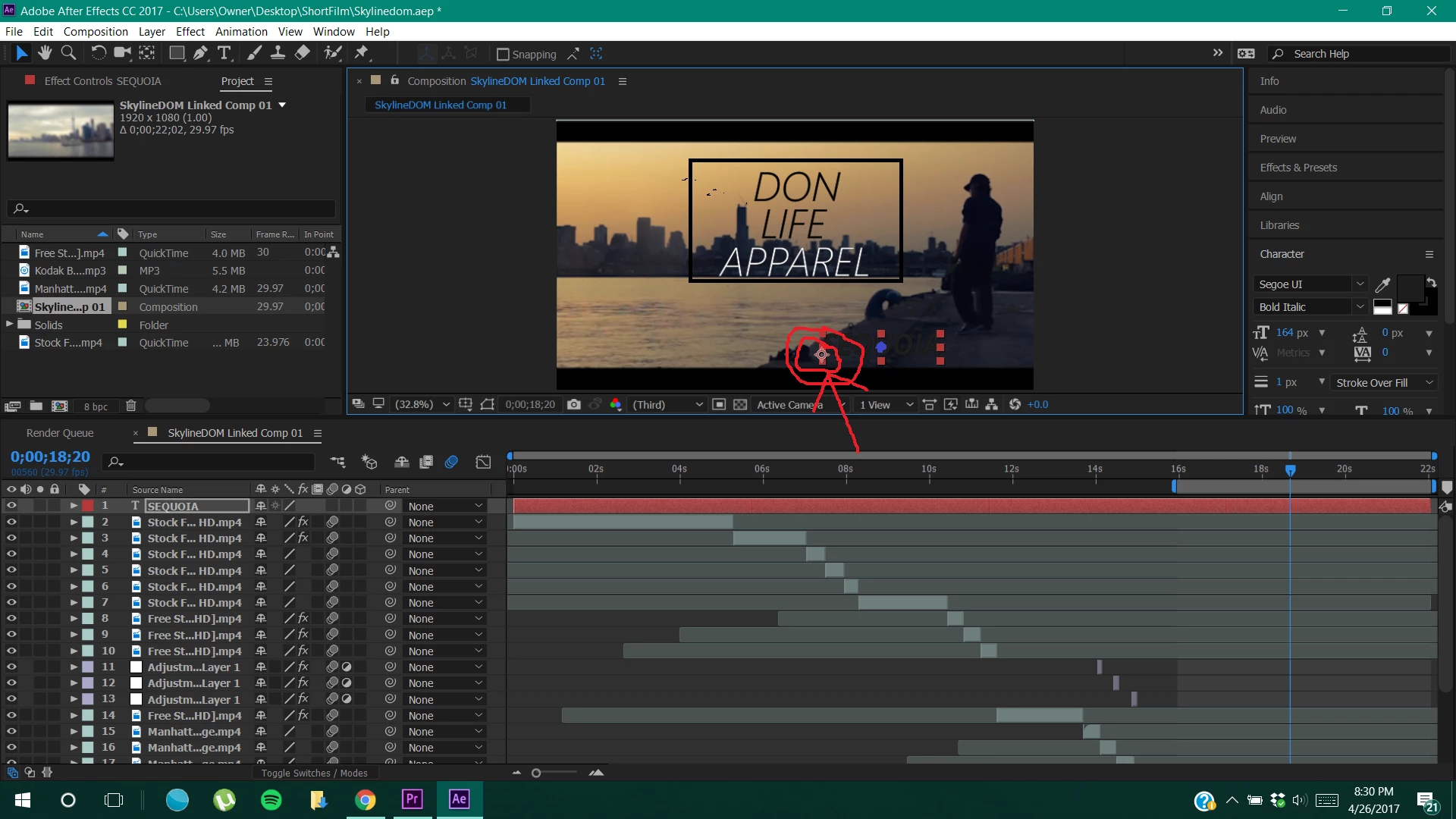
    This topic has been closed for replies.
    Correct answer Roei Tzoref

    Yes you can. It's called anchor point - look it up. You can click the shortcut Y and activate the tool for it so you can click the crosshair and drag. Use Ctrl to snap it to corners or center. there's also s shorcut for centering it to the selected layer: Ctrl+Alt+Home.

    You might want to run over the basics in Adobe's After Effect's tutorial page.

    1 reply

    Roei Tzoref
    Roei TzorefCorrect answer
    Legend
    April 27, 2017

    Yes you can. It's called anchor point - look it up. You can click the shortcut Y and activate the tool for it so you can click the crosshair and drag. Use Ctrl to snap it to corners or center. there's also s shorcut for centering it to the selected layer: Ctrl+Alt+Home.

    You might want to run over the basics in Adobe's After Effect's tutorial page.