
Need Help w/ Multiple variables in Per-character Text-Attribute Script
I'm in the newest version of AfterEffects (v.25.1), and I'm trying to set up a MOGRT that's relatively complex on the backend, and I need some help getting the code to work. I'll try to explain what I'm going for.
I have a template for a lower third graphic, and I want to be able to select specific sections of text by using sliders, and then apply preset custom formatting to that text by using a dropdown menu which lists four possible formatting options. Here's what the Essential Graphics setup looks like:
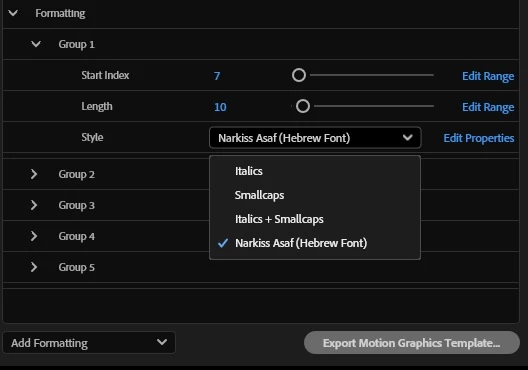
As you can see by there being 5 different groups, I want to be able to make up to five text selections, and have these same options for each one individually: 1) start index of the text selection, 2) length of the text selection, and 3) ability to choose what formatting preset is applied. (For example, I want to be able to select the second word in the lower third and make it italics, and also select the fourth word and make it smallcaps, etc.)
I have code that works exactly the way that I want it for one text selection. But I don't know how to add it such that it will work with up to five selections. Here's my code so far (including unused variables for the expression controllers in Groups 2-5).
var fc = thisComp.layer("Formatting Controller");
// Group 1
var start1 = fc.effect("Start Index—Section 1")("Slider");
var length1 = fc.effect("Length—Section 1")("Slider");
var style1 = fc.effect("Style—Section 1")("Menu").value;
//Group 2
var start2 = fc.effect("Start Index—Section 2")("Slider");
var length2 = fc.effect("Length—Section 2")("Slider");
var style2 = fc.effect("Style—Section 2")("Menu").value;
//Group 3
var start3 = fc.effect("Start Index—Section 3")("Slider");
var length3 = fc.effect("Length—Section 3")("Slider");
var style3 = fc.effect("Style—Section 3")("Menu").value;
// Group 4
var start4 = fc.effect("Start Index—Section 4")("Slider");
var length4 = fc.effect("Length—Section 4")("Slider");
var style4 = fc.effect("Style—Section 4")("Menu").value;
// Group 5
var start5 = fc.effect("Start Index—Section 5")("Slider");
var length5 = fc.effect("Length—Section 5")("Slider");
var style5 = fc.effect("Style—Section 5")("Menu").value;

switch (style1) {
	case 1:
		text.sourceText.style
			.setFont("LaskiSlab-RegularItalic",start1,length1);
		break;
	case 2:
		text.sourceText.style
			.setSmallCaps(true,start1,length1);
		break;
	case 3:
		text.sourceText.style
			.setFont("LaskiSlab-RegularItalic",start1,length1)
			.setSmallCaps(true,start1,length1);
		break;
	case 4:
		text.sourceText.style
			.setFont("NarkissAsafVariable-Regular",start1,length1)
			.setApplyStroke(false,start1,length1);
		break;
	default:
		text.sourceText;
}
How do I write an expression which allows this kind of format-switching on a per-selection basis?
Any help is appreciated, thank you!
 AdChoices