
Participating Frequently
August 22, 2023
Question

not possible to import swf to after effects - Error 86 :: 1

  • August 22, 2023
  • 10 replies
  • 1073 views

Hi. I'm having the same issue since several weeks. Every time I try to import a swf file to after effects I get the error 86 :: 1 and says the format may not be compatible. I'm working with the last version of After Effects (23.6) and the last version of Animate (23.0.2). Is anyone having the same issue? It happens with the most recent created swf files. With old swf files it doesnt happen, I can import them eassily. Im working with a Mac Book Pro 64 gb Ram Apple M1 Max MacOS Monterrey 12.5.1 
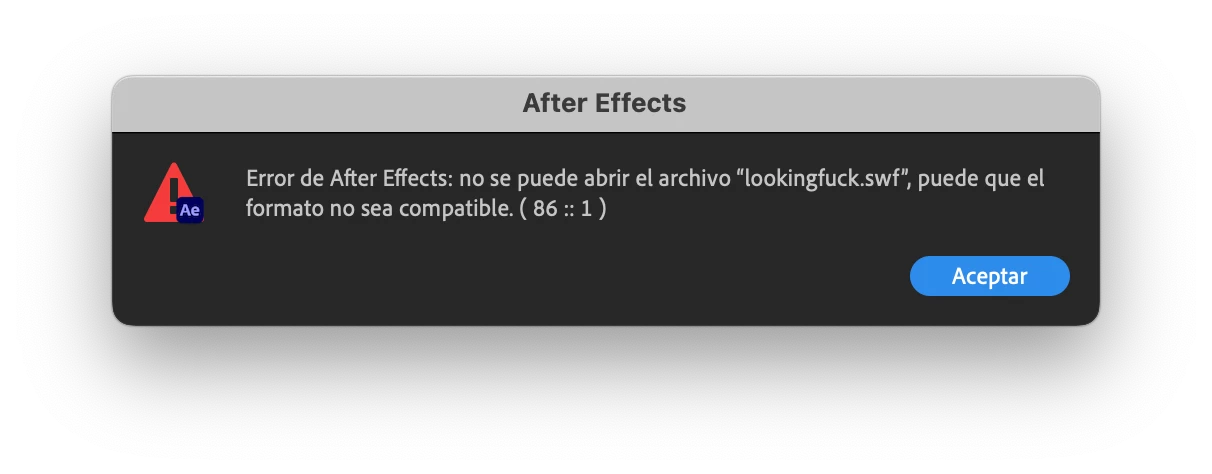
I restarted the preference, tried to publish the swf several times but nothing is working. Anyone who can help? Anyone having the same issue? I need a solution..., ADOBE please! whats going on!??!?!??! 

This topic has been closed for replies.

10 replies

Inspiring
December 18, 2023

Alba27699334tz3u, are you working out of Dropbox or some other cloud syncing folder? We are running into this same issue at our studio and it's a serious impediment.

nishu_kush
Community Manager
Community Manager
November 1, 2023

Hi Alba and James,


Can you install the latest version (24.0.2) and test if you still see the issue? I saw a similar issue some time back which was happening due to plug-in installed by the Adobe XD. If you experience the issue in the latest version, let us know the names of all the Adobe apps installed on your computer. Also, the names of the plug-ins that you installed for After Effects.

Looking forward to your response.

Note: Moving the thread from Bugs to Discussions for troubleshooting.


Thanks,

Nishu

Participant
November 10, 2023

Hello Nishu,


Just keeping you in the loop:


-Updated to latest AE 24.0.2

-Tried to import an FLA file

-Same swf error


As you requested, here are the apps on my M1:
PS, AI, ID (update available), PR, AE, AN, CH, AU, ME, Camera Raw


No After Effects plugins have been installed at all.

Participant
November 10, 2023

Adding:

Imported same FLA file into AE on my intel laptop. Imported fine. Saved Fine. Reopened fine. Went to my M1 and tried to open the project? Swf errors all over the place.

Participant
October 29, 2023

Just adding to this -

Intel Laptop:
-Successfully imported FLA animate files into After Effects
-Saved the After Effects project

Mac mini M1:
-Tried to open the same, newly saved project file, which resulted in an error.

Participant
October 29, 2023

I am running into this issue as well. My Mac Mini M1 has issues seeing .swf files. However, my intel windows laptop has no problem. Both Animate and After Effects have been updated to the latest versions.

So far it looks like after effects is generating errors on M1 machines?

Community Manager
August 24, 2023

Hello Alba.

At our side we were successfully able to inport the swf file you provided on 

Mac Intel

Mac wih M1 chip

Mac with M1 max chip


We have also tried this with different versions of After Effects and do not see any issues with all the testing we did on our side. 

Participating Frequently
August 24, 2023

Hey @Joy Raisinghani Does that have anything to do with my Laptop. I have a Macbook Pro with the M1 Max processor and I can`t import the file in AE. I tried the same swf file in my old macbook pro from 2014 with AE 22.6.5 and I was able to import it. Why am I getting this error with the one laptopo but not with the other one? Does it have anything to do with the M1 Max Processor? 

Participating Frequently
August 24, 2023

Hello Joy- Sure. You can find the swf file here


Thanks!

Community Manager
August 23, 2023

Hello Alba.

Can you share the swf file with us that you are having issues with?


Thanks,

Joy.

Participating Frequently
August 23, 2023

Hi Joy,


thanks for your reply. Regarding to your questions:

1. No audio in the files.

2. I've downloaded previous versions of AE and still having the same issue.


Best

Alba

Community Manager
August 22, 2023

Hello. 

Thanks for reproting the issue you are seeing with swf files. A couple of questions I would like to ask are 

1. The swf files that are failing to import, do they have audio?

2. The swf files that are fiiling to import, did they ever import with other versions of AE?


Best,

Joy R.

After Effects Team.