
Participant
August 25, 2022
Answered

Numbers are acting weird in After Effects

  • August 25, 2022
  • 2 replies
  • 1446 views

Problem one when using the Arial font, when I type "100" or any other number I get these weird markings.
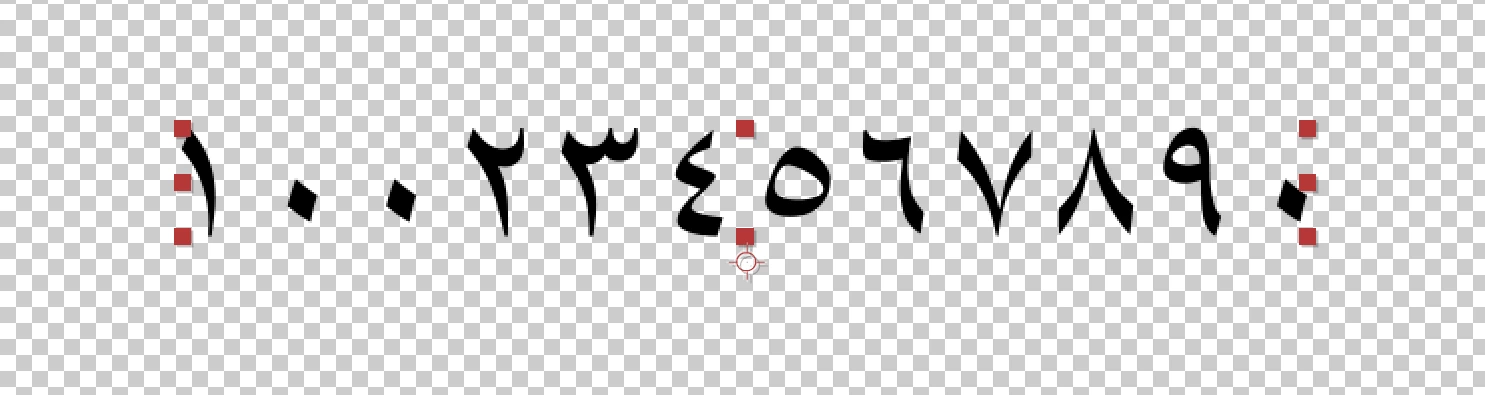
This happens when I use Regular and Bold, but not the other styles.

The next problem I have is with using numbers and a "-" if I type 1-3 it will switch it to 3-1 the second I type the 3. The only solution I have found to fix this is to type 3-1, which will then switch it to 1-3. This seems to be a problem across all fonts.


This topic has been closed for replies.
Correct answer Mylenium

Check the language settings in the prefs and the settings in the character panel flyout menu. Sounds liek you may have set a combination of glyph substitution and input pattern that simply replaces regular numbers with Arabic.


Mylenium

2 replies

Mylenium
MyleniumCorrect answer
Legend
August 25, 2022

Check the language settings in the prefs and the settings in the character panel flyout menu. Sounds liek you may have set a combination of glyph substitution and input pattern that simply replaces regular numbers with Arabic.


Mylenium

Participant
August 26, 2022

So in the Character Panel flyout menu "Hindi Digits" was checked on.

Still have no idea why it reorders my numbers when using "-"

Zaid Al Hilali
Community Expert
Community Expert
August 29, 2022

Besides what Mylenium mentioned regarding the Hindi Digits, you may need to make sure you're using a non-Arabic font and change Paragraph Directions in the Paragraph panel.

Joost van der Hoeven
Community Expert
Community Expert
August 25, 2022

What version of Ae? Mac or PC?

Participant
August 25, 2022

Version 22.6.0 on PC