
Inspiring
April 6, 2023
Question

OCIO / ACES Color Management in Media Encoder?

  • April 6, 2023
  • 3 replies
  • 5336 views

The new native OCIO color management in After Effects works great for me - but only if I export using the Render Que, where I can control the final Output Color Space using Color Tab of the Output Module.  This allows me to export my ACES footage as ACES/sRGB (olor_picking: Output - sRGB and Output/Output - sRGB options also work).  Using that export setting makes my exported footage match my working settings in After Effects using the OCIO ACES color management.


But I see no way of doing this in Media Encoder.  The footage is always exported way too dark.  And the only output color options I see are greyed out.
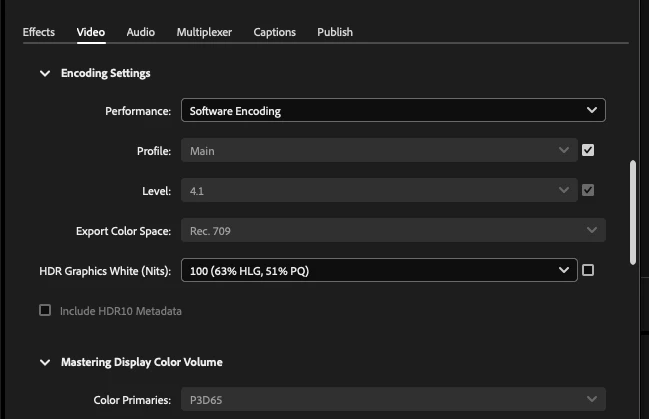
 

See screenshot.


I am using macOS 12.6.3

3 replies

Participant
January 12, 2024

Hi !

You should go in the Media Encoder Preferences panel and check the box Auto detect log video color space.

Inspiring
June 3, 2023

BUMP.  Still no answer for how to export OCIO / ACES workflows from Media Encoder since the Export Color Space option is greyed out on my M1 Mac Mini. Guess I will have to contact support directly. 

Participant
January 7, 2024

I've found a workaround for this. Though the OCIO workflow is integrated in AE 2024, there's no option I found in media encoder. So what I did is adding an adjustment layer with OCIO display transform and set the display color space to ACES/raw to correctly preview it. Voila!


You can then just hit render in Media encoder and it will come correctly.


Participant
February 23, 2025

I just discovered that if the auto detect log video color space was enabled (as xr7621822 said), I could just set the h264 preset in ME to custom (without making any changes) and everything matched. 


I tried enable  auto detect log video color space in ME but still color is off....

ToolfarmJP
Community Expert
Community Expert
April 7, 2023
Inspiring
April 11, 2023

That was the help page I originally referenced (along with he Adobe video tutorial) to get ACES working with my footage.  Unfortunately, it dosen't address Media Encoder - which is not properly outputting my footage the way the internal render queue does.  So back to my original question: Is the new OCIO Color Management System working with clips exported via Media Encoder?  And if so, how to set that up?