
MahaB82A
August 25, 2022
Answered

Opinion: "Create Composition" is redundant

  • August 25, 2022
  • 4 replies
  • 2097 views

In my view Create Composition is redundant if your select either Composition - Retain Layer Sizes or Composition. Because word Composition is there. 
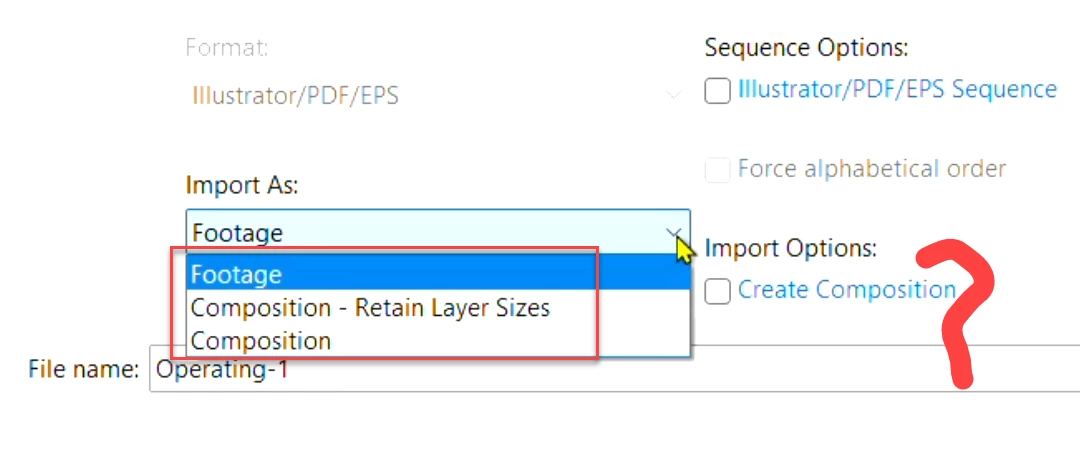
 

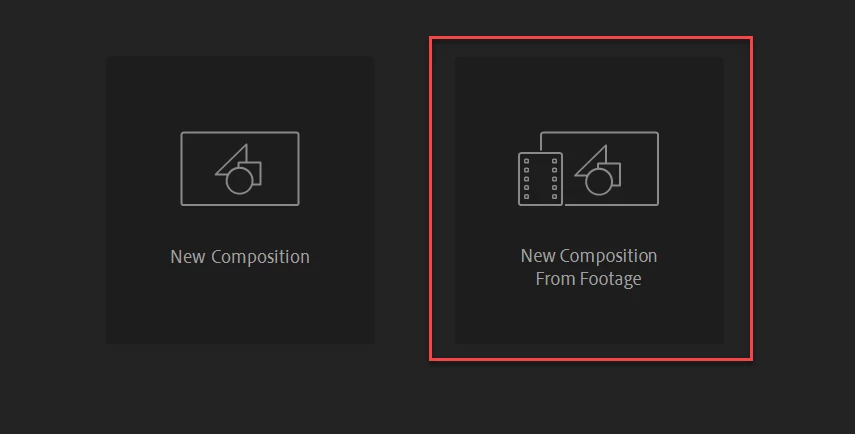
Even selecting Footage no need "Create Composition" option because there is a easy way to create a New Composition From Footage.


What do you think?


[NOTE: The title of this discussion has been edited to indicate that it's the OP's opinion]

Correct answer Warren Heaton

@MahaB82A wrote:

What you mean is:

Create Composition is an option for Import As footage only. 

Import As Composition - Retain Layer Sizes / Composition does not need Create Composition option.  


Yes.

4 replies

Joost van der Hoeven
Community Expert
Community Expert
August 28, 2022

If you already have a Comp, the dropzones are not availble.

MahaB82A
MahaB82AAuthor
August 28, 2022

What do you mean?

Warren Heaton
Community Expert
Community Expert
August 26, 2022


The "Create Composition" checkbox with the Import Options was a feature request that removes having to do an additional step to create Compositions from Source Footage in After Effects and the After Effects team added it.


Even though it's active for all pop-up menu options, it only affects the Source Footage imported as "Footage".

MahaB82A
MahaB82AAuthor
August 26, 2022

What you mean is:

Create Composition is an option for Import As footage only. 

Import As Composition - Retain Layer Sizes / Composition does not need Create Composition option.  


Community Expert
August 26, 2022

If you import retaining layer size without the composition, you get a bunch of layers that are different sizes and have no composition. If you select all those layers and create a composition, like many new users do when they import as a comp and do not open the comp AE creates, you get all of the layers in the middle of the composition.


If you import as a composition retaining layer size, then you get a comp with everything in the right place, every anchor point in the center of the layer, and you are ready to animate. 


The Composition Retain Layer Size is an accurate description of what is going to happen. If it was worded as you want it to be and it accurately did what the command said it would do, you would have a bunch of layers and no composition. 


I'm not sure why this is such a problem for you. All three import choices, Footage - imports footage, Composition, which creates a composition from the selected footage with every selected item centered in the composition, and Composition - Retain Layer Size, which creates a composition with all layers retaining their original size and in the correct position and in the same order that they are layered in the AI or PSD file, accurately describes what is going to happen.  

MahaB82A
MahaB82AAuthor
August 25, 2022

I am in the process of reading a Ae tutorial. In that tutorial both Composition - Retain Layer Sizes & Create Composition is selected to import a file. I cannot understand why you have to select both because Composition - Retain Layer Sizes has a Composition in it.


I assume both Compositions are indicating similar composition. If it is indicating different composition then selecting both are understood. One is Ai composition (Composition - Retain Layer Sizes) & other one is Ae  composition (Create Composition).


Community Expert
August 25, 2022

The New Composition From Footage button in an empty Composition Panel sends you to the Import Panel. So does the File/Import menu, or right-clicking in the Project Panel and choosing Import, or  Double-clicking in an empty area of the Project Panel, will do the same thing, open the Import panel. The New Composition From Footage button always creates a comp from a single selected file. You cannot stop that unless you select multiple files, then dismiss the dialogue that asks you if you want to create multiple compositions or a single one.

I rarely use the button because most of my comps are created from shots I need to trim before creating a composition. I don't need the slate and the director calling Action, I only need the frames that are going to be included in the final edit. If your footage is already trimmed or you are importing only graphics, the button might be considered more efficient. Almost all of my projects involve multiple shots from a single scene, but nearly all of my comps that have video as the main elements are one trimmed shot and a bunch of other elements that are either footage, graphics, or effects. 


The options in the Import Panel to choose Footage, Composition Retain Layer Size, or Composition, as well as the option to create a sequence, are similar, but they do not force the creation of a new comp. Creating a composition is not redundant because there are times when it is more efficient to have every layer the same size when you import a layered Photoshop or Illustrator file. Most of the time, retaining layer size is more efficient with most of my projects. 


I don't think the comp panel button is redundant. I do not use it very often. My usual workflow is to open After Effects and then save the project in the appropriate folder using the standard naming and file structure I learned when I started in the motion picture business way before we had computers. Then I usually add a couple of appropriately named folders to the Project Panel, select the folders, and press Ctrl/Cmnd + I to add footage and graphics to the appropriate folders before I even think of creating a comp. If I am coming from Premiere Pro, most of that work is already done, and all I have to do is name and save the project before I begin work.