


edwards27114347
Participant
March 17, 2020
Question

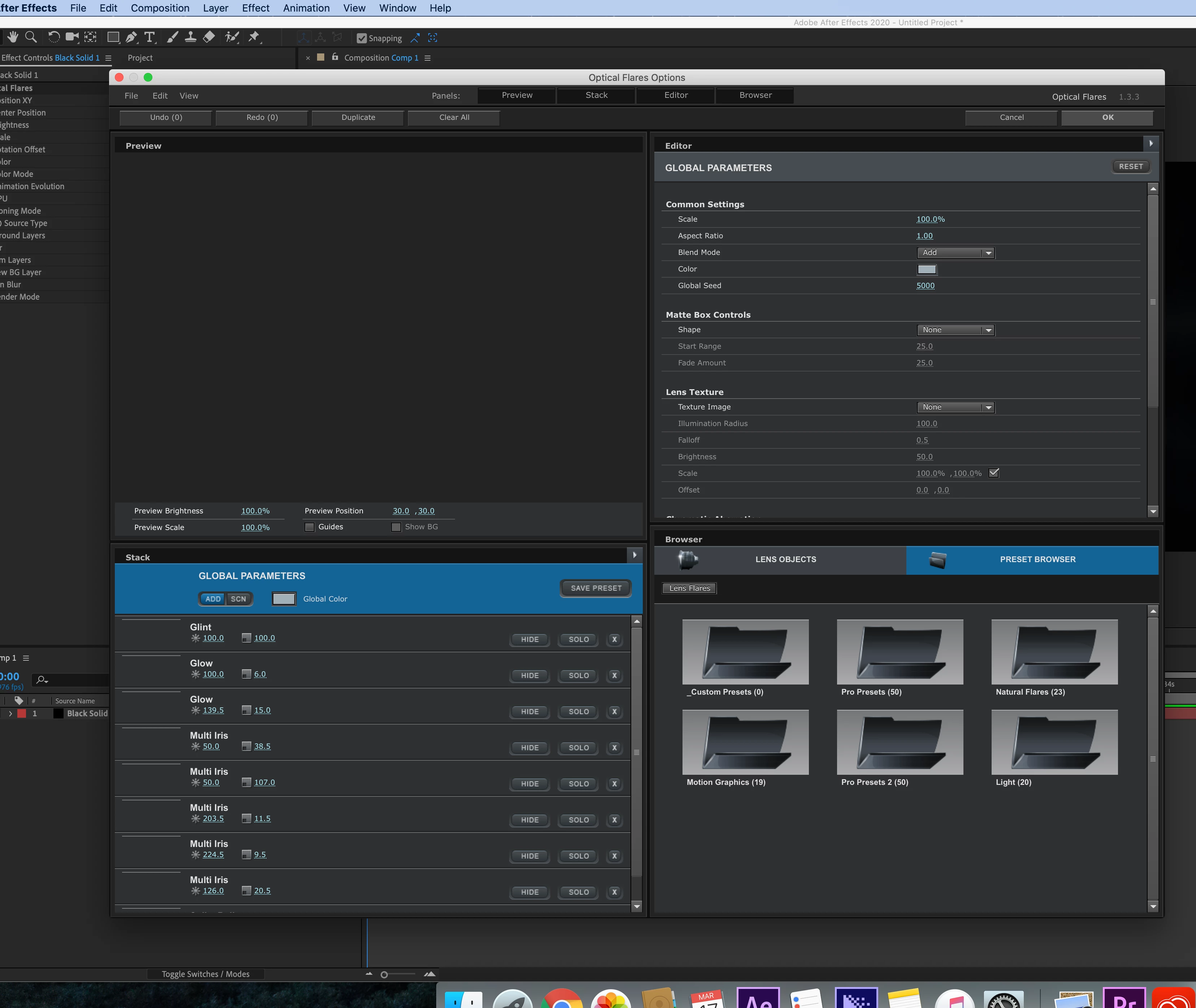
Optical Flares preview window greyed out...

  • March 17, 2020
  • 3 replies
  • 10405 views

Hi,

So I recently installed optical flares all correctly on my imac pro and for some reason

when I go to edit the flare, all the previews are greyed out so I'm pretty much unable to choose a flare 

or edit my own. 


Any ideas?
3 replies

Participating Frequently
November 28, 2020

Same problem for me. I assume you never got around this? A potential pointer for someone who knows more than me - on my 1st of 2 iMacs, I think I installed optical flares whilst on Mojave. I then later updated to Catalina and I can still see previews - so it's not a 32-bit thing I don't think. But on my new 2020 iMac, running Big Sur, I now have the same issue of no previews. I would blame Big Sur but, all the others who have this problem have it on Catalina (or even earlier it seems). So I don't think it's the OS version.

Participating Frequently
November 28, 2020

I have the same problem in Catalina do you have resolve the problem?

Participating Frequently
November 28, 2020

Finaly i have solution 

The specific reason is unknown, but there are solutions.

The following macz has compiled a temporary solution to this can not be previewed:

Open "System Preferences -> Display -> Color" and modify the display profile to "Normal RGB profile". At this time, you will feel that the color of the display has changed.


Then go back to AE (switching the color description file does not need to restart Ae), and reopen the independent panel of the Optical Flares plugin. You can see the familiar preview interface.


In fact, the display of lighting effects only does not display thumbnails in the independent panel of Optical Flares. When you return to Ae, you can still render it directly. And when switching the color profile of the Mac system display, you don't need to close the Ae software, just reopen the independent panel of Optical Falres to refresh.

The default color description of the Mac system still looks good, and I often work in the default color mode. So when I set the OF light in the Option Flares independent panel, I can set it back to the default color profile. It seems to be a good solution.


The solution to the display of the thumbnail of the Optical Flares preview is introduced here. I hope to help you. For more exciting tutorials, please followmaczTo understanding.


Participant
May 18, 2020

edwards27114347

Did you ever figure out how to fix this issue?  I have the same problem.

Participant
May 29, 2020

I need help,too

Participant
August 7, 2020

having the same problem here too


Mylenium
Legend
March 17, 2020

You may need to delve into your system's graphics settings to get proper OpenGL support. OF is an old plug-in that never got properly updated and recent versions of OSX have legacy OGL disabled by default. I'm not a Mac guy and may be spouting nonsense, but that's what I read on tech news pages. Investigating the issue via a web search should clear things up.


Mylenium