
Participating Frequently
June 2, 2014
Answered

OS X 10.10 Yosemite Won't Launch AE CS6

  • June 2, 2014
  • 13 replies
  • 155377 views

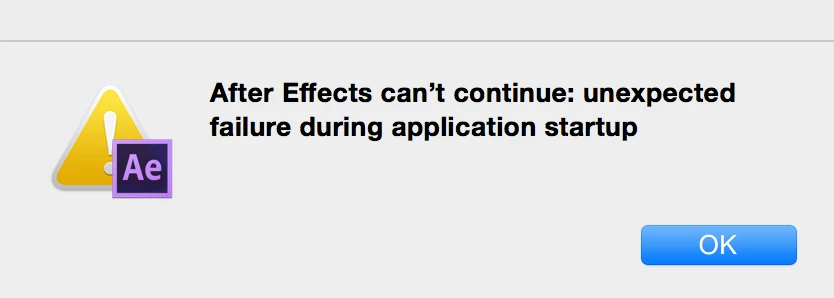
I believe I had the same problem with Mavericks when it was released, but it's also with OS X 10.10 now (I know it's soon but just reporting it).  Yosemite won't launch AE but all the other Adobe CS6 apps work great though.  Had to get Java for Illustrator but that's it.
Just a heads up for AE artists that are also developers. 😃

    This topic has been closed for replies.
    Correct answer Todd_Kopriva

    The problem with Mavericks was that the Nvidia OptiX library had a problem that caused us to need to get an update from them to include with an After Effects patch.

    We'll be testing with Yosemite now that it's available and see what may be broken that we need to fix.

    See this page:

    After Effects and Mac OSX v10.10 (Yosemite) | After Effects region of interest

    13 replies

    Inspiring
    February 24, 2016

    The update to 11.0.4 worked for me.

    Inspiring
    October 23, 2015

    Definitely not working for me today on OS X 10.10.5 (14F1021), the latest available Yosemite version.

    I'm not using a beta of Yosemite and never did. My AE CS6 fails to open, showed an error message:

    You can’t use this version of the application “Adobe After Effects CS6.app” with this version of OS X.

    You have “Adobe After Effects CS6.app” 11.0.

    Kudos to Apple for providing dialog boxes that you can copy the text from, to paste it when you search for help!

    Szalam
    Community Expert
    Community Expert
    October 23, 2015

    moonatwork wrote:

    Definitely not working for me today on OS X 10.10.5 (14F1021), the latest available Yosemite version.

    I'm not using a beta of Yosemite and never did. My AE CS6 fails to open, showed an error message:

    You can’t use this version of the application “Adobe After Effects CS6.app” with this version of OS X.

    You have “Adobe After Effects CS6.app” 11.0.

    Kudos to Apple for providing dialog boxes that you can copy the text from, to paste it when you search for help!

    You have to update your AE to version 11.0.4

    sma_film
    Participant
    February 1, 2016

    First there was this (I'm running OSX Yosemite 10.10.5):

    Then there was this (these):

    [url track as follows - After Effects CS6 (11.0.4) update: bug fixes for ray-traced 3D renderer and Spanish version on Windows | After Effects… then Adobe - After Effects : For Macintosh : Adobe After Effects CS6 11.0.4 Update : Thank You ]

    Then I got this when I tried to install the update:

    Creative Cloud doesn't give me an option to update. It just shows an icon that says 'Open.' ::

    Hence, returning me to problem number one.

    Please help me solve the age-old question: What's the frequency, Kenneth?!

    Participant
    July 7, 2014

    Since AE has a problem with the new default font of Yosemite, I just changed the Default Font back to Lucida Grande.

    I found this article:

    osx - Can I change the font systemwide (10.8.3) - Ask Different

    And just entered these commands into the Terminal:

    defaults write -g NSSystemFont LucidaGrande

    defaults write -g NSMessageFont LucidaGrande

    defaults write -g NSLabelFont LucidaGrande

    defaults write -g NSToolTipsFont LucidaGrande

    defaults write -g NSTitleBarFont LucidaGrande

    defaults write -g NSPaletteFont LucidaGrande

    And then, without the need to restart, AE CS6 is starting and running just fine.

    Also, I don't see problems like issues with text in finder etc. yet.

    I don't know too much about these things... So I just hope, that by changing these things, nothing gets messed up. But so far, everything seems to work as usual.

    ofek.dan
    Participating Frequently
    July 7, 2014

    BETA 3 FIXED THAT !!!!!!!!!!!!!!!

    Known Participant
    July 7, 2014

    Does Beta 3 Yosemite now work with After Effects CC too?

    James Landy
    Inspiring
    June 24, 2014

    Adobe and Apple are both working on resolving the problem of After Effects failing to launch with the Developer Seed version of OS X 10.10.

    After Effects is expecting the main system font to be Lucida Grande.  But Apple has replaced Lucida Grande with a new main system font, and that’s why AE is failing to launch. 

    Apple has said that they will have a workaround in seed 3 that will allow AE CS6, AE CC and AE CC 2014 to launch on OS X 10.10.  Adobe will be providing a fix for future versions of AE.


    I'll add a comment to this post when it's OK to start beta testing AE with OS X 10.10.

    esanchez33
    Participating Frequently
    June 25, 2014

    Out of curiosity, why is it that installing Lucida Grande doesn't fix the problem? Not doubting, just curious to know how this works. Maybe there could be a temporary fix?

    Todd_Kopriva
    Inspiring
    June 25, 2014

    It's not a matter of the font being installed; it's deeper than that.

    Apple is working on a fix. Stay tuned.

    esanchez33
    Participating Frequently
    June 20, 2014

    I can also confirm that the CC 2014 version of AE does not solve the problem!

    Participating Frequently
    June 24, 2014

    Well, i bought the CC 2014 for 4 days ago.

    When i download and install the Creative Suite Desktop App, i have a damn Blue Wheel going around for hours and days.. Nothing happens, Dont get the option to login, dont get the list of apps for install.

    So no, the CC Suite 2014 dosent at all start or get you to start install or work with it on Apple OSX 10.10 Yosemite.

    And im sick and pissed because of it, every time a new osx launches adobe is the last software to get stable for it..

    So, is it any beta, or new build desktop app i can use to get it working ?

    MaximillionPowerline
    Participant
    June 24, 2014

    I have the same problem. I kinda need it fixed as well, just got a 3d job today

    Participant
    June 11, 2014

    So has there been any updates on this? Would be much appreciated if a beta - fix even was released before the official release of OSX 10.10.   Once again, AE is the only problem that doesn't run (in regards to all the other typical production programs).

    Thanks!

    RSVlabsAuthor
    Participating Frequently
    June 11, 2014

    OS X Yosemite beta is brand new. They'll have more builds in the coming weeks of course...

    Todd_Kopriva
    Inspiring
    June 11, 2014

    It looks like this problem is because Apple removed a system font that After Effects uses for its interface on Mac OS. We're still investigating.

    marcelo_cecin
    Participant
    June 3, 2014
    Participant
    June 3, 2014

    Like the OP says, I know its too soon for anyone to care but just throwing it out there: the CC app itself doesn't seem to auto load anymore. After Effects CC won't start with the same error as above. Photoshop CC works fine

    AbidalSarraj
    Participant
    June 3, 2014

    All Adobe other Apps work fine for me CS6 & CC on OS X 10,10 Yosemite, Except After Effects CS6 & CC

    Hope to see a patch or fix soon..

    Thanks guys

    josselincuette
    Participant
    June 3, 2014

    Thanks AbidalSarraj ! Your feedback is truly appreciated.
    On another note, how would you rate the system's stability ?

    AbidalSarraj
    Participant
    June 3, 2014

    So far I give it 8/10, most media editing apps are not stable or they won't start at all, but with other design apps and productivity they works fine and great.

    I noticed my Mac got extra heat more than usual.

    Thomas Makzan
    Participant
    June 3, 2014

    Got a side track question. How you "get Java for Illustrator" to make it work? My AI crashes on startup.

    Thanks a lot.

    josselincuette
    Participant
    June 3, 2014

    I'd be curious to know as well. Photoshop CC and Illustrator CC stability on Yosemite are the only thing I truly need to install this beauty