



Copy link to clipboard
Copied
Wondering how to do this. I've got footage on a black background I need to have in screen mode, but then I want to take the resulting footage and use it in overlay mode for a reflection. Any thoughts?


 1 Correct answer

Just key out the black matte first. use a simple linear color key and then maybe a matte choker if you need it.

 14
Replies
14
14
Replies
14


Copy link to clipboard
Copied
Maybe I'm missing something here, but can't you precompose your screen layer and the layer underneath. Then use the pre-comp layer in overlay mode over another base layer?
Copy link to clipboard
Copied
Unfortunately not. Once I precomp, the blend mode of the footage is determined either by the precomp blend mode or the blend mode inside the layers of the precomp, but if it's the latter, then I can't change the precomps blend mode. Basically, I can't have two blend modes on the same footage, even if it's precomped. At least, I don't see a way to do it.
Copy link to clipboard
Copied
You need to turn off collapse transforms on the pre-composed layer.
Copy link to clipboard
Copied
It's off by default. If I turn it on, then it only honors the layers blend modes inside the precomp and I can't set an additional blend mode on the precomp. What am I missing?
Copy link to clipboard
Copied
So you saying that when you set the pre-comped layer to a blend mode the blend mode within the pre-comp stops working?
That means you would only see the top layer of the two pre-comped layers, correct?
If, when you set a blend mode to the pre-comped layers, you can still see both layers in the pre-comp then the blend mode is still working.
I'm not an expert with blend modes but when I test your set up I can still see both layers in the pre-comp when I set that pre-comp to a different blend mode which means it's not using one or the other...it's using both.
You're going to have to post screen shots.
Copy link to clipboard
Copied
Correct, once I precomp, I can either set a blend mode for the precomp, or I can turn on collapse transformations and honor the blend modes in the precomps layers, but then I can't select another blend mode for the precomp overall. 


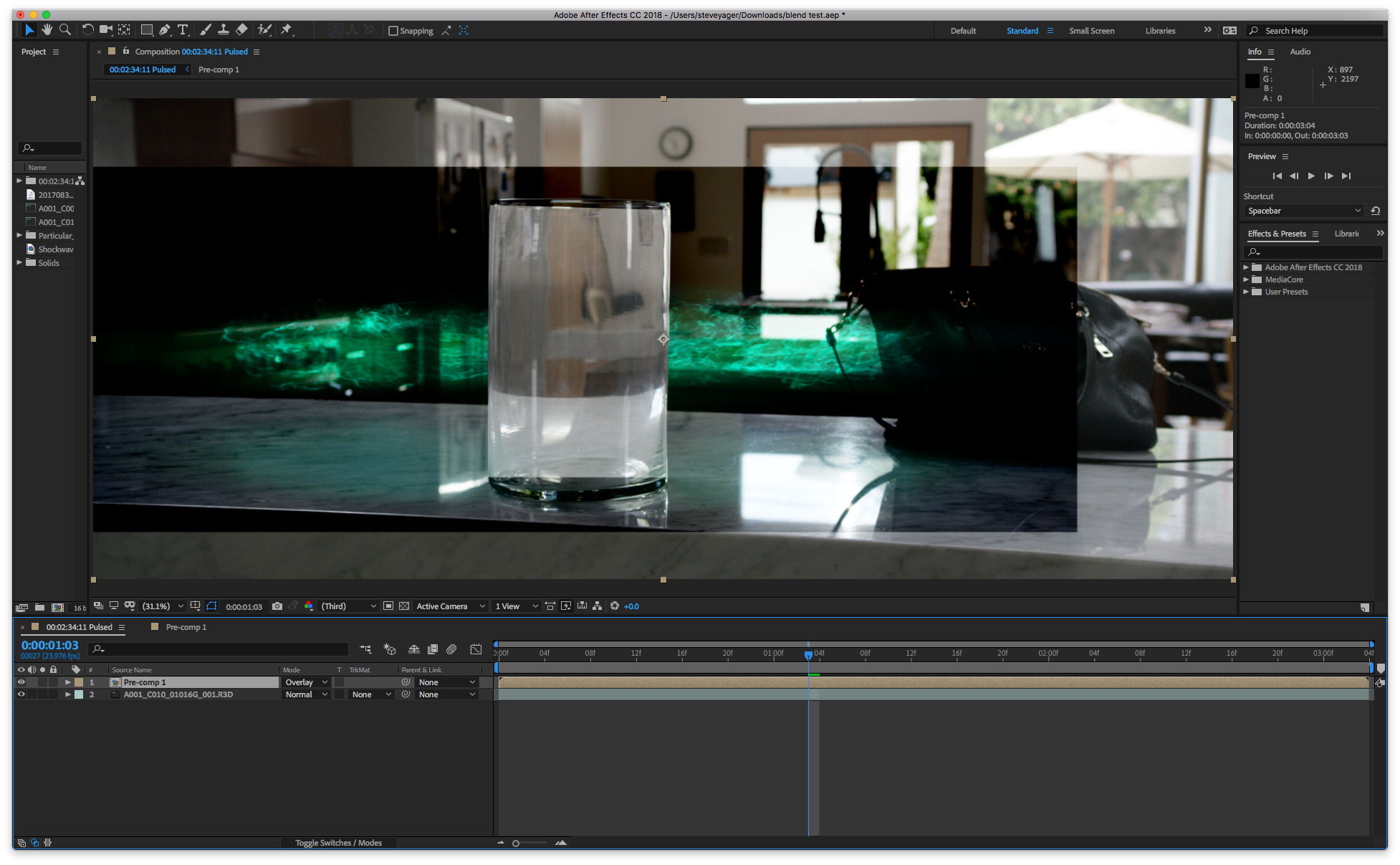

Copy link to clipboard
Copied
Looking at your screenshots I'm not sure why you're setting things up as you are.
1. For your 'greenstuff' (technical term there  ) can't you drop your layer directly over your kitchen background movie in screen mode - masking out the greenstuff layer as required.
2. If you do need another layer in overlay mode. You could make a precomp:
Layer 1: greenstuff - in screen mode
Layer 2: 50% grey solid - in normal mode
Place your precomp into the main comp in overlay mode (collapse transformations OFF). 50% grey is neutral (invisible) in overlay mode.
NOTE: for this 50% overlay method to work you will need to make sure 'Linearize working space' is ON on the Color settings of the Project Setttings dialog if you're using color management.
Having said this - I would have thought screen mode would work for your reflections as well as the main component?
Copy link to clipboard
Copied
Sorry I forgot about this.
It's hard to say exactly what you're doing wrong, if anything.
I think you're just expecting AE to work differently than it does.
Either way a solution is to just stop trying to do it with a single layer.
Pulling it off with one layer would be clever but, pragmatically, if it's giving you problems just use two layers.
I guess it all depends on whether your goal is the process or the result.
As Mike_Abbottsaid,
Just use a second layer for the reflection in the glass and mask off what you don't need.
I would use a separate layer for the reflection anyway so I could use some mesh warp to simulate the refraction.
Copy link to clipboard
Copied
Thanks for keeping up with this thread. I plan on using two layers, but the issue is my footage is on black, so it needs to be in screen mode, but I also want that same footage in overlay mode to blend better with the counter. So, it seems I can't have screen footage in overlay any way I try.
Copy link to clipboard
Copied
Just key out the black matte first. use a simple linear color key and then maybe a matte choker if you need it.
Copy link to clipboard
Copied
If you have Red Giant Universe you can use the UnMult effect to remove the matte.
Copy link to clipboard
Copied
Oh my god. Ugh, this is so simple it's stupid. Thank you! Exactly what I was missing.
Copy link to clipboard
Copied
I'm glad to help you solve the problem
Copy link to clipboard
Copied
You got the Mars bar. 


Find more inspiration, events, and resources on the new Adobe Community
Explore Now
 AdChoices