
Participant
July 29, 2020
Answered

Parent Pick Whip has replaced all layer attributes

  • July 29, 2020
  • 2 replies
  • 923 views

I've got a weird issue that I can't seem to resolve.


As seen in attached screenshot, I no longer have access to the paremeters for any attributes at all. They have been replaced by a property pick whip. This is the case whatever project I am in, and it happens with any layer of any kind. I've even tried uninstalling and reinstalling After Effects but it didn't solve it. 
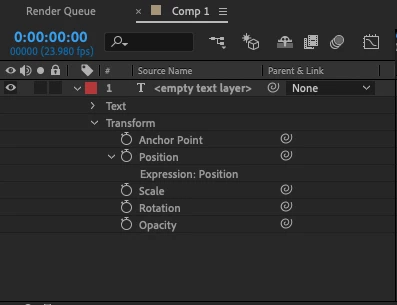
 

It's all very irritating. I need for the attributes and paremeters of a layer to behave as they usually would. (i.e. that you can edit the values rather than have a useless pick whip)


Have I somehow changed a setting somewhere accidently that is causing this? If so, why did the setting persist even after I reinstalled the software? 


I'd really appreciate any help as I'm having to use the graph editor as a workaround way of having any control over the various attributes of a layer - which is obviously ridiculous. 


Many Thanks,

Adam

This topic has been closed for replies.
Correct answer Mylenium

Right-click on the timeline column headings and reveal the AV column.


Mylenium

2 replies

Community Expert
July 29, 2020

There are 3 icons at the bottom left corner of the Timeline. The first is the switch for the Switches column. The second is for Modes (Transfer Column), the third is for In/Out/Duration/Stretch column. Holding down the Shift key and pressing F4 will toggle the Parent/Links column. 


The Parent/Links column only displayed Pickwhips for parenting for a long time. Now it displays a Pickwhip for any property that can be animated that is showing in the timeline. It is a great time saver for starting or writing expressions. I use the keyboard shortcuts and the column switches at the bottom of the timeline all the time. My workspace constantly changes depending on what I am doing. 


I have also edited the workspace list in the ToolBar so that Default, Color, Effects, Paint, Motion Tracking, and Essential Graphis are always showing because I use the different workspaces every time I switch tasks - because it saves time. 

Mylenium
MyleniumCorrect answer
Legend
July 29, 2020

Right-click on the timeline column headings and reveal the AV column.


Mylenium

awgwhiteAuthor
Participant
July 29, 2020

Thanks for your speedy response! Solved.