
Participant
May 31, 2021
Question

Parenting to layer inside a character rig comp

  • May 31, 2021
  • 1 reply
  • 1172 views

Hi everyone,

I hope you could help me with this.

I have a simple rig of a character in a comp, that I place in different comps "scenes" to build a story, I use Essential Properties to move the parts of the rig, this is very useful and works great for me.

Now there are some cases that I need an element of the scene to follow one element of the rig, like a cap on the head, but I don't want to have the cap in the character rig for several reasons.

The question is how do I parent the cap to the head in the nested comp?

I tried with an expression to link the properties of the cap to the head's one but those never actually change as the head is parented to the neck and is the neck rotating.

I've also tried to use a combination of null objects "copied with property links", but again the head "local" properties never change so doesn't work.

attached I've recreated a simplified version of my setup, where the star is the cap in this case.

This could have a very simple solution but I can't figure it out
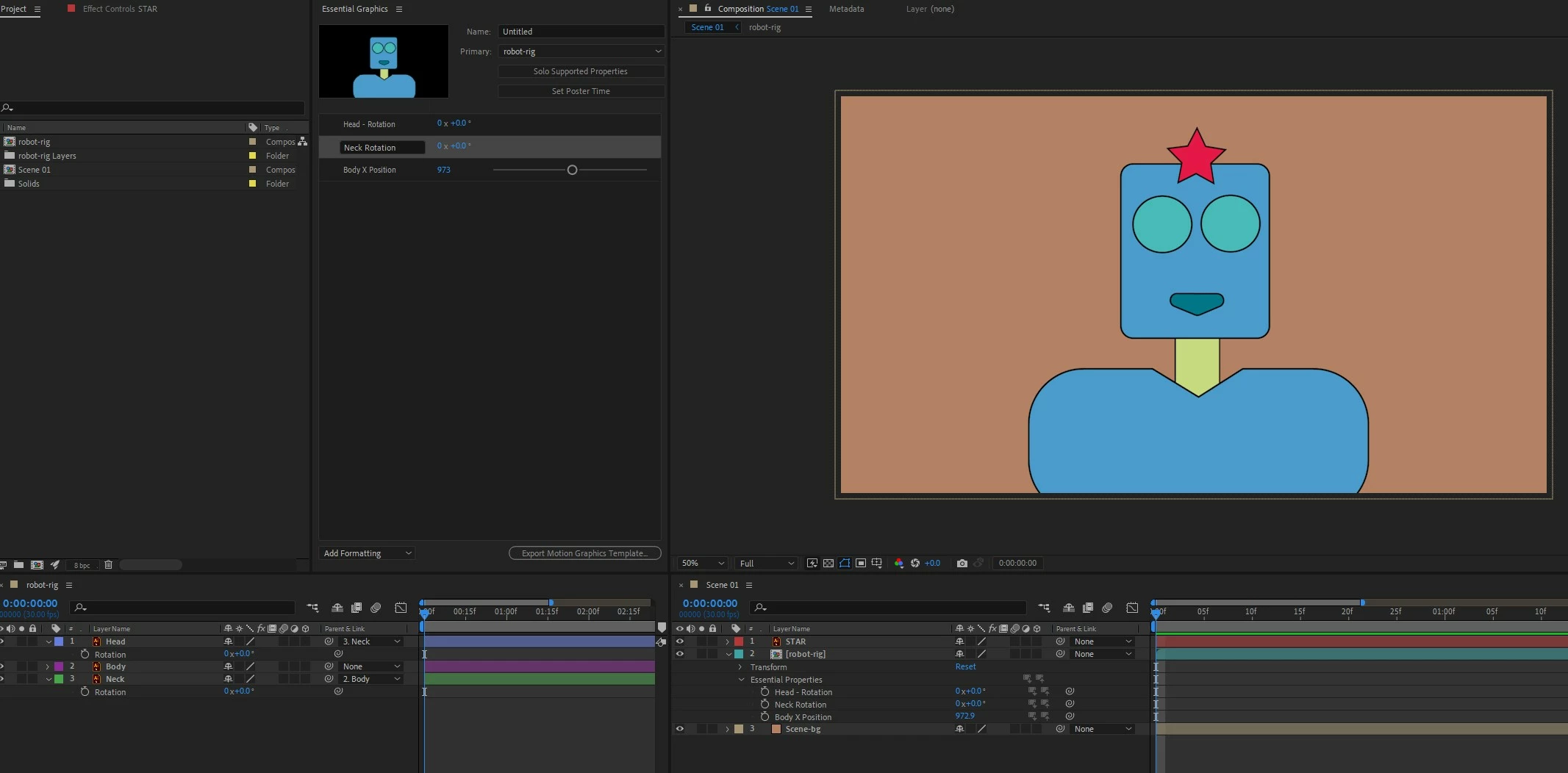
 

Could anyone help with this?

Thanks

Alessio

This topic has been closed for replies.

1 reply

Dan Ebberts
Community Expert
Community Expert
May 31, 2021

The position expression will probably look something like this:

xOffset = 0;
yOffset = -50;
L1 = comp("robot-rig").layer("Head");
p1 = L1.toComp(L1.anchorPoint + [xOffset,yOffset]);
L2 = thisComp.layer("robot-rig");
L2.toComp(p1)

Adjust xOffset and yOffset to position the hat exactly where you want it on the head. It gets more complicated if you need the hat to rotate with the body.


Dan Ebberts
Community Expert
Community Expert
May 31, 2021

I went ahead and worked out the rotation, if you want the hat to rotate with the head:

L1 = comp("robot-rig").layer("Head");
v1 = L1.toCompVec([1,0,0]);
L2 = thisComp.layer("robot-rig");
v2 = L2.toCompVec(v1)
value + radiansToDegrees(Math.atan2(v2[1],v2[0]))
Participant
June 1, 2021

Once you animate one of the Essential Properties in the Scene 01 comp, if you click the Push to Primary Comp button for that property, it moves the animation into the robot-rig comp, and then it works. I don't know if that fits your workflow though.


Hey Dan, you are right that works but the problem is that if I embed the animation in the master rig then I can't use it in other scenes unless I make copies of it. 

The actual project is quite big and I have several full-body character rigs, So I would like to save resources and have reusable assets.

Anyway, your code is very clever, is there any way to point to the local proprieties of the rig in the current scene?