Answered
pen tool handle are not visible
pen tool handle are not visible and i can't do curvy paths because of it.

pen tool handle are not visible and i can't do curvy paths because of it.
you are in RotoBezier mode look here
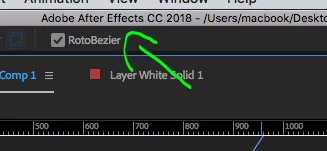
this means Ae will set the curves automatically and not work with handles - great feature for rotoscoping round shapes ( creating the path works similarly to the Curvature pen in Ps or Ai). you can set the tension of a vertex if you wish by holding the Alt key and moving the cursor (when the pen tool is active) or Ctrl+Alt (when selection tool is active).
if you want bezier handles on an existing RotoBezier path you should right click on one of the vertices, go to "mask and shape path" and uncheck "RotoBezier".if it's a new path then before you draw it make sure it's unchecked in the tools menu when the pen tool is active.
Already have an account? Login
Enter your E-mail address. We'll send you an e-mail with instructions to reset your password.
 AdChoices