Answered
Pick whip missing
I`m new to AE, and following this tutorial online, showing dragging of pickwhip from the text layer to the amplitude,
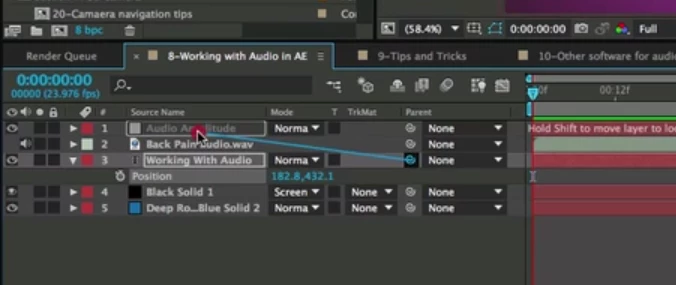
however in my AE (latest build) I cannot find the pick whip?
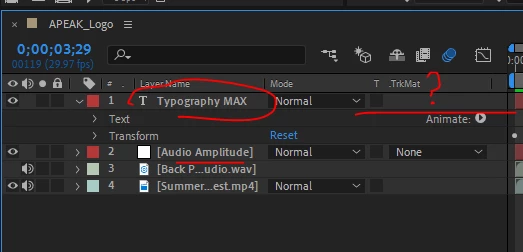
kind regards,

I`m new to AE, and following this tutorial online, showing dragging of pickwhip from the text layer to the amplitude,
however in my AE (latest build) I cannot find the pick whip?
kind regards,
You have not revealed the Parent Column. You need to check the User Guide and study up on the timeline.
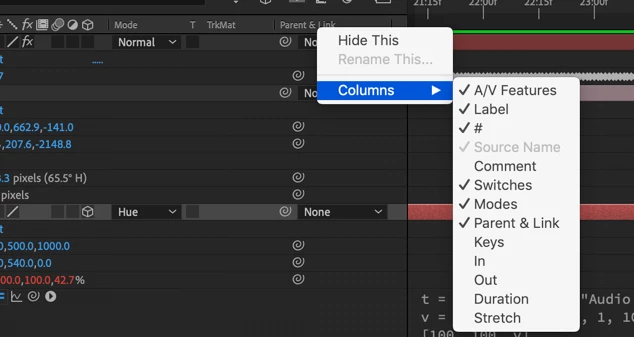
There is a lot more information in the User Guide that will help you use the time saving and helpful features in most of the panels in the AE UI.
The screenshot you posted appears to be asking you to hold down the shift key as you parent a text layer to the Audio Amplitude layer in a timeline. This will snap the child layer (text layer) to the same position as the Audio Amplitude layer, but I don't understand why you would need to do that. A layer named Audio Amplitude is a Null layer created by the Keyframe assistant and its position has nothing at all to do with the rest of the composition. This makes me think that you are looking at a tutorial prepared by an amateur that does not know what they are talking about and you are learning useless workflows. Make sure you vet your trainers. There is currently much more bad advice given by amateurs and enthusiasts on YouTube than there are valuable tutorials presented by folks that know what they are talking about.
If you are new please save yourself a bunch of time and start in the Overview section of this forum or on the After Effects Product page and go through the beginner and expert tutorials. All of that training has been vetted and the folks presenting them are giving you good advice.
Already have an account? Login
Enter your E-mail address. We'll send you an e-mail with instructions to reset your password.
 AdChoices