
neildavies
Known Participant
October 23, 2018
Answered

pick whip toggle disappeared

  • October 23, 2018
  • 4 replies
  • 28862 views

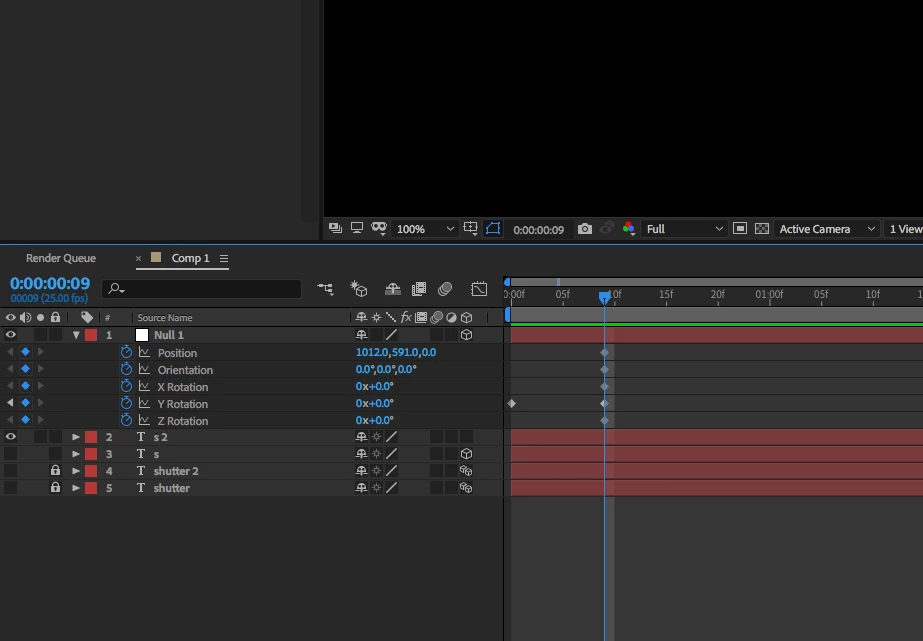
Hi, Hoping someone will be able to help. My parent pick whip toggle seems to have disappeared. Anyone got any clue how I find it? Where has it gone?

    This topic has been closed for replies.
    Correct answer Mike_Abbott

    Right click in the header bar of the timeline - the lighter grey area where you see 'Source name' and the other icons to the right. You'll get a pop up menu: Columns > Parent & Link.

    4 replies

    Participant
    November 18, 2023

    Community Expert
    December 27, 2020

    There are 3 icons in the lower-left corner of the timeline. The first turns on and off the switches column, the second the modes column, the third that looks like this {} turns on and off the in/out/duration/stretch column. Shift + F4 reveals and hides the Parent/Link column. These columns turning on and off at random are the result of unintended user input or loading up an AEP file that was saved with columns turned off in the timeline. There is no bug that switches columns on and off. 


    You can also reset any workspace by double clicking on the workspace to the right of the toolbar. You can also edit the layout so your most commonly used workspaces are visible. Motion Tracking, Editing, Color correction are all more efficient if you use the proper workspace. Anyone that consistently has problems with the workspace or the timeline should spend a few minutes studying the UI and explanations presented in the User Guide and the online documentation.

    Inspiring
    December 27, 2020

    no kidding. I know there are 3 icons in the lower-left corner...  I did neither of your suggestions. After YEARS AND YEARS of using AE, this was a brand new thing I've never seen before. If you work for Adobe, Adobe better start hiring people with tact and diplomacy. The question was already answered, btw. Thanks for the condescending remark, Rick.

    Inspiring
    December 26, 2020

    why is it AE is so buggie ....? Mine just disappeared too.

    Mike_Abbott
    Mike_AbbottCorrect answer
    Legend
    October 23, 2018

    Right click in the header bar of the timeline - the lighter grey area where you see 'Source name' and the other icons to the right. You'll get a pop up menu: Columns > Parent & Link.

    neildavies
    Known Participant
    October 23, 2018

    Thank you SO much! So simple, yet it was driving me crazy! Much appreciated.