
Participant
October 12, 2020
Answered

Pixelated Vector File in After Effects

  • October 12, 2020
  • 2 replies
  • 862 views

Hi,

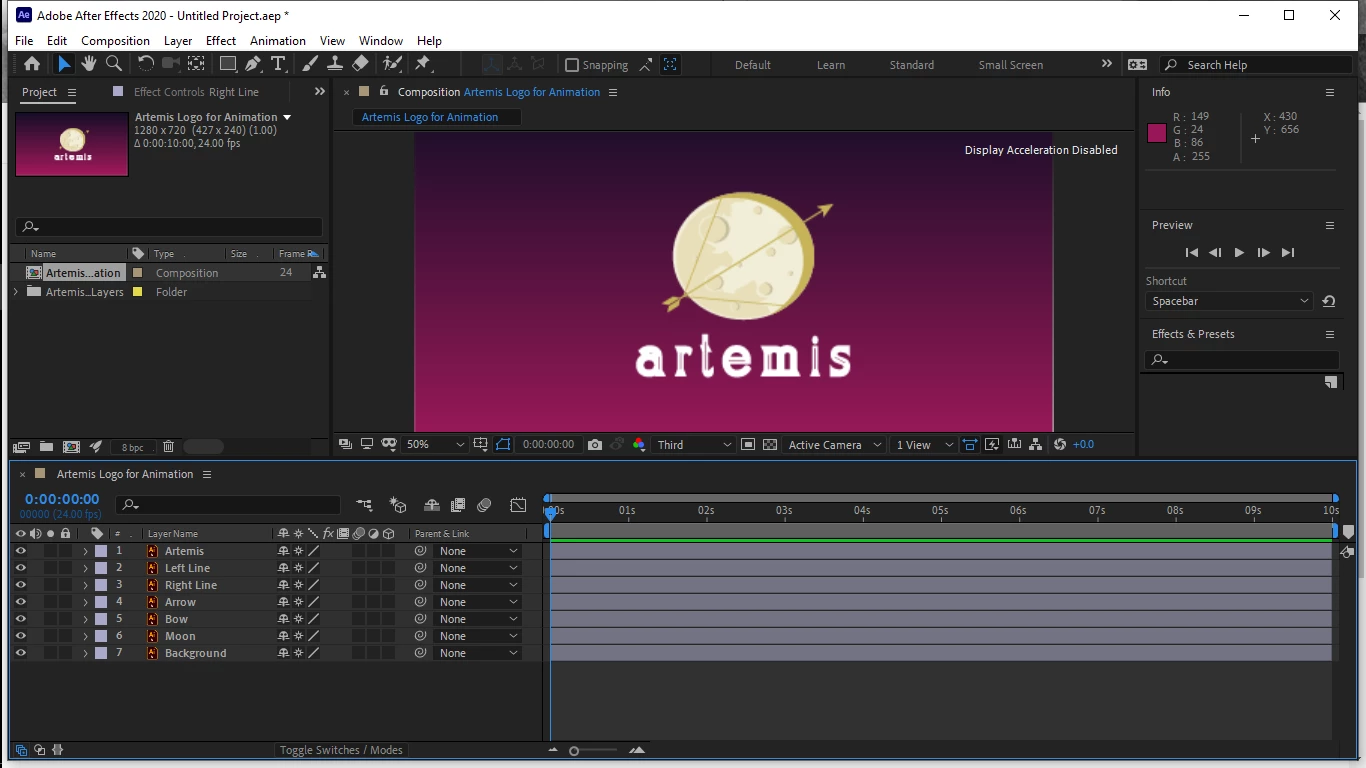
I started a new composition in AE but the vector files are pixalated. I tried followig youtube tutorials that told me to click on the sun symbol to continuously rasterize but it still appears to be pixelated. 
This topic has been closed for replies.
Correct answer Anna Lander

Your preview resolution setting now is Third. This means that you see every third pixel in image. Set it Full, and all must become OK.

2 replies

Community Expert
October 12, 2020

The most efficient Composition Panel resolution setting is Auto. That will always give you the best display and the fastest previews available. 

Anna Lander
Anna LanderCorrect answer
Inspiring
October 12, 2020

Your preview resolution setting now is Third. This means that you see every third pixel in image. Set it Full, and all must become OK.

Participant
October 12, 2020

Thank you so much