
Inspiring
November 6, 2021
Answered

PNG image looks blurred when importing into AE

  • November 6, 2021
  • 3 replies
  • 1805 views

Hi Forum.


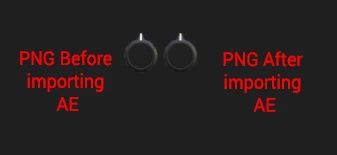
I have a PNG sequence which I import into AE. I have notice some quality deterioration when I import the image to see how it looks in AE. If you notice before importing into AE, the left image is much crisp and sharp, and on the right right side the image is a bit blurred, especially the tip of the image white colour looks blurred.  This is viewed at 100% and full quality in AE.


what could be causing this, or whats the best fix for this problem?


Thank you.


This topic has been closed for replies.
Correct answer Mylenium

Well, are you sure it's not an issue with Blender applying motion blur and/ or its antialiasing? That would not necessarily show up on a still image of course.


Mylenium

3 replies

Participant
October 11, 2022

I need help from experts, i frequently uploaded content on my Apk Website but the images i uploaded on any post in png format then the picture remain blurred, looking forward for help

Participant
October 26, 2022

It could be not a bets solution, however, recently I was working on a video in AE for goldenlady and there was a lot of blured images. After all, I drew it in AI and used it for AE project. Result of course was even better than expected.

Mylenium
MyleniumCorrect answer
Legend
November 7, 2021

Well, are you sure it's not an issue with Blender applying motion blur and/ or its antialiasing? That would not necessarily show up on a still image of course.


Mylenium

Inspiring
November 7, 2021

You are correct, I asked for the file not to include any highlight and emission during the export, and it seems to have helped.


Kind regards.

Mylenium
Legend
November 6, 2021

Without any info on where those images come from/ how they were created as well as what your footage interpretation is nobody can really tell you much. There are some recognizable changes, but whether that#s merely a wrong color profile or something like a wrong DPI setting when exporting e.g. from Illustrator is really not possible to determine unless you provide more info.


Mylenium

Inspiring
November 7, 2021

The image (Control Knob) was created in Blender 3D, and exported as PNG image sequence High Quality. Importing this image in Photoshop is nice and crisp as I wanted to test it. Its just in After effects which its blurry.


Some more information, if I only import one image from the PNG sequence its nice and crip in AE

if I import the entire PNG sequence of 128 images, then its causing the blur.  


Heres and example: