
Participant
February 7, 2019
Answered

Preview in After Effects CC 2018 extremely slow

  • February 7, 2019
  • 2 replies
  • 1717 views

I'm trying to preview very simple files from an After Effects tutorial I'm doing and the preview slows to a crawl after the first 1-2 seconds. The video becomes pixelated, speed drops to about 10fps, and the audio becomes garbled and drawn out.

Here's the tutorial I'm doing. Anyone with a LinkedIn Learning account can download the example files to see what I'm talking about. I'm currently trying to preview the H+_Bumper_v2.aep file

After Effects CC 2018 Essential Training: The Basics

These are the specs of the computer I'm working on:

Dell XPS

Intel Core i7-4790 CPU @ 3.60GHz

24Gb RAM

NVIDIA GeForce GTX 745

Windows 8.1 Pro

4k monitor + Cintiq 21ux

I know this isn't a "workhorse" machine, but it should be able to preview simple 10 second files without slowing down so much that it basically crashes. Even running previews of the sample files from this tutorial at 1/4 resolution or worse have it slowing to a crawl after the 1 second mark.

After Effects is completely unusable in this condition.

I've gone through multiple discussions about this on these forums and can't find any fixes. Is the only solution to downgrade to AE CC 2017?
This topic has been closed for replies.
Correct answer OussK

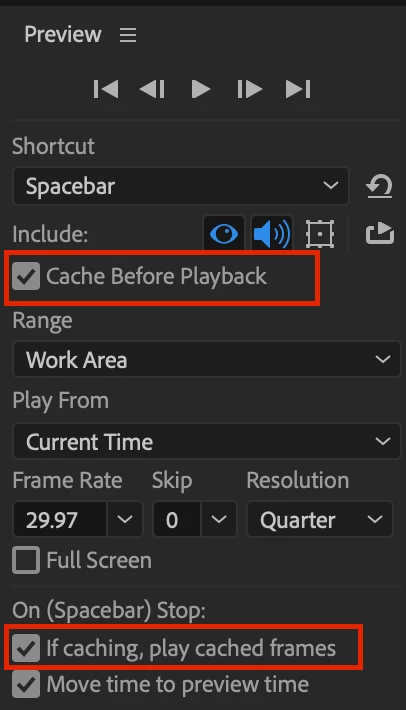
you need to cache the preview before play, that's it even downgrading will didn't help, try this settings from preview panel

2 replies

OussK
Community Expert
OussKCommunity ExpertCorrect answer
Community Expert
February 7, 2019

you need to cache the preview before play, that's it even downgrading will didn't help, try this settings from preview panel

Participant
February 7, 2019

Thank you! That seems to have helped quite a bit. I still have to downgrade the video to 1/4 quality (blocky, pixelated) but now I can at least view the preview in real time.

It's clear that not everyone is having this problem, so what's the limiting factor on my performance? Processor? RAM? Video card? It would be helpful to know why the performance of After Effects CC 2018 is so poor for me, so that I can ask IT for the right upgrades to solve this problem.

OussK
Community Expert
Community Expert
February 7, 2019

Really it's not a issue, after effects work like this, and 90% you will work on quarter resolution or maybe half so it's normal, anyway you PC spec are very good and enough to RUN AE without issue, you can only be sure you run the GPU accelerator from project settings under file menu.

Participant
February 7, 2019

Title should say After Effects 2018. Can't seem to find a way to edit it.

Peru Bob
Community Expert
Community Expert
February 7, 2019

I've edited it for you.