

Procedural Text Gradient
Hello,
I am trying to make a MOGRT for some editors to use throughout a project.
I need to have the text animation visuals match up with a design, which has a faux 3D style extrusion.
I also need to use a bouncy animation, which uses expressions to give an overshoot animation effect.
I was told yesterday that the animation needs to feel more 3D, so I need to add a gradient to the text extrusion effect to make it look more 3D.
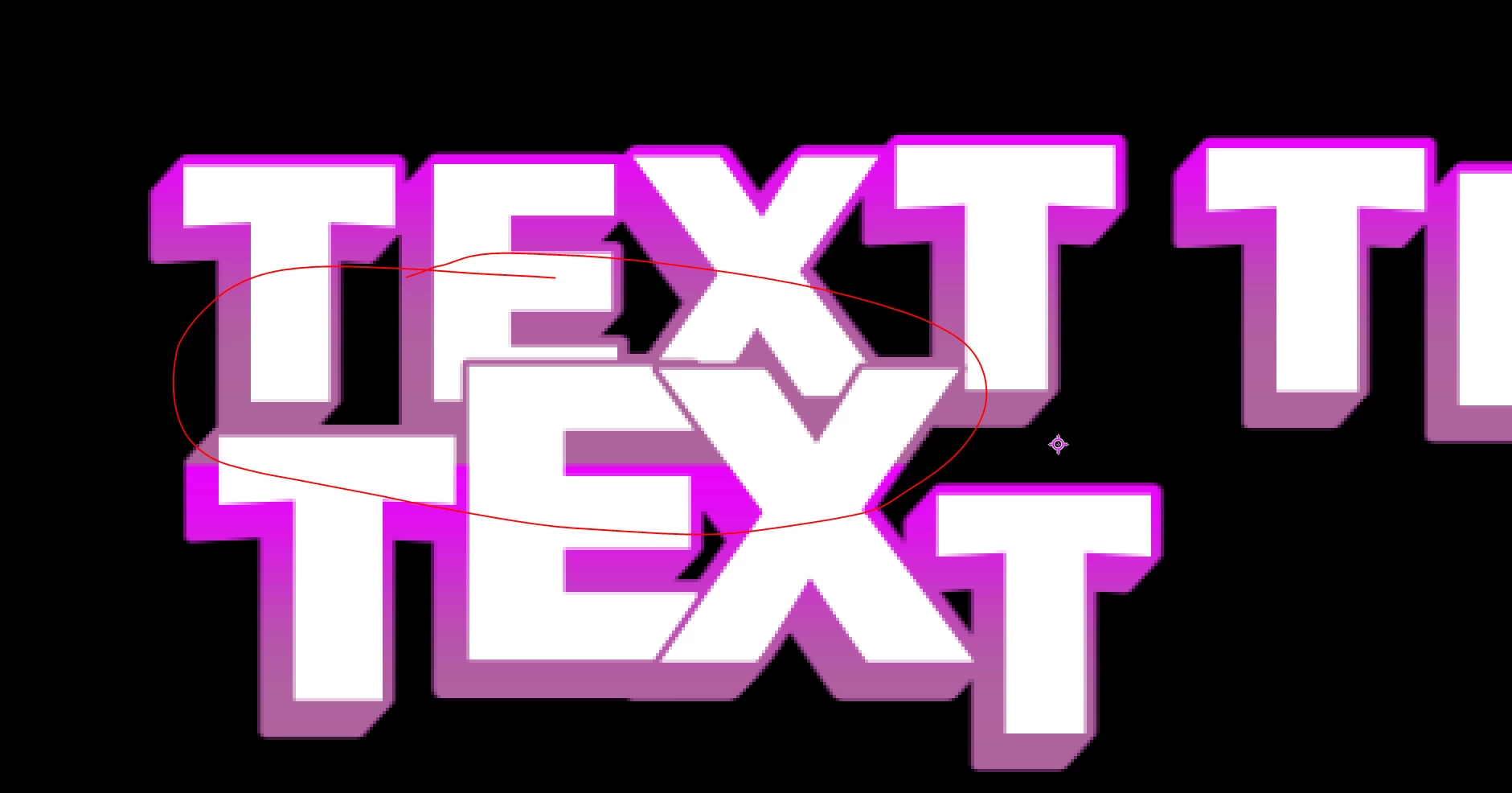
This is where the problem is at the moment. I cannot seem to get the animation to work accurately with any kind of gradient. None of the gradients will move with the text, and as it is a template, it needs to be flexible, so in some instances, there will be 2/3 lines of text.
I have attached an example of the broken gradient approach.
Is there any way of getting the gradient to work over different lines of text? I am currently using 3 ramp variations which turn off and on, based on how many lines of text there are.
In the last example, you can see the main issue I am having with the ramp overlap. The 3 ramp layers are tied to the matte of the extruded layer. So, they maintain that mask.
Any ideas would be most helpful. These need to be editable in premiere, so I want to avoid locked asset ideas. I am using 2023 too.


 AdChoices