

Exit
  • Global community
    • Language:
      • Deutsch
      • English
      • Español
      • Français
      • Português
  • 日本語コミュニティ
  • 한국 커뮤니티
0

Proxy for 3D Content with Collapse Transformations

Community Beginner ,
Mar 28, 2020 Mar 28, 2020

TL;DR: when I use a proxy with 3D content and collapse transformations, the proxy is placed at the wrong transformation/coordinates and the colors are wrong.


I'm creating an explanatory video for a technical topic. A WIP render is shown here (I've skipped to the part I'm starting to struggle with): https://youtu.be/fIhR3sXW0nA?t=248


The video involves lots of panning and zooming into the content, so I chose to use a 3D camera for the motion, and thus all my layers are 3D. Also, because I'm zooming into content and I need to maintain clarity, I've used "collapse transformations" on all my precomps. However, all the content is actually on the same plane.


The issue I'm encountering is that the performance of the After Effects UI is incredibly slow, and more so the further I go in the project, as new subject matter enters the scene. I've reached the point where it's almost unworkable, and as a result, my progress has slowed dramatically. I'm looking for ways to speed things up.


I'm already previewing at third or quarter resolution. Applying a "region of interest" doesn't make a significant difference to the performance.


I wanted to try to use a proxy to accelerate things. After all, most of my content is stationary most of the time. However, when I create a proxy, it places it as the wrong spatial coordinates, and somehow the proxy image is lighter and harder to see (this happens with both video and image proxies). 


Here's what the original looks like:
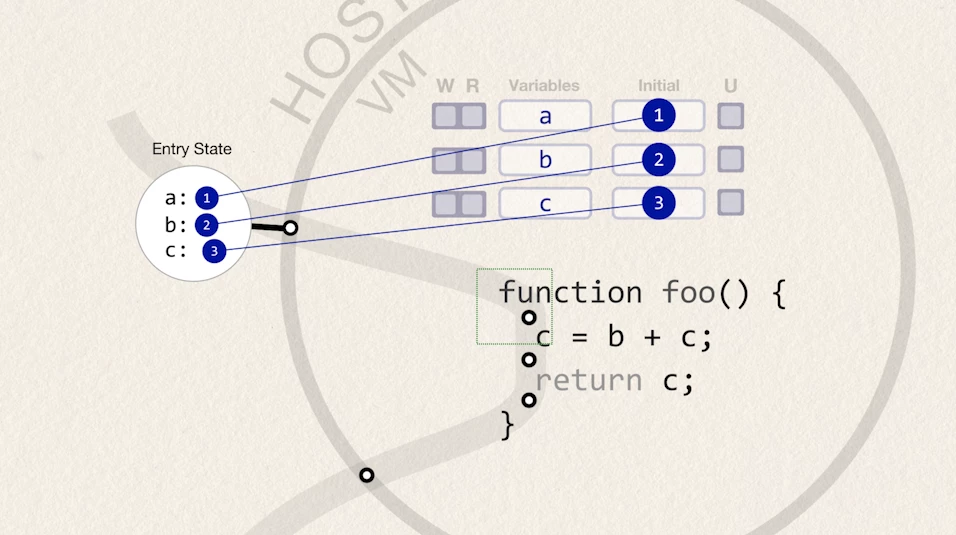
 

Annotation 2020-03-29 142950.png

Here's what it looks like with the proxy for some of the content:
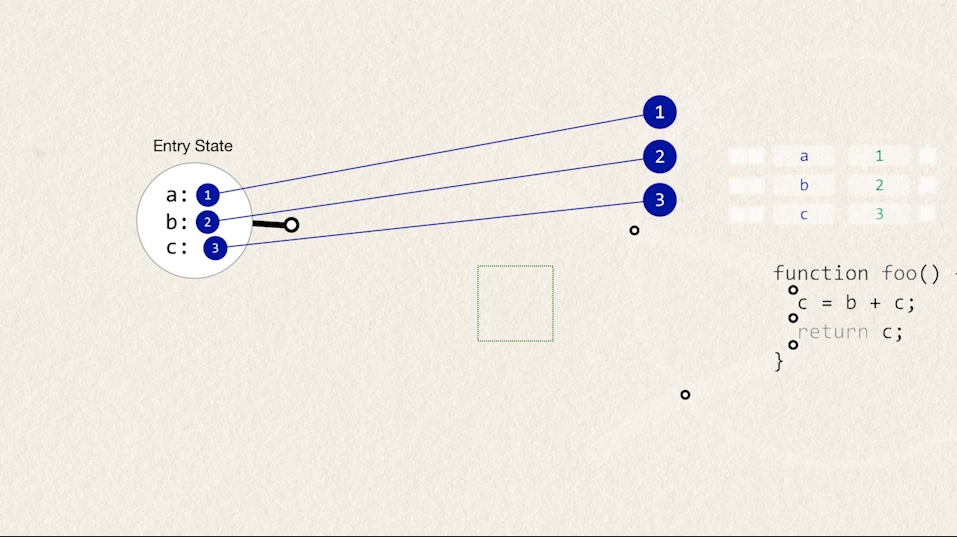
Annotation 2020-03-29 143035.png


Can anyone advise on how to fix these, or if there's a better way for me to achieve what I'm trying to achieve?

TOPICS
Performance , Preview , User interface or workspaces
445
Translate
Report
Community guidelines
Be kind and respectful, give credit to the original source of content, and search for duplicates before posting. Learn more
community guidelines
Community Expert ,
Mar 28, 2020 Mar 28, 2020

My first guess is that you are trying to do your camera moves on the entire project in a single comp. When I do this kind of work I always break up the narration into sentences or phrases that are only a few seconds long and make each of those segments a separate comp. I usually finish the project by rendering all of the comps and doing the polish and final cut in Premiere Pro. It sounds like a lot more work but in the end. it is almost always faster and solving problems like the ones you are experiencing are a lot easier to deal with. 


It is not at all unusual for a bunch of shape layers to start to slow down a project. The first thing I would do is split out the segment that is giving you problems and see if that helps. If it does, complete that section, render it, and move on with the next section. If it doesn't then we need a lot more detail and we need to see the modified properties of the layers that are giving you problems. I helped a guy not too long ago that was having similar problems by having him turn off motion blur while he was working on the project and then turning it back on for the final render. 

Translate
Report
Community guidelines
Be kind and respectful, give credit to the original source of content, and search for duplicates before posting. Learn more
community guidelines
Community Beginner ,
Mar 28, 2020 Mar 28, 2020

Hi, Rick. Thanks for the suggestion.


I think that breaking up the video into separate segments would improve performance, but it would give me another issue which is how to maintain content robustly from one segment to the next.


When you say you break up your narration into separate segments, is there much content that carries over from one segment to the next? If so, how do you carry it over? 


by having him turn off motion blur while he was working on the project

Interesting. I personally don't have motion blur enabled, and I'm struggling to identify any one particular feature or layer that's slowing the system down.


Translate
Report
Community guidelines
Be kind and respectful, give credit to the original source of content, and search for duplicates before posting. Learn more
community guidelines
Community Beginner ,
Mar 28, 2020 Mar 28, 2020

I've solved part of my problem, but am still looking for assistance.


For the color issue, it seems that the default setting for proxy creation is to generate an output with premultiplied color, but then it seems that AE is expecting a post-multiplied proxy image, so this setting needs to be set to "straight".

Annotation 2020-03-29 165836.png


For the coordinate transformation issue, it appears that the proxy doesn't deal well with a camera in the precomp. If I delete the camera, the coordinates of the proxy are correct.

Here is without the proxy enabled:

Here is the proxy rendering:

Annotation 2020-03-29 170637.png

Now that there is no camera to correctly frame the content in the precomp, the precomp view (and thus the proxy) does not contain all the content. In this case, the content is still reasonably close to the 3D origin, so it doesn't cut anything off anything important in this project, but in general, I would like to know if there is a solution to this framing issue.


There seems to be an additional problem as well. When I preview at a quarter resolution, it seems to cut off part of the proxy. Here is previewed at full resolution (with the proxy enabled):

Annotation 2020-03-29 170357.png

And then here it is when I change to quarter resolution (with the proxy still enabled) -- notice the top of the content is cut off:

Annotation 2020-03-29 170944.png


Is this a bug?

Translate
Report
Community guidelines
Be kind and respectful, give credit to the original source of content, and search for duplicates before posting. Learn more
community guidelines
LEGEND ,
Mar 29, 2020 Mar 29, 2020
LATEST

Pro tip: Draft 3D will do more for you than your proxies. the rest are likely just precision issues inherent in the reduced actual resolution of the proxies vs. the cameras sampling and clipping. Such stuff can even literally disappear when e.g. using motion blur due to too many pixels having low opacity. I'm not precluding any genuine bugs, but it pretty much has behaved this way since forever.


Mylenium

Translate
Report
Community guidelines
Be kind and respectful, give credit to the original source of content, and search for duplicates before posting. Learn more
community guidelines