Exit
  • Global community
    • Language:
      • Deutsch
      • English
      • Español
      • Français
      • Português
  • 日本語コミュニティ
  • 한국 커뮤니티
4

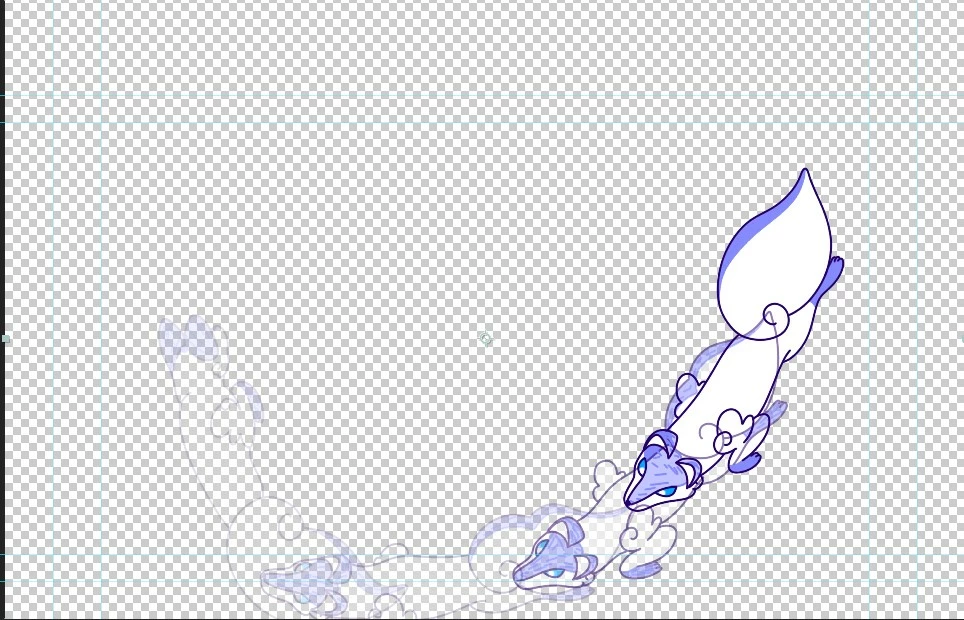
psd animation fading in and overlapping in aftereffects

Community Beginner ,
Feb 14, 2024 Feb 14, 2024

You see the problem in the screenshot below. An animation made in Photoshop is being overlapped in After Effects. When playing the animation in AE it looks like its fading each frame in and out.

When purging all Memory and Disk Cache in AE the problen often dissapears, but sometimes it just dissapears on the frame I am and is then on different frames. Closing and opening AE does not help, neither does reimporting the file.


This has been happening with different projects and files in After Effects 24.0.3


Screenshot 2024-02-14 121848.jpg

TOPICS
Dynamic link , Performance
315
Translate
Report
Community guidelines
Be kind and respectful, give credit to the original source of content, and search for duplicates before posting. Learn more
community guidelines
Adobe Employee ,
Feb 14, 2024 Feb 14, 2024

Do you see the issue in export? What's the frame rate of the animation in Photoshop? Be sure to keep the frame the same in After Effects as in Photoshop.

Let us know if that fixes the issue.

Note: Moving this thread from Bugs to Discussions for troubleshooting.


Thanks,

Nishu

Translate
Report
Community guidelines
Be kind and respectful, give credit to the original source of content, and search for duplicates before posting. Learn more
community guidelines
Community Beginner ,
Feb 14, 2024 Feb 14, 2024

Hi Nishu!
Yes, I see the issue also in the export and the framerates are the same...

Thanks,
Veronika

Translate
Report
Community guidelines
Be kind and respectful, give credit to the original source of content, and search for duplicates before posting. Learn more
community guidelines
Adobe Employee ,
Feb 19, 2024 Feb 19, 2024

Do you mind sharing the After Effects project (with media) to test?

Feel free to DM me if you don't want to share it publicly.


Thanks,

Nishu

Translate
Report
Community guidelines
Be kind and respectful, give credit to the original source of content, and search for duplicates before posting. Learn more
community guidelines
Community Beginner ,
Feb 21, 2024 Feb 21, 2024

Here is the ae project and media (a different shot but the same problem).

Thanks,
Veronika

Translate
Report
Community guidelines
Be kind and respectful, give credit to the original source of content, and search for duplicates before posting. Learn more
community guidelines
Community Beginner ,
Feb 22, 2024 Feb 22, 2024
LATEST

I noticed now that in the project window the icons of the layers is different on the sequences that work and dont work. The ones that work have a PS icon and the others a image sequence icon. I tried importing sequences which work in other AE projekts but they don't work. So I guess it's a importing problem? 


I tried all the option there are when importing. for example: import as footage, as composition with and without retaining layer sizes and so on...


Screenshot 2024-02-22 151111.jpg

Translate
Report
Community guidelines
Be kind and respectful, give credit to the original source of content, and search for duplicates before posting. Learn more
community guidelines