
Participant
March 29, 2019
Answered

Puppet tool: triangle settings in mesh not visible

  • March 29, 2019
  • 2 replies
  • 3240 views

So I'm doimg this tutorial where I have to use the puppet tool. The problem is Can't seem to change the amount of triangles in the mesh option.

It only shows expansion and density. I'm using a layered photoshop file of a character.

Anyone knows what seems to be the problem?
    This topic has been closed for replies.
    Correct answer Martin_Ritter

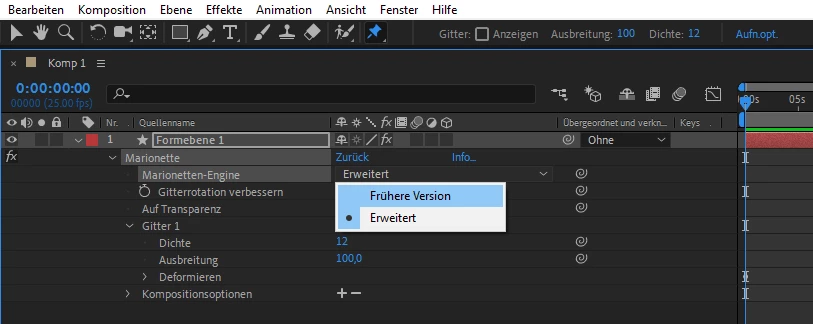
    You are on the new version of the puppet tool engine.

    No problem, you can just switch back to the legacy version. See screenshot attached - it's German, but you'll find the corresponding setting in your language version.

    Workflow was to add puppet pins, then switch to old version, then set up triangle amount.

    Of course you can work with the new version of the puppet tool, too.

    *Martin

    2 replies

    Participant
    March 30, 2019

    Aha thanks!! Found it.. :-)

    Martin_Ritter
    Martin_RitterCorrect answer
    Legend
    March 29, 2019

    You are on the new version of the puppet tool engine.

    No problem, you can just switch back to the legacy version. See screenshot attached - it's German, but you'll find the corresponding setting in your language version.

    Workflow was to add puppet pins, then switch to old version, then set up triangle amount.

    Of course you can work with the new version of the puppet tool, too.

    *Martin