Participant
September 6, 2021
Answered

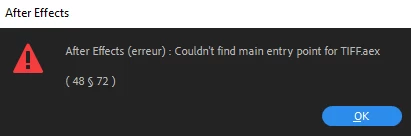
"couldn't find main entry point for TIFF.aex"😪😪
  • September 6, 2021
  • 6 replies
  • 10771 views


Title edited by Mod.

This topic has been closed for replies.
Correct answer Mahmoud Berro

I fixed it, try deleting the plugin folder entirely, and try reinstalling the aftereffects, It will recreate the deleted plugin folder by itself and the problem will be solved, if you keep the folder "plugins" without deleting it will result in the same error, so you have to delete the "plugin" folder before trying to reinstall the aftereffects setup.

6 replies

Participant
July 25, 2023

I have been stuck on this merry-go-round for weeks now. I get the entry point error, I uninstall AE and wipe plugins and preferences, I reinstall everything and then after a while the errors recur. It's never for the same plugin each time and I even get this error for built-in effects, so it's not like you can blame it on a third party. Having said that I do have a lot of plugins, and having to reinstall all of them every time I reinstall After Effects means the whole thing takes half my day... and it's a huge pain. I am using AE 2022 LTS on a Xeon W-2155 workstation with a Quadro P5000, 64gb RAM.

Mahmoud Berro
Mahmoud BerroCorrect answer
Participant
May 3, 2023

I fixed it, try deleting the plugin folder entirely, and try reinstalling the aftereffects, It will recreate the deleted plugin folder by itself and the problem will be solved, if you keep the folder "plugins" without deleting it will result in the same error, so you have to delete the "plugin" folder before trying to reinstall the aftereffects setup.

Participant
February 14, 2024

it works for me


roger_habit
Participant
April 3, 2022

I get the same error for After Effects 2020 and 2021 (latest update on both).  Removing the TIFF.plugin file from the plugins folder is the only thing that seems to stop it from happening.  I also don't see that plugin in the After Effects 2022 plugins folder.  Removing it doesn't appear to hinder my work or cause any problems, same with clicking OK.  I'm using a late 2013 Mac Pro.

Participant
January 24, 2022

Any idea on how to fix the issue? Fairly annoying that i constantly have to press OK in order to open AE. Currently running AE CC2022

Participant
October 12, 2021

I get the same error message and same results when I click ok.  Doesn't seem to affect my work, however it is annoying in that AE wont open until I click ok.

nishu_kush
Community Manager
Community Manager
September 6, 2021

Hi Harinjaka5E76,


Thanks for writing in. Would you mind sharing the following details so that we can troubleshoot the issue properly?

We're here to help, just need more info.


Thanks,

Nishu

Participant
October 9, 2021

After clicking ok ae opens as always. it happened after i moved my plug-ins and presets to another version, and it 

accidentally deleted in the main folder
