

emtink
Participating Frequently
December 3, 2019
Frage

"Mt. Mograph Motion 3" Extension cannot install

  • December 3, 2019
  • 3 Antworten
  • 15313 Ansichten

I'm trying to install an After Effects extension using ZXP installer. Running the .exe errors out and gives me this error:
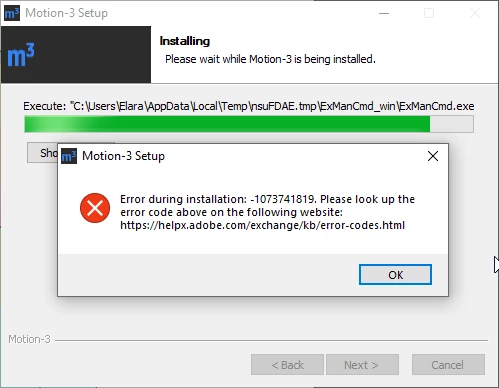
According to that site (https://helpx.adobe.com/exchange/kb/error-codes.html), I believe that it thinks the installer is corrupt. This can't be true because one of my coworkers was able to install just fine with the same installer. 


Trying to brute force install by dragging the .zxp file into ZXP installer gives me this dialogue:
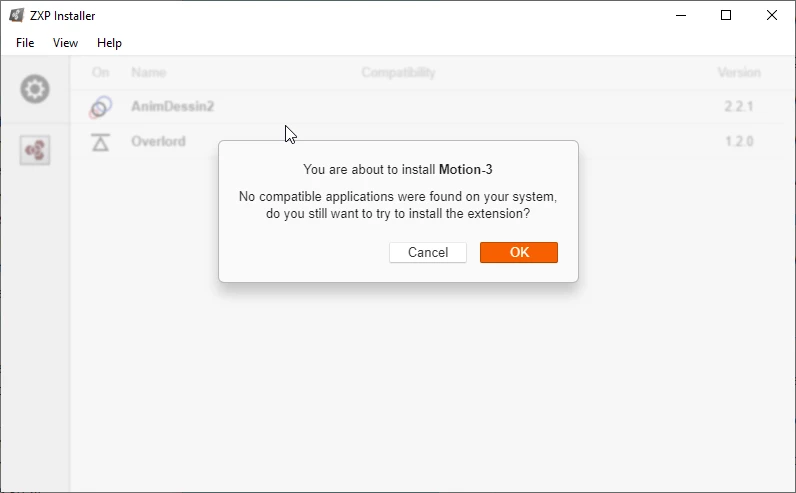
I don't want to brute force install this extension as then I won't be able to auto-update it (it updates frequently). Why aren't any of my CC applications being recognized by ZXP installer? I've reinstalled AE and that doesn't seem to help. I'm using AE 2020. 

Dieses Thema wurde für Antworten geschlossen.

3 Antworten

Participant
February 16, 2022

16/02/2022 solution for AE22 (licensed) v22.2.0 (build 120)

same as Nkoone mentioned but with some diferences.

resolve for the zxp install without installer on https://aescripts.com/knowledgebase/index/view/faq/zxp-installer-faq/
You should be an administrator

Manual installation on Windows

  1. rename your .zxp file to .zip
  2. unzip the zip file
  3. drag that unzipped folder into the folder
    C:\Program Files (x86)\Common Files\Adobe\CEP\extensions\
  4. Create a registry entry (value chain) called "PlayerDebugMode" with String value 1 in (hit right click on the key code CSXS.10 and 11 and hit create new value chain, and just put the value 1)
    HKEY_CURRENT_USER/Software/Adobe/CSXS.10
    and here
    HKEY_CURRENT_USER/Software/Adobe/CSXS.11
    (To create and modify registry entries you can search for the program "regedit" in the windows menu)


Inspiring
April 21, 2022

rafaeld6246264's solution worked for us. Thanks!

Participant
December 15, 2019

Same identical problem here!

emtink
emtinkAutor
Participating Frequently
December 16, 2019

What have you tried to fix it so far?


I've been in contact with the devs of ZXP Installer and they say it's an Adobe issue, and I've been in contact with the creators of the extension and am waiting to hear back on if there's a way to update the extension without going through a .exe file. Direct install works just fine for me but prevents the extension from ever updating. 

Inspiring
March 12, 2020

Hi did you find the fix for this?

Mylenium
Legend
December 3, 2019

Without any actual system info and otehr details nobody can tell you much. most likely you botched the permissions on your folders somehow and even the ZXP package itself may have inherited wrong permissions if it got shuffled around from another computer. Also script access for networks and all that jazz needs to be enabled in ExtendScript and AE.


Mylenium