
Inspiring
August 12, 2013
Answered

"Stuck" Image in Transparent Background

  • August 12, 2013
  • 23 replies
  • 65084 views

After Effects 11.0.2.11

Mac OS 10.7.4

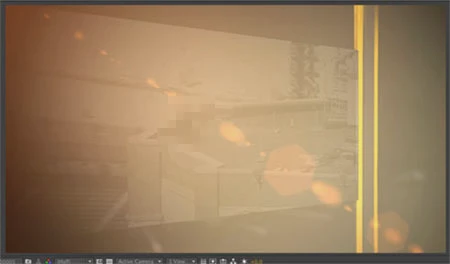
A "ghost" frame from an old movie is stuck in the transparent / checkerboard background.  Always the same movie / frame.   Even in a new comp without any layers this old quicktime movie shows up.  Was a moving movie, this ghost effect is now just a single still frame.   Put one item in the comp and it disappears.  Turn off the eyeball for all of the layers and the ghost image comes back.

Does not show up in final renders .. yet.   Mostly in just (Auto / Half) rez comp viewer previews.

I've tried deleting prefs.    Cleared disk cache.    Cleared Conformed Media Cache.  Restarted the program.    Restarted the computer.      It's been like this for weeks.

Now it has started showing WITH other layers "on".  This is new.   Makes it tough to work.

IT department says they have no idea, that "we'll have to wipe your entire computer" but before going THAT route wanted to see if anyone else has ever had this problem and if they've discovered a solution.

Thanks,

Marc

In these examples below this "rooftop scene" not only isn't supposed to be in the image, it's not even in the AE project file.       

Here it is actually with other layers set to "on" which has never happened before:
    This topic has been closed for replies.
    Correct answer laurentblanchard

    OK I found the problem, it comes from when you display AE on multiple screens. It is rely to specific graphic hardware i guess. As already mentioned above : clear cache AND clear ...AppData\Roaming\Adobe\After Effects files. Have a good one

    23 replies

    Participant
    November 25, 2013

    I'm working in AE CC 12.0.0.404

    Same exact thing happening here. Ghost frame is always underneath my layers. Its weird because if I only have one layer, when I move the position of that layer, the ghost image follows...but if I hide the layer, the image is still there. The image renders if there is not a layer on top of it.

    Todd_Kopriva
    Inspiring
    November 25, 2013

    Start by clearing the disk cache (which you can do from the Edit > Purge menu).

    Also, you should be using After Effects CC (12.1), which includes a lot of bug fixes.

    Todd_Kopriva
    Inspiring
    November 26, 2013

    Already cleared cache several times...Restarted computer...

    Like I stated in my original post using CC 12.1

    Any other ideas


    I was responding to grolarmedia.

    Todd_Kopriva
    Inspiring
    August 12, 2013

    We fixed a lot of caching bugs in After Effects CC (12.0). Have you tried in that version?

    Known Participant
    November 21, 2013

    I am having a similar issue.  Every new or empty comp on this computer has this ghost image.  If I "Save Frame as"--"File"  I get a png with the ghost image.  If I try "Save Frame as"--"Photoshop Layers"  I get error, "cannot save a layered file because there are no active video layers at this current time."  If I have media encoder render it as mp4 no ghost image.

    Using AE CC 12.1.0.168

    Mylenium
    Legend
    August 12, 2013

    Sounds liek a graphics hardware issue. Turn off all that stuff:

    http://myleniumblog.com/2012/05/15/make-cs6-work-for-you/

    Mylenium