
Inspiring
August 12, 2013
Answered

"Stuck" Image in Transparent Background

  • August 12, 2013
  • 23 replies
  • 65081 views

After Effects 11.0.2.11

Mac OS 10.7.4

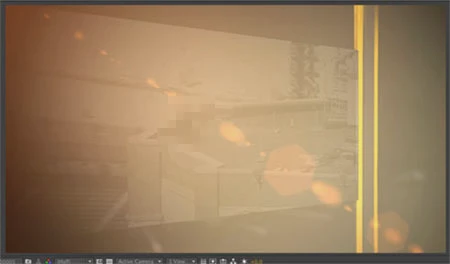
A "ghost" frame from an old movie is stuck in the transparent / checkerboard background.  Always the same movie / frame.   Even in a new comp without any layers this old quicktime movie shows up.  Was a moving movie, this ghost effect is now just a single still frame.   Put one item in the comp and it disappears.  Turn off the eyeball for all of the layers and the ghost image comes back.

Does not show up in final renders .. yet.   Mostly in just (Auto / Half) rez comp viewer previews.

I've tried deleting prefs.    Cleared disk cache.    Cleared Conformed Media Cache.  Restarted the program.    Restarted the computer.      It's been like this for weeks.

Now it has started showing WITH other layers "on".  This is new.   Makes it tough to work.

IT department says they have no idea, that "we'll have to wipe your entire computer" but before going THAT route wanted to see if anyone else has ever had this problem and if they've discovered a solution.

Thanks,

Marc

In these examples below this "rooftop scene" not only isn't supposed to be in the image, it's not even in the AE project file.       

Here it is actually with other layers set to "on" which has never happened before:
    This topic has been closed for replies.
    Correct answer laurentblanchard

    OK I found the problem, it comes from when you display AE on multiple screens. It is rely to specific graphic hardware i guess. As already mentioned above : clear cache AND clear ...AppData\Roaming\Adobe\After Effects files. Have a good one

    23 replies

    Participant
    July 11, 2016

    Hey, sorry to be the guy that says "I've got the same problem" ,but I've got the same problem.

    I did start a new post here:Burt in image. but I'll keep a watch on this one so there not the same trash on two posts.

    (theres some screen shots and render example over on mine as well)

    Note on the original post it says "Does not show up in final renders" on mine it does other than that it seems to be an identical error.

    Participant
    July 11, 2016

    Hey Joe,

    I managed to fix mine after purging the memory several times. (Edit\Purge\All Memory & Disk Cache...).

    However, it didn't work on the same day the problem occurred (I did purge the memory and restarted the computer several times) but on the next day it worked and I did the same process of clearing the memory.

    I believe it is a cache problem and since I managed to fix it, it hasn't happened again.

    I hope I was helpful and wish you luck with solving it.

    PS: temporary fix is to place a text layer outside your screen with even just a dot "."

    deep4k
    Participant
    May 6, 2016

    I had the same issue , i had to fix it  by making a text layer with just a dot ( . )  and placing it anywhere outside the frame ,  thats the only solution i have found so far. tried reinstalling  and everything.

    Szalam
    Community Expert
    Community Expert
    May 6, 2016

    deep4k wrote:

    I had the same issue , i had to fix it by making a text layer with just a dot ( . ) and placing it anywhere outside the frame , thats the only solution i have found so far. tried reinstalling and everything.

    If you are using AE version 13.7.2 and are still experiencing issues like this - especially ones that won't go away when you clear your cache, please file a bug report immediately.

    Participant
    June 30, 2016

    Yesterday I updated to AE 13.8.0.144 and the "Ghost frame" issue appeared. I tried test render and it was on the render as well. I tried clearing cache, restarting but it was still there. The temporary fix is to place a solid (black) underneath the whole composition (or under the pre-comp that has the ghost frame). Still I hope Adobe fixes it soon as apparently its been going for a while.

    My configuration is:

    iMac (Retina 5K, 27-inch, Mid 2015)

    3.3 GHz Intel Core i5

    32 GB 1600 MHz DDR3

    AMD Radeon R9 M290 2048 MB

    Participant
    February 1, 2016

    I see this problem on a number of Adobe products, including Photoshop and Lightroom...only AFTER I upgraded to a new "coffee can" Mac Pro from a 2007 Mac Pro. Same monitor (30" Dell) and the same software. This only happens in Adobe products, so it's something related to that. I suspect that there's a driver issue that doesn't clear some sort of caching in the video processor.

    RBProduções
    Participant
    September 18, 2015

    I solved the problem.

    In the folders C:\Users\you\AppData

    and looked for temporary files related to Adobe.

    Manually I deleted all I thought were causing the problem.

    I do not know exactly which deleted file solved the problem.

    But it worked.

    CAUTION TO DELETE FILES ON APPDATA.

    Just do if you are sure what you're deleting.

    Dipsacus
    Participant
    October 12, 2015

    Thx ! It solved my problem too !

    Actually, i only deleted all the files i found in C:\Users\YourNameHere\AppData\Roaming\Adobe\After Effects and after restarting AE, the image stuck was gone.

    By the way, this problem appears for me only a single time with the latest CC 2015 version.

    chrish272727
    Participant
    July 15, 2015

    same issue happening here, just started today (july 15, 2015) using an imac 27 inch late 2013, 3.4 ghz intel core i5 processor, 32gb ram 1600 mhz ddr3 with NVIDIA Geforce gtx 775m 2048 mb. Updated to new apple software this morning as well, which puts me on Yosemite version 10.10.4. The issue was not happening prior to the os update. Now it appears even when building a composition-->new composition blank comp.

    Known Participant
    October 9, 2015

    Same problem for me! Random old project still frame on blank composition. By the way my random frame is QUITE EMBARRASSING. Today I was so close to send a final render to a customer with the random frame!!

    AE CC 2014 up-to-date

    Windows 8.1 Pro 64 bit

    32 GB RAM Corsair DDR 4

    Video nVidia GeForce GTX 980 Strix

    Intel Core i7 Extreme 930

    Please Adobe fix this!!

    Szalam
    Community Expert
    Community Expert
    October 9, 2015

    Alberto Bedin wrote:

    Same problem for me! Random old project still frame on blank composition. By the way my random frame is QUITE EMBARRASSING. Today I was so close to send a final render to a customer with the random frame!!

    AE CC 2014 up-to-date

    ...

    Please Adobe fix this!!

    It's probably not going to be fixed in CC 2014, try it in CC 2015.

    If you haven't installed CC 2015 yet, make sure, when you do install it, that you turn off the default option to remove your old versions.

    If you don't like working in CC 2015, you can at least open your file, make a tiny change, save it in CC 2015 (with a different file name), then open it again in CC 2014 and see if the phantom frame goes away.

    bighc
    Participant
    July 13, 2015

    I am actually experiencing this exact problem on my machine. I am running 2015 CC, and when my movie should be fading out to black, a random frame from an earlier clip becomes the background. Have tried all the above suggestions, still no help. This is a big issue both for me and my client. Hope you Adobe guys take this seriously.

    jaredsales
    Participant
    July 13, 2015

    I really feel for you. I'm still having this issue and have had to tell my client that it is a widespread bug that has been reported for years to Adobe and has gone unaddressed. Client has grown extremely impatient as I've now had to resort to outputting a 45 minute piece shot by shot and reassembling.

    It is interesting that this issue has persisted for 3 years and the initial response was "upgrade to CC2014" now Adobe doesn't even try to address it. 3 major versions of After Effects have been released since this thread started, probably more if you look at the other threads across the Internet with the same problem.

    You would think for the $50 a month I spend I could get some sort of response from Adobe. But no. No one from Adobe has even attempted to respond or reach out to find out specifics so they can address it.  I'm attempting to find a comparable piece of software so that I can finally be finished using this buggy product that they don't even stand behind.

    Szalam
    Community Expert
    Community Expert
    July 14, 2015

    If you'll note the responses from Adobe in this thread: they are having a hard time pinning this bug down because it is very difficult to reproduce. The vast majority of people are not experiencing this issue. So, please, file a bug report and provide as much detail as you possibly can about your particular setup - hardware, OS, and software. The tiniest little detail might be the solution to the whole problem. What kind of hard drives are you using? What are your cache settings? What sort of security software do you have installed? What other video/graphics/3d software?

    Do these weird phantom images persist if you import your composition into a brand new project? After a complete system restart?

    Etc.

    freebird2000
    Participant
    February 20, 2015

    Am having the same problem in AE CC 2014 (13.2.0.49)

    Create new comp. No layers added. There is an image from old comp that appears. It cannot be selected or turned off. When I add a layer the "ghost" disappears, as long as new/only layer is turned on. Turn off layer and "ghost" reappears. Def seems like a cache issue. Have trashed all cache files, nothing makes it go away.

    Adobe? Anyone? Please help.

    Participating Frequently
    February 21, 2015

    Ah, but does t actually render? I've seen this artifact on lots of systems but they do not actually appear in the finished product.

    Try a test render.

    Participant
    March 3, 2015

    Same problem.  2 separate projects. Once it was a piece of footage, the 2nd time it was a shape layer.

    It does in fact render if I do a test render. Purging image cache does remove the stuck image, but only temporarily.

    Problem occurs when there are no layers in the comp, or no layers are "active" (either eye is turned off, or the layer is simply further down or in front of the playhead in the timeline as not to be rendered).


    I've found a temporary solution to be to place a small solid (or anything) outside of the render region (or camera view) but have the layer still span the entire timeline. This somehow acts as a placeholder and makes AE perhaps evaluate the frame / screen even though its blank since the object is outside of the render region / camera view.  This in effect removes the stuck image.  If you have a moving camera, it can be useful to parent your placeholder object to the camera outside of its field of view so that it never gets seen should the camera turn it its direction. 


    Participant
    March 17, 2014

    Hello People out there!

    I am facing the same issue

    Since a few days I have a very annoying ghost issue in After Effects. (cc 12.2.1.5)

    I really have no clue what the problem is and how I should solve it.

    Sometimes, when I set the opacity of a layer to 0% I can still see it. It is like a ghost. Even if I turn the little eye off or delete it, the Footage/Ghost won't go away.

    I also tried to Empty the cache (while disabling refresh) and cleaned the database and everything, but the problem is still there.

    (Also when I restart After Effects or my whole computer)

    Sometimes it even shows me, that my ghost is part of another footage (while soloing layers), but I already checked that footage while revealing it in composition and checking the footage in the explorer. I also tried to safe it to a different filetype and relink it, but it was still not working.

    Here a a few pictures of my problem below:

    https://dl.dropboxusercontent.com/u/.../ae_issue1.jpg


    https://dl.dropboxusercontent.com/u/.../ae_issue2.PNG


    https://dl.dropboxusercontent.com/u/.../ae_issue3.jpg


    https://dl.dropboxusercontent.com/u/.../ae_issue4.jpg

    Sometimes, when I scrup with the slider through the composition it appears and disappears and when I loose my click, it is sometimes there and sometimes not.

    It is even in my rendering, which is really bad because, because the video is due tomorrow :S...

    Das anyone of you know if I did something wrong or if it is a programm bug?

    I am really desperate right now!

    my machine: HP Z220 Workstation

    Windows 7

    Intel (R) Core(TM) i7-3770 CPU @ 3,4 Ghz

    16 GB Ram

    Xeon E3-1200 v2/3rd Gen

    All drivers are up to date.

    Sincerely,

    Mandy

    Participant
    January 9, 2014

    It's crazy. I installed new ram and ssd today, so I installed everything including windows 7 home professional 64 bit from scratch including after effects CC of course.

    After working for about 4 hours the problem occures again!

    Todd_Kopriva
    Inspiring
    January 9, 2014

    We're having a hard time reproducing this. I've forwarded this to one of my coworkers who has been trying to get more information about this bug. If she responds asking you for more information, please help her out so that we can isolate and fix this problem.

    Participant
    January 9, 2014

    Thx Todd!

    Here is some more info

    my machine: dell xps 502l

    Windows Home premium 64 bit

    intel  i7-2670

    16 gb ram

    Geforce GT 540m

    Yesterday I did some rendering, and while exporting at the half resolution setting the ghost image showed in the final rendering during empty moments in the comp, just as it did before at 1/2 resolution in comp window. it also showed up in the ram preview also when it was saved to a avi file and in the normal preview,

    Exporting at full resolution was no problem. Note that now after the reinstallation of everything the image changed and so far it only appears when I choose 1/2 resolution in the composition video. Before different images also appeared in 1/4 and 1/3 but never in full resolution. I deactivated cuda for raytracing but no difference.

    But the problem seems to only occur in compositions with a resolution of 5184x3454. When I create a comp with this settings it has the ghost image in the background. Creating a comp with just 1 pixel difference and the image is gone. Changing the resolution in an existing comp who has the image will make it go away. Changing it back, brings it up again. Note that 5184x3454 is the original resolution of the footage (imported jpeg frames as a sequence)

    Of course I wiped the cash and everything multiple times.

    All drivers are up to date

    Participant
    January 5, 2014

    I'm having the same problem on my windows 7 notebook. Everytime I open a new comp a ghost image out of an other comp is there. I noticed I can only see it with the resolution set to 1/3 but after a restart of my pc an other ghost image from an other comp apears when I swith to 1/4. So now I have to diffrent images in the background one on 1/3 and one on 1/4. The image is only visable when there is no layer at that moment.

    I already deleted the cache etc.

    I have version 12.2.0.5.2