
Inspiring
August 12, 2013
Answered

"Stuck" Image in Transparent Background

  • August 12, 2013
  • 23 replies
  • 65083 views

After Effects 11.0.2.11

Mac OS 10.7.4

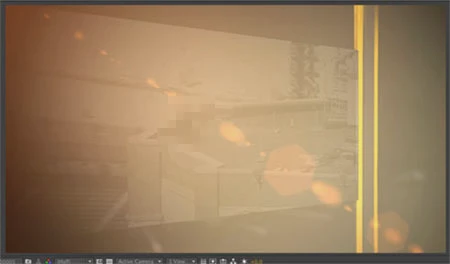
A "ghost" frame from an old movie is stuck in the transparent / checkerboard background.  Always the same movie / frame.   Even in a new comp without any layers this old quicktime movie shows up.  Was a moving movie, this ghost effect is now just a single still frame.   Put one item in the comp and it disappears.  Turn off the eyeball for all of the layers and the ghost image comes back.

Does not show up in final renders .. yet.   Mostly in just (Auto / Half) rez comp viewer previews.

I've tried deleting prefs.    Cleared disk cache.    Cleared Conformed Media Cache.  Restarted the program.    Restarted the computer.      It's been like this for weeks.

Now it has started showing WITH other layers "on".  This is new.   Makes it tough to work.

IT department says they have no idea, that "we'll have to wipe your entire computer" but before going THAT route wanted to see if anyone else has ever had this problem and if they've discovered a solution.

Thanks,

Marc

In these examples below this "rooftop scene" not only isn't supposed to be in the image, it's not even in the AE project file.       

Here it is actually with other layers set to "on" which has never happened before:
    This topic has been closed for replies.
    Correct answer laurentblanchard

    OK I found the problem, it comes from when you display AE on multiple screens. It is rely to specific graphic hardware i guess. As already mentioned above : clear cache AND clear ...AppData\Roaming\Adobe\After Effects files. Have a good one

    23 replies

    Participant
    July 15, 2023

    I am working in AE 2023 (23.5.0) and had this happen, so it's still a problem for some current users.  Purge All Memory and Disk Cache cleared the stuck frame.  Thank you!

    Participant
    January 9, 2022

    I'm using After Effects 2021 and had the same problem for a long time but I found out this simple solution.

    Edit > Purge > image cache memory


    Participant
    September 14, 2021

    It gets weirder. It only seems to happen for me when previewing on Full. (Maybe because I was on Full when the bug first occured?)


    It happened after After Effects had a memory leak and crashed my PC after expanding to 32GB ram usage. It is a baked image of a scene I used in a transition. Which is similar to the OP's situation. Maybe there is some relation?


    A workaround if you can't figure it out, Just work in half res when dealing with transparency.


    I'm also not sure that this bug bakes into rendered videos.

    Participant
    October 15, 2020

    I'got the same problem here, but nothing in this forum actually helped me. The solution I found were deleting an effect CC LENS that was applyied in a shape layer. I found this hiding every layer and trying to export until I realised that was the CC LENS. I still don't know why it didn't worked, not sure if it is my GPU (RADEON 570x) or other thing. The most important is that my problem is now solved!

    pidgepxdge
    Participant
    July 13, 2018

    The same problem is happening for me as well and I'm using CC18! It's been like this for the last few projects and it's honestly really irritating!

    Adobe please try fix this!

    orm1982
    Participant
    January 9, 2020

    Happening to me on a mac with the 2020 version - was going mad with it and wanted to let people know that renaming the linked comp in AE fixed the problem - WTF!

    Inspiring
    April 28, 2018

    Bumping this because I just got a ghost image in a very long project here in CC 2018. Still happening!

    Worth noting the image was of my film subject with Darth Vader. So I really thought I was slipping into an alternate reality or being rightly trolled.

    Here to report that simply using the new (more recent) Purge > everything fixed it 100%. No need to go in and delete any files manually. I watched the ghost image disappear from the frame in question as soon as the purge was complete.

    My guess is that whatever image is being cached when it gets clogged becomes the lucky ghost image. But who cares -- it is definitely about time this went away. At least Purge seems to be working for me. Hope this helps & happy ghost busting!

    dhruvbahri
    Participant
    May 7, 2018

    This happened to me for the first time with this latest patch. Bloody irritating but I think it has something to do with Adobe Dynamic Link. I am stacking a project across Premiere and Afx and this started happening. Also if you use multiple screens at different resolutions or just multiple screens with the wrong hardware it seems to cause issues too. Purging all caches seemed to help me.

    Evil Edison
    Known Participant
    June 12, 2018

    Edit/Purge/Image Cache Memory seems to have fixed the problem for me.

    Participant
    November 10, 2016

    SOLUTION!

    Hi everyone, I have had the same problem and it is sooo frustrating but i found a solution on another forum and have done it and it works! (for me... hopefully i does for you too) It's definitely worth a try.

    please note: i use PC but fix could work on mac too. lmk

    Apparently when you clear your caches it doesn't clear one folder in particular (*.noindex). This folder contains hundereds of folders named 0a, 0b, 0c, 1a, 1b,1c, etc. If you delete everyone of these folders the problem will be fixed! (It will not effect anything on your adobe install or any projects)

    Navigate to here or equivalent on your set up.

    C:\Users\YOURUSERNAME\AppData\Local\Temp\Adobe\After Effects\13.7\Disk Cache - YOURUSERNAME-PC.noindex

    Delete the contents and you should be good to go!

    Really hope this helps

    D*

    Participant
    March 24, 2017

    Thank you very much. I was baffled completely on this one! You saved my project!

    laurentblanchardCorrect answer
    Participant
    November 1, 2016

    OK I found the problem, it comes from when you display AE on multiple screens. It is rely to specific graphic hardware i guess. As already mentioned above : clear cache AND clear ...AppData\Roaming\Adobe\After Effects files. Have a good one

    Roei Tzoref
    Legend
    November 1, 2016

    thanks for the update!

    jacka54402691
    Participant
    October 1, 2016

    I am currently having the same problem, image is stuck and reappears multiple times throughout the animation and stays there even if all the layers are hidden. Also shows up in renders. Need help fixing this ASAP.

    I've already tried clearing cache multiple times, uninstalled and reinstalled with cache clears and CCleaner and Computer restarts inbetween. Nothing fixes it for this project.

    Participant
    October 1, 2016

    My solution that I used above.

    "I've found a temporary solution to be to place a small solid (or anything) outside of the render region (or camera view) but have the layer still span the entire timeline. This somehow acts as a placeholder and makes AE perhaps evaluate the frame / screen even though its blank since the object is outside of the render region / camera view.  This in effect removes the stuck image.  If you have a moving camera, it can be useful to parent your placeholder object to the camera outside of its field of view so that it never gets seen should the camera turn it its direction. "

    jacka54402691
    Participant
    October 1, 2016

    I've tried this with several different objects within after effects and it hasn't worked

    Participant
    September 2, 2016

    We have version 13.8.108 and have the same stuck image problem. Trying prescribed remedies from this thread. HEY ADOBE, your software is broken! I've used AE as part of all my full time jobs since 1996, and never had something like this before. This has persisted for YEARS! !

    Participant
    September 2, 2016

    Thanks to Dipsacus​, the problem has stopped for now.

    Deleted the files here: C:\Users\YourNameHere\AppData\Roaming\Adobe\After Effects

    This killed the current display settings, dual screen, but that was not a big deal.

    Thanks.

    P.S. Adobe- you're still on the hook for this one!

    Roei Tzoref
    Legend
    September 2, 2016

    it could be just a corrupted preferences file. ctrl+alt+shift+launch app will replace the prefs.txt file with a new one in the folder you mentioned. in my experiance, resetting the preferences (and deleting cache in the preferences) is the one of the first things you should try before going bananas from what appears to be a bug.