

Phi.Def
Inspiring
February 27, 2022
Answered

"This project contains expression errors" but no apparent error!

  • February 27, 2022
  • 3 replies
  • 6102 views

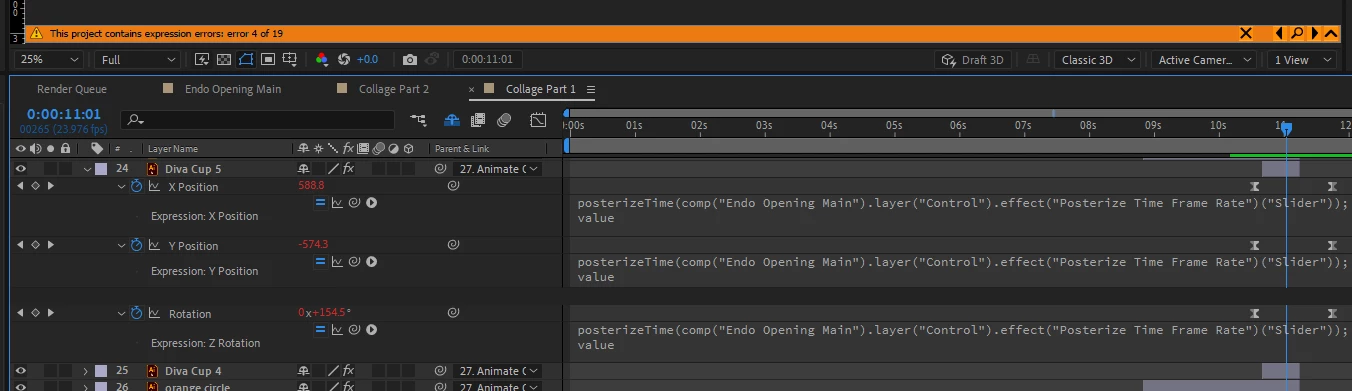
See photo: I made a change to my comp, and got the expression errors warning. But when I click on the magnifying glass for any of the 19 errors, the expressions that get revealed in the timeline panel seem fine. No yellow triangles with exclamation marks indicating an error, and the expressions seem to be working fine.


What's up with that?
 

This topic has been closed for replies.
Correct answer Rick Gerard

The expression error will not prevent the project from rendering. If you don't what to see it make the layer with the error 3D, delete the expression, then make it 2D again.


You just have an endless loop of errors created by removing the Z-axis when changing layers. It's more of an annoyance than a bug.

3 replies

Phi.Def
Phi.DefAuthor
Inspiring
February 28, 2022

This must be a bug.


As a test, I created a fresh new project and a new comp. In the comp I added two solids. I made the solids 3D layers, and pickwhipped the Z position of one solid to the Z position of the other solid (see screenshot 1).


Then I turned off the 3D layer switch for both layers and am now getting an expression error warning (see screenshot 2).


Phi.Def
Phi.DefAuthor
Inspiring
March 4, 2022

Does anyone have any input on this? I'm in the middle of  big project and I can't get the warning banner to go away and so I'm not getting legit warnings in the case of a real broken expression.

Attached is a project file (containing only two solids and a single comp) demonstrating this issue.

Rick GerardCommunity ExpertCorrect answer
Community Expert
March 4, 2022

The expression error will not prevent the project from rendering. If you don't what to see it make the layer with the error 3D, delete the expression, then make it 2D again.


You just have an endless loop of errors created by removing the Z-axis when changing layers. It's more of an annoyance than a bug.

Mylenium
Legend
February 28, 2022

That behavior would likely indicate that some of your stuff is generating odd values somewhere halfway through. Similarly it could be that there is a duplicate reference somewhere if you did not properly rename layers, comps and controls when duplicating stuff. Without any info about the exact setup of your project and the expressions usd nobody can give you a definitive answer, though, assuming there's more than the posterizeTime() stuff shown iun your clipped image.


Mylenium

Phi.Def
Phi.DefAuthor
Inspiring
February 28, 2022

Here is a screenshot showing that the error warning is saying there's an error on a property ('Z Position') that doesn't exist.

Community Expert
February 28, 2022

Select all layers and press the 'e' key twice. Somewhere you should see a yellow triangle next to the property with an expression. There must be more expressions somewhere.


You could also have expression errors in nested comps. Clicking on the ^ should expand the warning banner and reveal the name of the layer and problem property. Clicking the magnifying glass should take you to the problem expression.


This is all explained in the User Guide.

Phi.Def
Phi.DefAuthor
Inspiring
February 28, 2022

I twirled down the warning banner, and found more info (see screenshot). It looks like it's saying that the expression errors are on properties that no longer exist. Specifically, I had a comp full of 3D layers with separated dimensions, and expressions on the Z positions. Then I made them all 2D layers, so the Z positions are all gone. This is where the warning is saying the expression errors are.

By the way, saying "this is all explained in the user guide" is pretty condesending. I'm here because I actually have a problem, not because I'm an idiot that doesn't try to do research before asking a question.


Phi.Def
Phi.DefAuthor
Inspiring
February 28, 2022

Open the Comp "Collage Part 1", select Layer 4, press the 'e' key twice to reveal the expressions, copy the full Expression and paste it to the forum so we can see what it says. I suspect a typo in a variable that points to another property or some missing or incorrect punctuation. Clicking on the magnifying glass should take you directly to the problem expression.


Try not to be offended if someone suggests a place to look to find more information on the UI. Artists need thick skins.


I've been working on it, so that particular layer is now 12. I've twirled down ALL properties of the layer and fully expanded the expression field for the only expression on the layer. As you can see in the screenshot, there's no yellow triangle with an exclamation mark next to it. And the warning (also shown in the screenshot, says the expression error is on the 'Z Position', and the layer doesn't have a Z position property.

The expression code for the only expression on that layer is as follows:


posterizeTime(comp("Endo Opening Main").layer("Control").effect("Posterize Time Frame Rate")("Slider"));
value


The "Posterise Time Frame Rate" slider referred to by that expression exists and this expression is working fine.