


- Home
- After Effects
- Discussions
- Re: RAM Preview – Not in real-time
- Re: RAM Preview – Not in real-time

Copy link to clipboard
Copied
Hello.
I'm having a hard time dealing with this new Preview in AE. A lot of times it is not giving me a real-time playback.
It is nice to have the preview continuously playing while making some changes on the comp, but sometimes I would like to have a real-time preview, like the old RAM preview.
Is it possible to generate a real-time RAM preview? I don't mind waiting for AE to render before playing back the animation.
I have tried the Numpad 0 and also spacebar. I've tried to purge all, restart machine, etc...
Thanks in advance.
Best,
Andre Arruda
After Effects 2015.3 (13.8.0.144)
Mac Pro (Late 2013)
3.5 GHz 6-Core Intel Xeon E5
64 GB 1866 MHz DDR3 ECC


 1 Correct answer
Changing the monitor to 60Hz solved the problem here =]

 85
Replies
85
85
Replies
85


Copy link to clipboard
Copied
That is so wierd! It did work for me though but how can that be an issue if its stacked or not?
Anyway thanks a lot!


Copy link to clipboard
Copied
PerryPride wrote:
That is so wierd! It did work for me though but how can that be an issue if its stacked or not?
Here's a simplified answer: Mac 10.11 changed how redraw rectangles are calculated when they intersect the region at the bottom of the application window between the rounded corners, which forced After Effects to invalidate how it was re-drawing the timeline and then draw a much bigger region than expected, which slowed down the refresh rate during previews. So, doing odd things with the UI fixes it in some cases (like docking a panel underneath.)
Hopefully a proper fix from Adobe comes so workarounds like this aren't needed.

Copy link to clipboard
Copied
What about the Windows version? Still the same Preview Issues here, also with CC 2017!
Copy link to clipboard
Copied
Bernhard Naether wrote:
What about the Windows version? Still the same Preview Issues here, also with CC 2017!
If you are having issues with this on Windows, it may be similar symptoms, but it's an entirely different cause. I've heard only one or two other people on Windows with a similar issue. You should create a new thread (since it's a different problem) and share as much information as you can about your system. It's a very rare problem, so it's probably going to require a good bit of troubleshooting to find the cause.

Copy link to clipboard
Copied
2021 here, using AE 2022... still an issue... Can't believe I am able to preview with that trick. It is just so basic. Like Illustrator exporting JPG with proper metadata so AE can read them 😵💫 😵💫 basic things. They should rise the salary of those coders.

Copy link to clipboard
Copied
oh my god you are a legend!
I tried everything nothuing worked but this actually did!
THANKS!!

Copy link to clipboard
Copied
On Windows it doesn't work
Copy link to clipboard
Copied
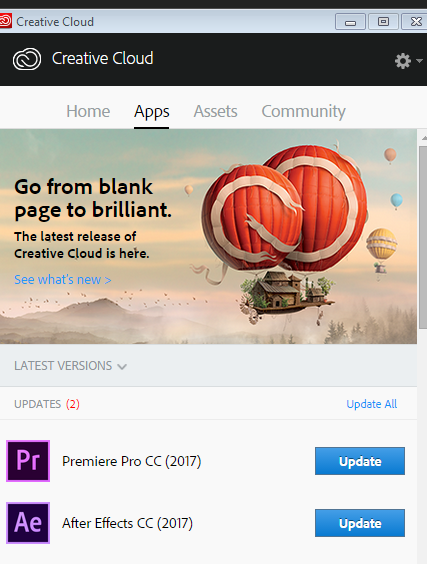
Everybody who is having this issue, please install the latest update that came out last night: After Effects CC (November 2017) Bug-Fix Update Is Now Available
This update is 14.0.1 and should be a bug fix for this and several other disturbing issues - especially for Mac users. It does not fix all the bugs that are new with the CC 2017 release (Known issues in After Effects CC 2017), but it does fix some issues that have been plaguing After Effects since the first parts of the new architecture showed up in the CC 2015 release.
If you can't see the update yet, you may need to wait a while until you see it as it can take up to 24 hours to populate an update across all the data centers. You may need to log out, relaunch the Creative Cloud app, and log in again.
HUZZAH!

Copy link to clipboard
Copied
just updated it, tried on one project, I think it's fixed now.
thanks adobe.

Copy link to clipboard
Copied
Preview is — no one wants to edit footage in real time. BRING BACK RAM PREVIEW! I have the same problem as thousands of after effects users audio glitching during "Preview" then when it plays the audio it is actually out of sync, preview is never at frame rate, highly frustrating if you use any sort of audio with visual effects, or actually want to preview your work without having to pre render. I am running a mac pro 2015, and this software is just a load of B. I have been using after effects for over 5 years and didn't install the 2015 when they switched to "preview" as to me it seems ridiculous. After effects cc ran better on my 2012 mac book pro than this does on my 2015 mac pro! The "RAM Preview" renders the frames first so then you are assured a smooth playback whatever ram you have installed, now there is no option for ram preview so the use of this program is pointless. Does anyone know how to re-download CC2014 as now in my adobe account I can only access cc2015 which has the same render process as this. Adobe sort it out.
Moderator note: Please refrain from using profanity.
Copy link to clipboard
Copied
I have paid more for adobe CC than I would if i bought the adobe package back when it was CS6, and now you screw over hardworking people who use your software daily so that you can try and make it cooler! Do everyone favour and test this on multiple machines with multiple different graphics cards before launching the update!!!! Thinking that everyone who uses after effects has a top spec desktop. No one I know who uses this software is happy with cc2015 or now cc2017 "preview" function, yet again you have forgotten about the general user. Please Adobe do some customer research before you bring out a product, ask consumers before you alienate yourself from the market
Copy link to clipboard
Copied
Maybe it's a stupid question from my side but have you checked the "Cache Before Playback" box in the Preview window?
With that option checked it works fine on my late 2015 iMac since the update last night.
Copy link to clipboard
Copied
PerryPride wrote:
Maybe it's a stupid question from my side but have you checked the "Cache Before Playback" box in the Preview window?
With that option checked it works fine on my late 2015 iMac since the update last night.
I don't think it's a stupid question. Because he is asking for exactly this.

Copy link to clipboard
Copied
even with the update the ram preview is not as reliable as it used to be, i hate it.
this is classical adobe, they just add little changes to make the software looks cool, but they dont improve it. they should learn from maxon.

Copy link to clipboard
Copied
BRING BACK RAM PREVIEW!
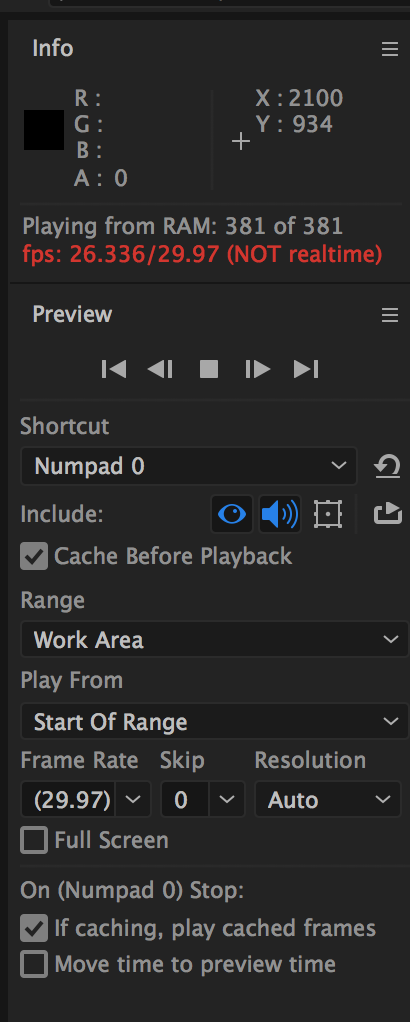
you can have the old behaviour of RAM Preview by simply setting up your preview settings like this:

let's take a closer look at this option:

this is exactly how RAM Preview worked. some Mac systems had playback problems even with this checked on since 2015. I cannot imagine how frustrating it is. I am a windows user and my experience is a better and better playback with every version. the latest 14.0.1 update will hopefully put an end to these problems.
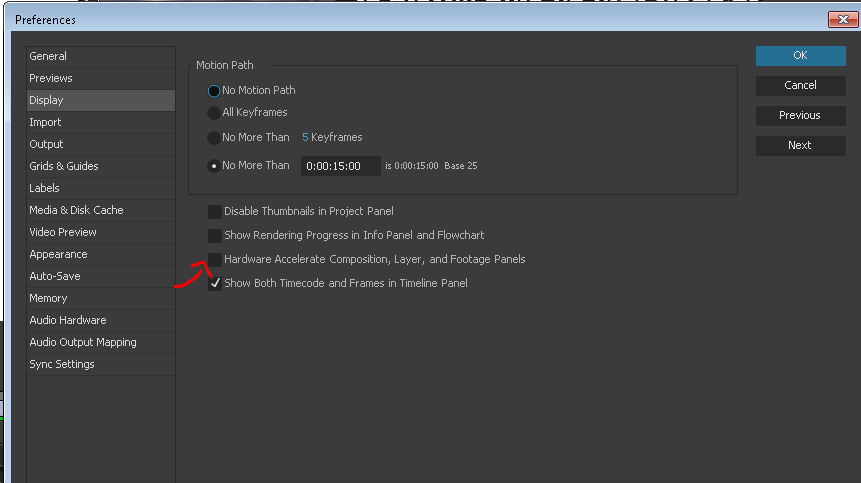
another thing to check: in my system in this version of CC2017 and in CC2015.3, it appears that hardware acceleration checked on is NOT good for my playback with audio. so I check it off:
Copy link to clipboard
Copied
I just updated my After Effects but it is still not giving me real-time preview, annoying!!
Any thoughts or ideas?
Copy link to clipboard
Copied
papanapa wrote:
I just updated my After Effects but it is still not giving me real-time preview, annoying!!
Any thoughts or ideas?
What version number of your OS are you running?
What exact version number of AE have you updated to?
Copy link to clipboard
Copied
MacOS 10.12.3
After Effects 14.1.0.57
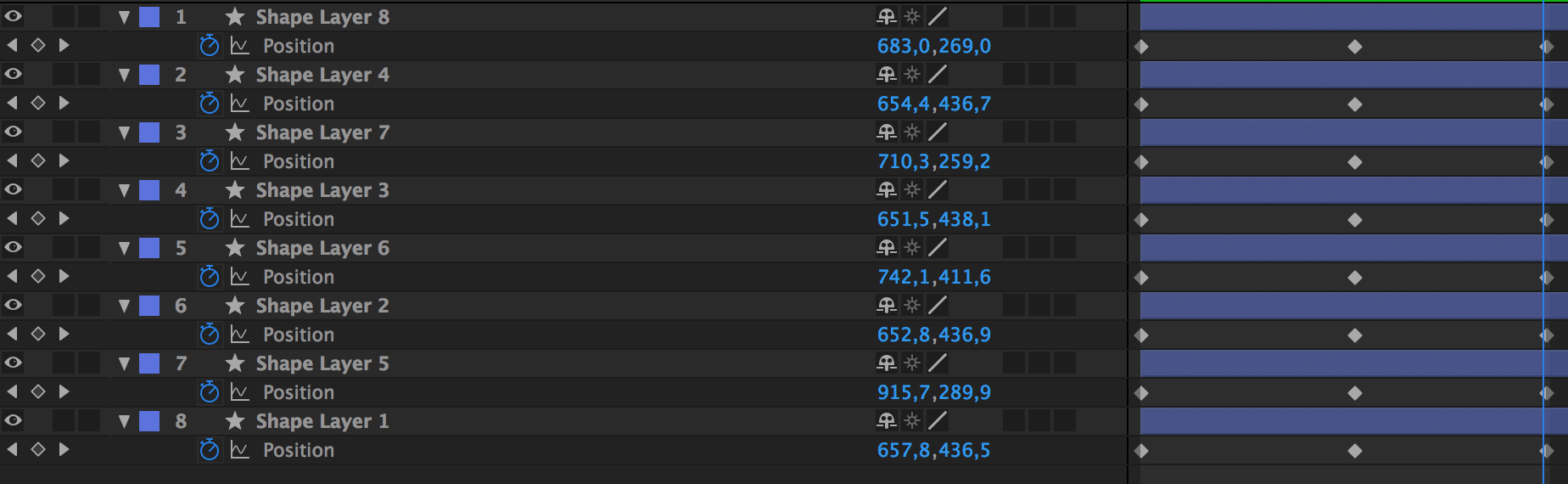
Just as an example, I've just created a simple FullHD 8 layers shape animation on position and it does not give me real-time preview.
After the 3rd loop on the preview it started to run on 29.97fps. But if I stop the preview and press 0 again, without any changes, it won't play real-time preview on the first playback.
My monitor (Samsung 4k) is running on 30Hz, even though the Mac Pro and the monitor both support 60Hz. Could that be an issue?
Mac Pro (Late 2013)
3.5 GHz 6-Core Intel Xeon E5
64 GB 1866 MHz DDR3 ECC
Monitor Samsung 28" 4k - U28D590
Plugged with the HDMI cable provided with the monitor, directly into the HDMI port on the MacPro.
Copy link to clipboard
Copied
papanapa wrote:
My monitor (Samsung 4k) is running on 30Hz, even though the Mac Pro and the monitor both support 60Hz. Could that be an issue?
Possibly. Your scene description should DEFINITELY have no problem playing back in real time, so something is amiss and that would be the first thing I'd troubleshoot if I were in your position.

Copy link to clipboard
Copied
After effects is telling me it IS playing back in real time, but that definitely isn't the case. The image stutters along at 15 FPS (a guess). Any ideas?
Copy link to clipboard
Copied
Changing the monitor to 60Hz solved the problem here =]

Copy link to clipboard
Copied
This does not fix it and makes no sense.

Copy link to clipboard
Copied
OMG! YOU SAVED MY LIFE THANK YOU SO MUCH

Copy link to clipboard
Copied
I can not believe that worked! And I don't understand why but it worked great. 30 frame timeline. I had my monitor set to 24Hz and it would not play the previews smoothly on an M1 Ultra, etc. switching to 30Hz and smooth as silk!

Copy link to clipboard
Copied
Hello, this is the end of 2017 and I have all updates on Ae CC 2017 MacOS 10.12.6
and I still have this issue on 59,94 fps 1080p composition. The cached area doesn't playback properly and this is very annoying! because it's not obvious at first look and happens from time to time. You just can't get expected result (no matter preview resolution down factor) and the same time you can't understand is this animation timing or playback that is not synchronized. I've tried all the tricks in the thread. Bigger work-areas works slower. I can't believe that this is not a joke to get in a situation when you simply can't finalize the urgent project because of this little annoying bug.


Find more inspiration, events, and resources on the new Adobe Community
Explore Now
 AdChoices