
Participant
July 18, 2020
Answered

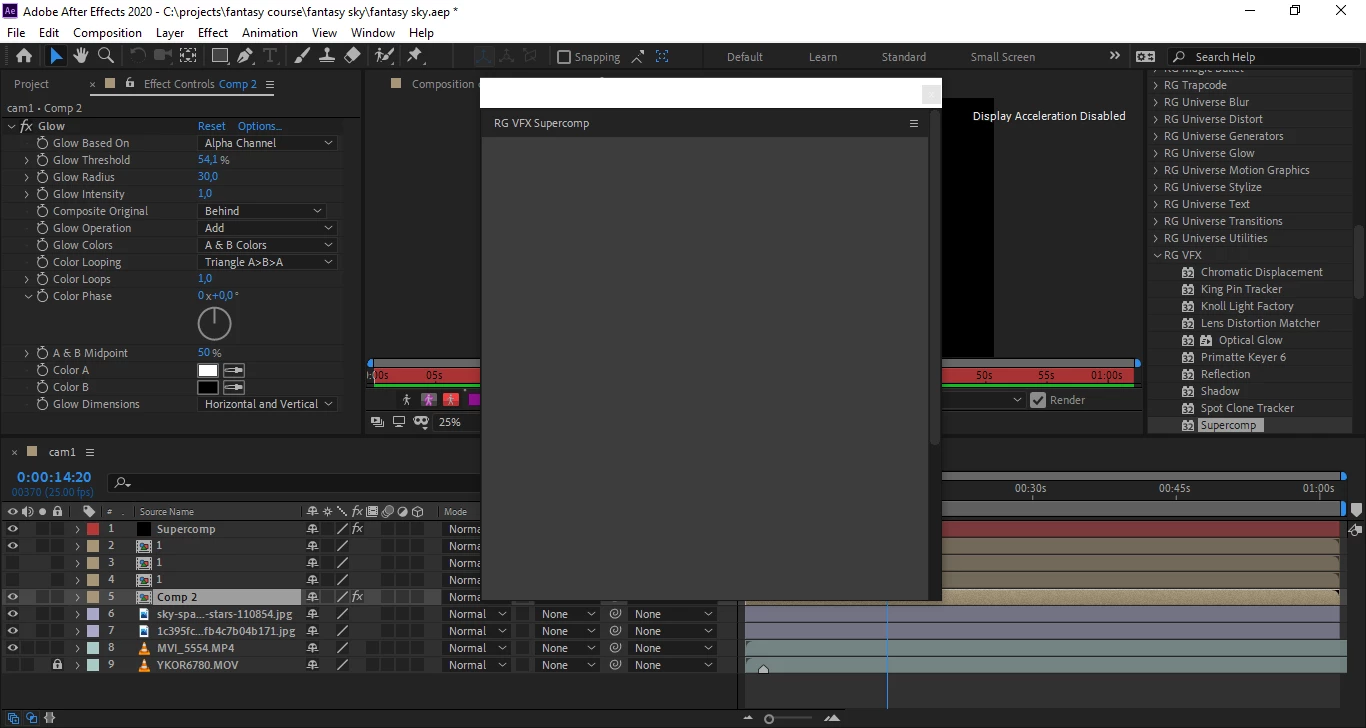
Redgiant supercomp panel is empty.

  • July 18, 2020
  • 7 replies
  • 5258 views

I apply supercomp effect on different layers but supercomp control panel is empty. I have reinstalled AE and Redgiant VFX Suite for several times already, but nothing changes. Other VFX Suite plugins work fine i guess. Does anyone else faced similar problem? 
Alex

This topic has been closed for replies.
Correct answer Kevin Kem

This may not work for everyone, but I had a similar problem.  I also have the Red Giant Universe panel preset, but once I closed that panel, Supercomp began working as expected.


7 replies

Kevin KemCorrect answer
Participant
June 25, 2023

This may not work for everyone, but I had a similar problem.  I also have the Red Giant Universe panel preset, but once I closed that panel, Supercomp began working as expected.


Participant
March 10, 2022

i was facing same problem, but when i updated my graphic card drivers & updated basic winodows updates, boom, now it works fine.

Participant
October 1, 2021

Guys, uninstall the package and then install it again. Don't update it after, keep it to 1.5 version and everything will work! Also, same goes to magic bullet, in case you had problem with magic bullet looks

Participant
October 13, 2021

I've already tried this once, but when I get to the previous version, it opens, but the effects don't show up in the preview. (in the Supercomp preview that should show the effects and layers, it goes all black) 😿

Participant
July 14, 2021

Had a similar problem.


when you go in AE go into project settings and turn on the gpu (idk if that's how your supposed to say it)


Directions.

File > Project setting (at the bottom of the listing or Ctrl +Atl + Shift + K)

in the video rendering and effects tap switch to gpu acceleration.


the change however doesn't seem permanent you have to change it gpu whenever you open AE


that's how I got mine to work, idk what will work for you but my computer isn't the greatest and maybe it was just an update in their software that allowed it.


If you enjoy the software you really should think about purchasing it, it really is worth the money.


lemme know if it works 

Participant
February 22, 2021

Have the same problem :C if u got a solution pls let me know 

Participant
July 14, 2021

Had a similar problem.


when you go in AE go into project settings and turn on the gpu (idk if that's how your supposed to say it)


Directions.

File > Project setting (at the bottom of the listing or Ctrl +Atl + Shift + K)

in the video rendering and effects tap switch to gpu acceleration.


the change however doesn't seem permanent you have to change it gpu whenever you open AE


that's how I got mine to work, idk what will work for you but my computer isn't the greatest and maybe it was just an update in their software that allowed it.


lemme know if it works 


Known Participant
July 18, 2020

RG + AE + Catilina = disaster

If anyone has a solition at the moment that would be great. Cant deny for my 80 euros a month I'm rather dissapointed.

Community Expert
July 18, 2020

You you may want to check with Red Giant tech support if other effects are behaving normally.

Participant
July 18, 2020

Obvious advice, but I don't have a licensed copy of this product.

Community Expert
July 18, 2020

Then get a licensed copy of the software.