Exit
  • Global community
    • Language:
      • Deutsch
      • English
      • Español
      • Français
      • Português
  • 日本語コミュニティ
  • 한국 커뮤니티
0

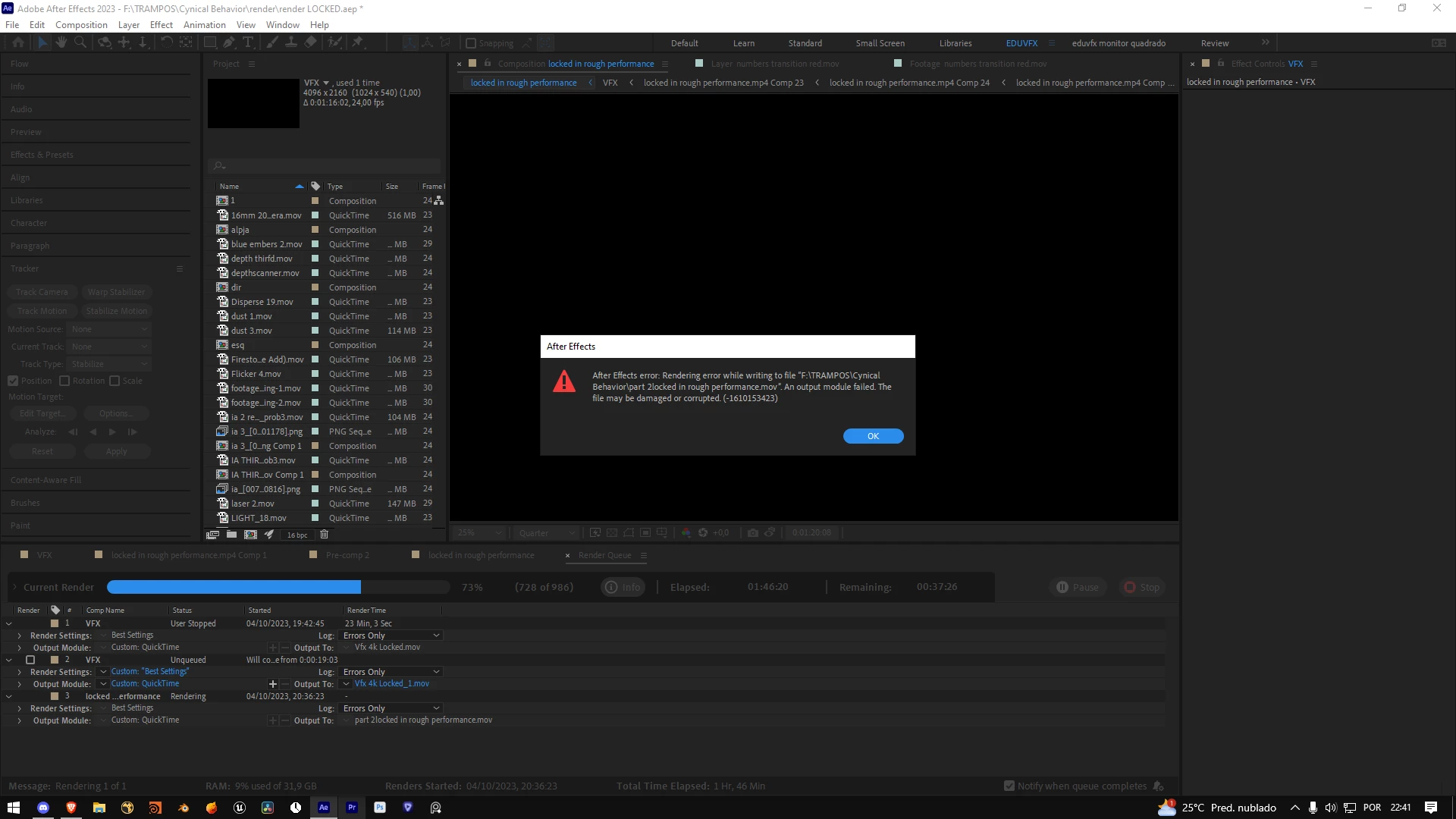
render slow

Community Beginner ,
Oct 04, 2023 Oct 04, 2023

Ana322464353a5y_0-1696470166820.png

In addition to taking a long time, I got this error before completing the render.

TOPICS
Performance
680
Translate
Report
Community guidelines
Be kind and respectful, give credit to the original source of content, and search for duplicates before posting. Learn more
community guidelines

correct answers 1 Correct answer

Adobe Employee , Oct 05, 2023 Oct 05, 2023

Render speed in AE will vary grately based on what is in your comp, color depth (16bpc will be slower than 8bpc), plugins being used, etc. You can turn on the Composition Profiler in the timeline (it's a column) and see how long each frame is taking to render, which layers are slow, and see if you can optimize the rendering time through that information. More info here: https://helpx.adobe.com/after-effects/using/composition-profiler.html


I think if you're on the latest NVIDIA driver that shou

...
Translate

correct answers 1 Pinned Reply

Adobe Employee , Oct 05, 2023 Oct 05, 2023

Do you have enough disk space left on your machine? Can you share your machines specs? Can you create a log file so we can get some info on what's happening in the render? 

Translate
Adobe Employee ,
Oct 05, 2023 Oct 05, 2023

Do you have enough disk space left on your machine? Can you share your machines specs? Can you create a log file so we can get some info on what's happening in the render? 

Translate
Report
Community guidelines
Be kind and respectful, give credit to the original source of content, and search for duplicates before posting. Learn more
community guidelines
Community Beginner ,
Oct 05, 2023 Oct 05, 2023

Captura de tela 2023-09-12 204023.pngcrash log files: https://we.tl/t-Q79Pf0WEDf

Translate
Report
Community guidelines
Be kind and respectful, give credit to the original source of content, and search for duplicates before posting. Learn more
community guidelines
Community Beginner ,
Oct 05, 2023 Oct 05, 2023

I don't know what I can do to improve the processor in terms of rendering because in games, other 3D applications, etc. I don't have any rendering problems or crashes, this only occurs in after effects and premiere

Translate
Report
Community guidelines
Be kind and respectful, give credit to the original source of content, and search for duplicates before posting. Learn more
community guidelines
Adobe Employee ,
Oct 05, 2023 Oct 05, 2023

Thanks for sending the log. Looks like a combination of NVIDIA drivers and Element 3D not working well. Unfortunately AE is just at the mercy of both the driver and the plugin working correctly and it's not. 


Thread 263 Crashed: [16180] THREAD_PRIORITY_NORMAL
0 nvoglv64 0x00007ffbfb6e3565 vk_icdNegotiateLoaderICDInterfaceVersion + 830949
1 nvoglv64 0x00007ffbfb128d6a DrvValidateVersion + 43530
2 nvoglv64 0x00007ffbfb17cdf7 DrvPresentBuffers + 175319
3 nvoglv64 0x00007ffbfb17cfbe DrvPresentBuffers + 175774
4 nvoglv64 0x00007ffbfb292cda DrvPresentBuffers + 1313722
5 nvoglv64 0x00007ffbfb2997ab DrvPresentBuffers + 1341067
6 nvoglv64 0x00007ffbfb21b13b DrvPresentBuffers + 823323
7 nvoglv64 0x00007ffbfadcd5b8 ? Unknown - (Symbols generated from a DLL export table) [ Error:487 Tentativa de acessar endereço inválido. ]
8 nvoglv64 0x00007ffbfad08b99 ? Unknown - (Symbols generated from a DLL export table) [ Error:487 Tentativa de acessar endereço inválido. ]
9 nvoglv64 0x00007ffbfaeb3503 ? Unknown - (Symbols generated from a DLL export table) [ Error:487 Tentativa de acessar endereço inválido. ]
10 nvoglv64 0x00007ffbfaeb3087 ? Unknown - (Symbols generated from a DLL export table) [ Error:487 Tentativa de acessar endereço inválido. ]
11 nvoglv64 0x00007ffbfb12bce8 DrvValidateVersion + 55688
12 KERNEL32 0x00007ffd0cc87344 BaseThreadInitThunk + 20
13 ntdll 0x00007ffd0cec26b1 RtlUserThreadStart + 33


Thread 0: [9992] THREAD_PRIORITY_NORMAL
0 ntdll 0x00007ffd0cf10884 NtWaitForAlertByThreadId + 20
1 ntdll 0x00007ffd0ce99205 RtlAcquireSRWLockExclusive + 357
2 Element 0x00007ffbad872c8d PluginMain + 4306669
3 Element 0x00007ffbad44cb0c ? Unknown - (Symbols generated from a DLL export table) [ Error:487 Tentativa de acessar endereço inválido. ]
4 Element 0x00007ffbad43f68b ? Unknown - (Symbols generated from a DLL export table) [ Error:487 Tentativa de acessar endereço inválido. ]
5 Element 0x00007ffbad455e0b ? Unknown - (Symbols generated from a DLL export table) [ Error:487 Tentativa de acessar endereço inválido. ]
6 Element 0x00007ffbad457620 PluginMain + 128
7 FLT 0x00007ffc3398e399 FLT_IsPluginManagerFeatureEnabled + 14249
8 FLT 0x00007ffc3398fbe8 FLT_IsPluginManagerFeatureEnabled + 20472
9 FLT 0x00007ffc33972c00 FLT_RegisterPseudoEffect + 4192
10 FLT 0x00007ffc339c4d39 FLT_PurgeEffectData + 8921
11 FLT 0x00007ffc339c664a FLT_HandleEvent + 122
12 AfterFXLib 0x00007ffc4085221b CEffects::UpdateInvalidParams + 11787
13 AfterFXLib 0x00007ffc409502cb CComposition::GetMarkerInfoStr + 17243
14 AfterFXLib 0x00007ffc4086ab1d COutlineDir::GetOutlinePano + 40093
15 AfterFXLib 0x00007ffc40847cf2 ae::ShotCutDetection::AnalyzeSelectionWithUserPreferences + 66898
16 AfterFXLib 0x00007ffc408684b7 COutlineDir::GetOutlinePano + 30263
17 AfterFXLib 0x00007ffc403b1f98 CView::DispatchMouseEvent + 488
18 Endless Callstack!

Translate
Report
Community guidelines
Be kind and respectful, give credit to the original source of content, and search for duplicates before posting. Learn more
community guidelines
Community Beginner ,
Oct 05, 2023 Oct 05, 2023

but in this project I did not use the 3d element at any time , minha versao de drivers:studio.png

Translate
Report
Community guidelines
Be kind and respectful, give credit to the original source of content, and search for duplicates before posting. Learn more
community guidelines
Adobe Employee ,
Oct 05, 2023 Oct 05, 2023

The crashing call stack indicates that Element is being used. Go to Effects -> Manage Effects... and then disable Element. Restart AE and see if that helps. 

Translate
Report
Community guidelines
Be kind and respectful, give credit to the original source of content, and search for duplicates before posting. Learn more
community guidelines
Community Beginner ,
Oct 05, 2023 Oct 05, 2023

It looks like I sent the wrong log because this last error did not generate a log. This error is from yesterday and this log is from a while ago.

Translate
Report
Community guidelines
Be kind and respectful, give credit to the original source of content, and search for duplicates before posting. Learn more
community guidelines
Community Beginner ,
Oct 05, 2023 Oct 05, 2023

Ana322464353a5y_0-1696556610888.png

It says here what caused the crash but I still don't know why my renders are so slow, which Nvidia driver do you recommend?

Translate
Report
Community guidelines
Be kind and respectful, give credit to the original source of content, and search for duplicates before posting. Learn more
community guidelines
Adobe Employee ,
Oct 05, 2023 Oct 05, 2023
LATEST

Render speed in AE will vary grately based on what is in your comp, color depth (16bpc will be slower than 8bpc), plugins being used, etc. You can turn on the Composition Profiler in the timeline (it's a column) and see how long each frame is taking to render, which layers are slow, and see if you can optimize the rendering time through that information. More info here: https://helpx.adobe.com/after-effects/using/composition-profiler.html


I think if you're on the latest NVIDIA driver that should be ok. For the plugins that are crashing, I'd recommend seeing if there are upgraded versions you could install, or reach out to plugin developer and see if they help figure out what is causing their plugin to crash.


Translate
Report
Community guidelines
Be kind and respectful, give credit to the original source of content, and search for duplicates before posting. Learn more
community guidelines