
Participating Frequently
April 17, 2018
Question

Render Times are long, think I'm doing something wrong.

  • April 17, 2018
  • 4 replies
  • 743 views

So I have a bit of a problem.

I have a project that I will be using often - the end result of which is here. Illenium - Fractures (feat. Nevve) - YouTube

My problem is that it is taking about 12 hours to render out. I want to cut that down, but don't know how.

Just so you all know how the project is set up - here is a screenshot and I will explain how things work.
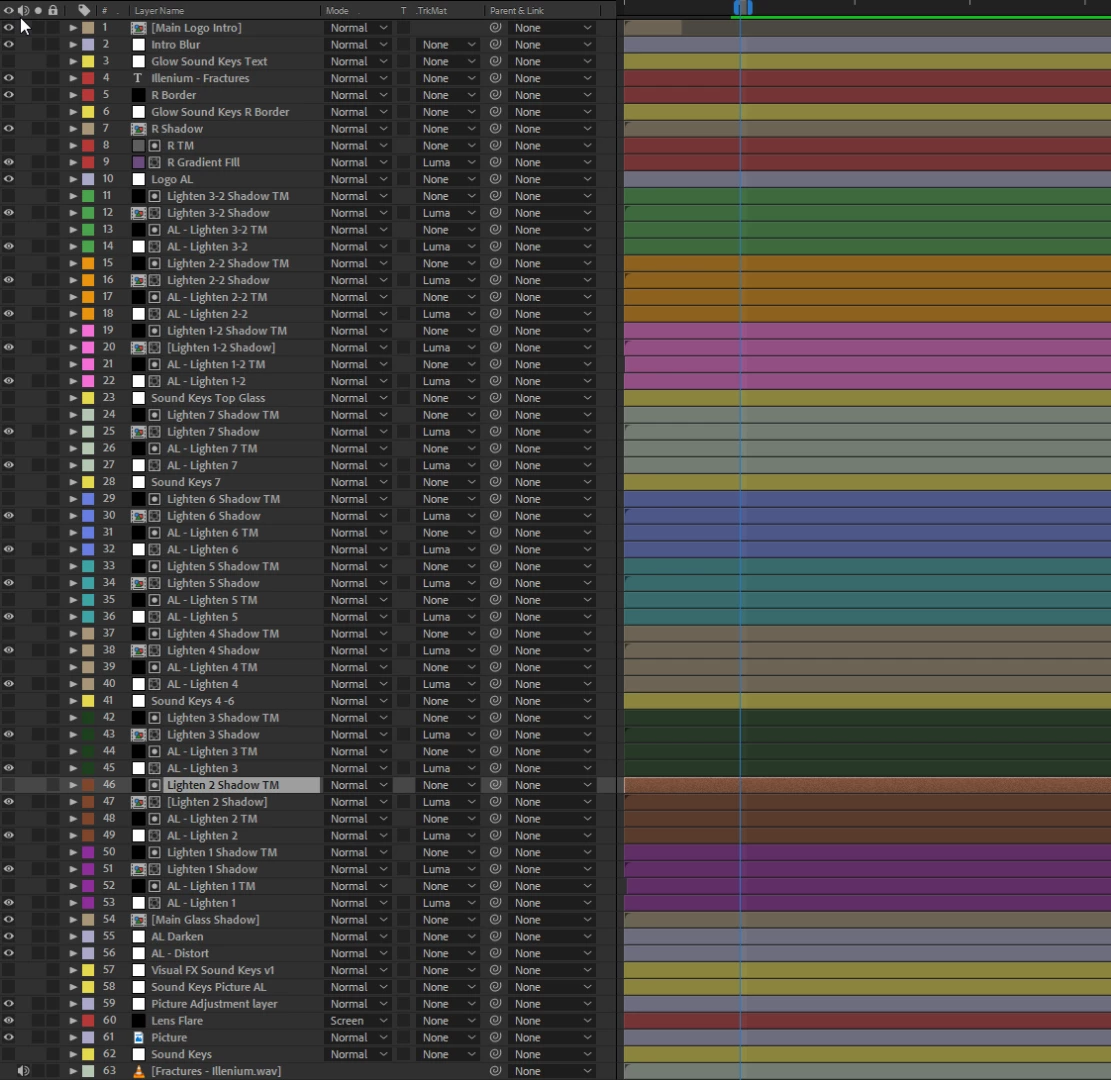
So things start at the bottom.

I have a picture layer that is the base of everything.

Above that I have what you will see as a repeating of 4 layers that are AL - Lighten x, AL - Lighten x TM, then the shadow and Shadow TM.

Those TM's are simply track Mattes the two layers that are visible use via luminescence. The Track Mattes are given gradients that are then adjusted using sound keys to give my overlay its unique audio visualizer. I might add that the Shadows are made up of a shape layer that is just black, then another track matte in the comp to feather it. The lighten layer is an adjustment layer that adds exposure to an underlying layer - AL Darken and AL Distort. These are layers that darken the image behind it and scale it up/blur it, to give the appearance of glass.

That is mainly what takes the most processing.

The rest of the effects when rendered out take only an hour or 2. however all those adjustment layers and track mattes take about 6 to 8 hours to render by themselves.

Also I might add that I render using x264, YouTube 4k preset, maximum render quality checked, to a different hard drive than the project is on. I use Media Encoder CC to export.

My specs - 1800x CPU

1080ti Graphics

16 GB RAM 2400Mhz

M.2 for the project drive

SSD for the export Drive.

All temps are normal and no part of the system is bottle necked while monitoring hardware usage.

This topic has been closed for replies.

4 replies

Participating Frequently
May 30, 2018

Still having problems with this and I have no idea where to turn. I am thinking of scrapping this template and trying to make a new one, but even that may prove unfruitful.

Is there significant problems that would be caused by mass expressions? A lot of different gradients? Those are the only two things I can think of.

Dave_LaRonde
Inspiring
May 30, 2018

An expression will do a lot of evaluating and calculating before it can even begin to start rendering a frame for preview.  The fewer expressions you can use, and the more prerendering you can do, the faster the export will be.  It is that simple.

Roland Kahlenberg
Legend
April 18, 2018

Pre-rendering is not the same as precomping/precomposing.

Very Advanced After Effects Training | Adaptive & Responsive Toolkits | Intelligent Design Assets (IDAs) | MoGraph Design System DEV
Participating Frequently
April 18, 2018

I know, and I have tried both. Thank you for clearing up any misunderstandings going forward however.

When I Pre-Rendered, I Pre-Rendered the overlay, then the effects, then the picture. That brought things down from 11 to 10 hours.

Dave_LaRonde
Inspiring
April 18, 2018

I see you're using quite a few instances of Sound Keys which appear to be driving the glows with blend modes applied over the base picture.  It's going to be tough to isolate them and still get the same visual effect. 

Just as a test, see what happens with just ONE instance of Sound Keys activated.

Participating Frequently
April 18, 2018

Tested just one instance of Sound Keys, render time stayed the same. Which is interesting because it is driving ALL of the animation other than the picture itself moving.

As for Pre rendering sections. I don't think that will work because this is a template for many many music videos, and the animtions for litterally everything change from track to track.

I tried using set matte on the sets of 4 layers so that I could trim down on some layers being rendered. However things get weird.

With Set Matte I get this kind of effect on the first audio bar when it is set to the same luma tracking as the regular track matte.

Here is a look at the gradient that is being used to power it.

Which makes no sense in my eyes. It should be the same as the other tracking where anything in white shows the layer, anything in black makes the layer transparent.

Instead it is just showing anything in black on the Tracking layer as well black.

Here is a picture of how it should work.

And another of the gradient of the tracking layer - this is being used with the track matte effect, not the set matte. It is set to Luma Tracking

Roland Kahlenberg
Legend
April 18, 2018

It's hard to tell what's going on from what you've shown. Have you tried enabling Set Matte's Premultiply Matte Layer option? As for pre-rendering, I suggest you take a re-look. I've never seen a case where nothing can be pre-rendered. There must be a set/group of layers that can be pre-rendered — ever pre-rendering single layers with effects on them can help, exponentially, towards speeding up the final render.

And take a look at RenderGarden to speed up your AE renders.

Very Advanced After Effects Training | Adaptive & Responsive Toolkits | Intelligent Design Assets (IDAs) | MoGraph Design System DEV
Roland Kahlenberg
Legend
April 18, 2018

Look at sections where you can pre-render to a high-quality movie which will be used in the final render.

Relatedly, if you have identical layers being used as mattes, then pre-render these too. Then, look into using Set Matte instead of Track Mattes. This results in a leaner Timeline and makes for planning and changing stuff much easier.

Very Advanced After Effects Training | Adaptive & Responsive Toolkits | Intelligent Design Assets (IDAs) | MoGraph Design System DEV