

Austin James Piedra
Known Participant
November 1, 2018
Question

Rendered Colors Do Not Match Composition Preview

  • November 1, 2018
  • 2 replies
  • 1523 views

I've been trying to render out a series of shots and have been running into this issue with every one. Within After Effects CC 2019, my composition looks fine, but once the shot is rendered, it looks as though the blending mode changes (either set to Add or Classic Color Dodge). This seems like a color space issue but I have no idea how to approach solving it.
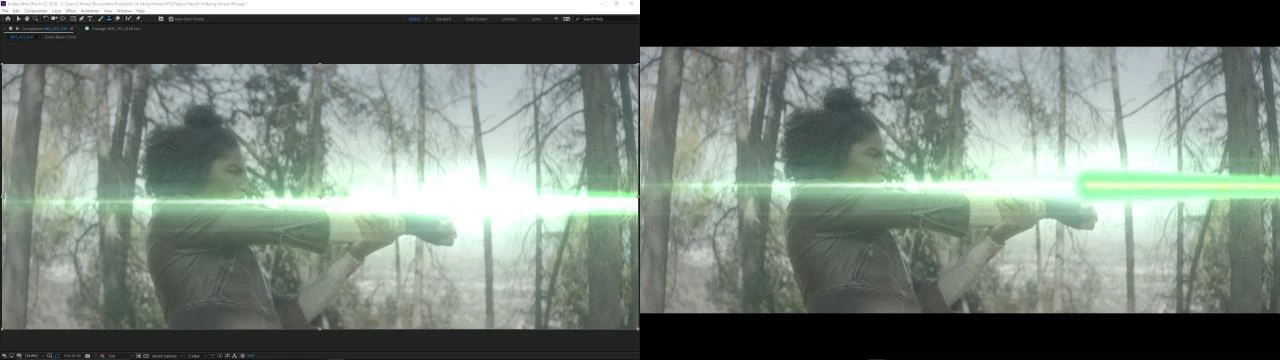
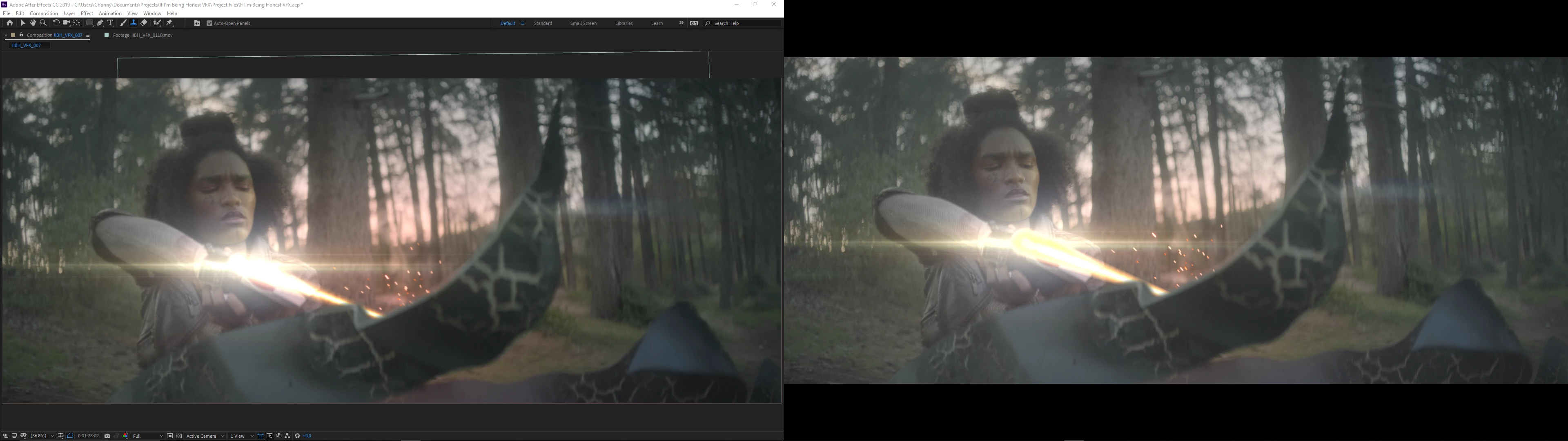
The footage is all 2592x2160 Quicktime Movs and the project itself is the same, 32 bpc. These shots were rendered in Media Encoder to H.264, Match Source, Maximum Depth and Render Quality, CBR 480, and a Key Frame Distance of 1.

This topic has been closed for replies.

2 replies

Inspiring
January 12, 2021

The same always happens to me in AE 2021 under Win10 and I rarely use more than 8bpc.

Dave_LaRonde
Inspiring
November 1, 2018

What happens if you change the project to 8 bpc?  H.264 is only 8-bit.

Austin James Piedra
Known Participant
November 2, 2018

Switching the Project to 8 bpc in After Effects and rendering the compositions in Media Encoder didn't change anything.Still getting the same weird result.

Austin James Piedra
Known Participant
November 2, 2018

Even weirder, I tried the same thing on the yellow beam composition and it fixed the problem. All I did was change the Bpc for both comps.