
Resize & reposition text layer, based on multiple layers position
I'm in the middle of creating a script/process, where I press a few buttons, and AE creates a fully working typography video based on a video file, and the transcription of the video.
Within this process, all words transcription are split up into seperate layers, with in and out points matching the word duration, based on markers that were applied via text analysis in a separate scriptlet. The scriptlet I've written (with the help of my seasoned, programmer father. He'd kill me if I didn't give him any credit, ha!), creates a new text layer for every word, and sets the in and out points to the duration of that word, unless the words are spoken very close together (within 6 frames), then it sets the outPoints to "phraseEnd" outPoint. It's not perfect yet. Bit confusing, pic below may make sense of it.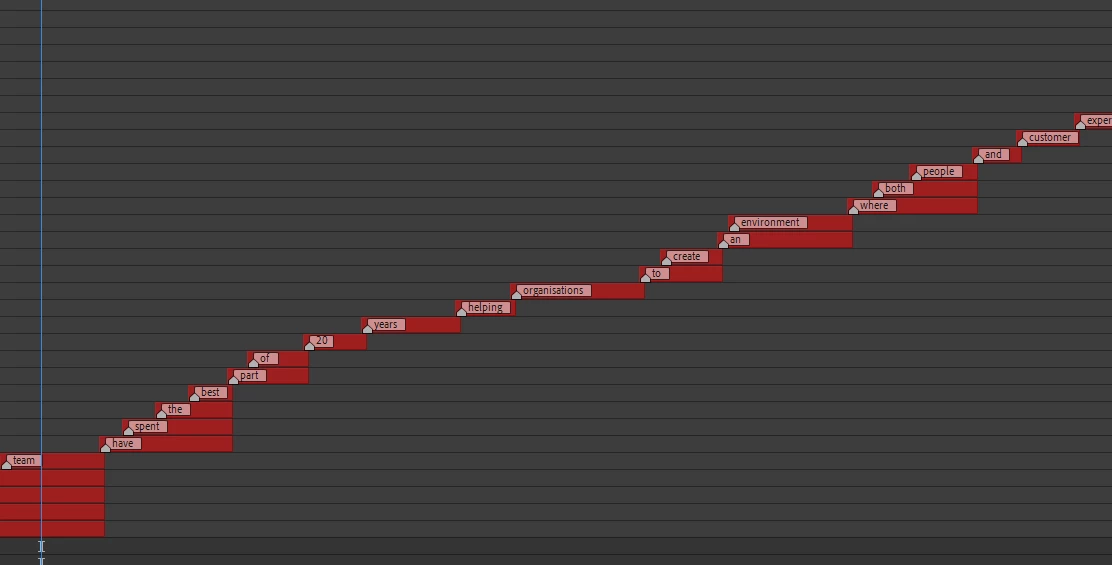
I have expressions set on each layer to check if the word is part of a "phrase", and dynamically position the layers below each other, and scale them up or down so they match their previous word (another pic below).

My issue comes when there are too many words in one phrase, and some of the words are below the bottom of the comp. So i've looped through all of the layers, and found the "layerEndPhrase" layer and "layerEndPhraseBottomLeft". But I have no idea what to do with this information. I'm just not sure of the calculations and values that I need in order to create an expression like this.
If the layers after the start of the phrase are determining the layer at the end of the phrase, then I cant reference "layerEndPhraseBottomLeft" as it will change depending on where the first word in the phrase is, is that correct?
Does anyone have any ideas as to how I could do this?
Pretty new to all of this so excuse any rookie mistakes.
Here's my current code:
On position:
layerBelow = thisComp.layer(index+1);


if (thisLayer.outPoint <= layerBelow.outPoint)

{

layerBelowBottomLeft = layerBelow.effect("Source HUD")("Bottom Left");

layerBelowWidth = layerBelow.effect("Source HUD")("Box Width");

thisLayerWidth = effect("Source HUD")("Box Width");

thisLayerHeight = effect("Source HUD")("Box Height");

newPosition = [layerBelowBottomLeft[0]+(thisLayerWidth/2),layerBelowBottomLeft[1] + thisLayerHeight + 15];

}

else

{

l = thisLayer.index;

while( l <= thisComp.numLayers && thisComp.layer(l).outPoint == thisComp.layer(l-1).outPoint)

{

l--;

}

layerEndPhrase = thisComp.layer(l);

layerEndPhraseBottomLeft = layerEndPhrase.effect("Source HUD")("Bottom Left");

}
On scale:
try{

layerBelow = thisComp.layer(index+1);

if (thisLayer.outPoint <= layerBelow.outPoint)

{

layerBelowBottomLeft = layerBelow.effect("Source HUD")("Bottom Left");

layerBelowWidth = layerBelow.effect("Source HUD")("Box Width");

thisLayerWidth = effect("Source HUD")("Box Width");

oldValue = thisLayer.sourceRectAtTime(0).width;

newValue = (layerBelowWidth/oldValue)*100;

[newValue,newValue]

}

else

{

[value[0],value[1]]

}

}

catch(err) {value}
 AdChoices