

AntDX316
Inspiring
December 3, 2021
Answered

RGB + Alpha doesn't show unless you switch out the Format then back again.

  • December 3, 2021
  • 6 replies
  • 213647 views

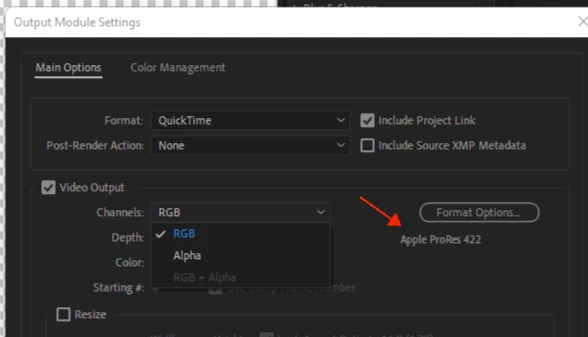
Look at the photos from 1 then 2 then 3.  RGB + Alpha is greyed out unless I go to something else like AIFF then back to RGB + Alpha.  Why does it matter?  Because I cannot have the transparent background and use whatever I have w/ no background as an "overlay" which is the Whole point of this the AE project in the first place.

Correct answer Andrew Yoole

In Image 1 you have the output format set as Quicktime ProRes 422.  Quicktime ProRes 422 doesn't support alpha channels.  That's why its greyed out.


I'm assuming that after you switch the output format to AIFF, you then switch back to a format that does support alpha channels, such as Quicktime ProRes 4444.  Perhaps you're using a preset or Output Module to switch back, but I can't tell from your Image 3 because you've cropped that out.

6 replies

Participant
October 7, 2022

In Germany we say: "Bruder, ich küss doch dein Auge!"

Participant
August 7, 2022

Really helpful thank you! 

Participant
July 18, 2022

It really helped me, thanks mate !

AntDX316
AntDX316Author
Inspiring
December 3, 2021

Format Options to Animations is the way

Warren Heaton
Community Expert
Community Expert
December 3, 2021

Good reminder about Animation.  Apple ProRes 4444 with Alpha is the modern equivalent, but there are systems/workflows in use that will only accept the Animation CODEC.  If the rendered file is going to a system that requires Animation, then of course go with that; however, it's a good time to start using Apple ProRes 4444 instead if someone hasn't been using it already.


Animation has been the default for the Lossless with Alpha Output Module Template for a very long time and prior to becoming a legacy CODEC was very well suited for it.


The current version of After Effects has switched to ProRes for the High Quality templates, including when there's an alpha.


AntDX316
AntDX316Author
Inspiring
December 3, 2021

422 makes it harder to do playback on VLC but 444 works it's just the file size is at least 2x bigger.  Could imagine it's like trying to decode H.265 vs H.264.  Perhaps it runs better on the Apple M1 than it does on the Ryzen 5950X.

Warren Heaton
Community Expert
Community Expert
December 3, 2021

The CODEC selected under Format Options... needs to support RGB+Alpha.  This applies to any Format/CODEC combination in AE.   


Right now you're set to Apple ProRes 422 which support RGB or Alpha, but not both.


Click Format Options... and change the CODEC to Apple ProRes 4444 which supports RGB+Alpha.


AntDX316
AntDX316Author
Inspiring
December 3, 2021

It defaults to that, I don't want it to "default" to that!

Warren Heaton
Community Expert
Community Expert
December 3, 2021

You don't have to use Apple ProRes 4444, but you do need to pick format settings that support an Alpha Channel.  After Effects can't magically put an Alpha in a format that doesn't support it.


That said, sometimes we need an alpha and also need to render to formats that don't support one.  If that's the case, choose Edit > Add Output Module after you've added the Comp to the Render Queue.  Set the first Output Module as the RGB pass and the second as the Alpha Only pass.  It's common to name the Alpha pass exactly the same as the RGB pass with "_matte" added at the end of the filename.  In video editing, the Alpha Only version is sometimes called a "Hold Out Matte".

Andrew Yoole
Andrew YooleCorrect answer
Inspiring
December 3, 2021

In Image 1 you have the output format set as Quicktime ProRes 422.  Quicktime ProRes 422 doesn't support alpha channels.  That's why its greyed out.


I'm assuming that after you switch the output format to AIFF, you then switch back to a format that does support alpha channels, such as Quicktime ProRes 4444.  Perhaps you're using a preset or Output Module to switch back, but I can't tell from your Image 3 because you've cropped that out.

Participant
May 25, 2022

I'm stuck since 2 week thanks a lot !!!