
Participant
October 15, 2017
Answered

ROTO BRUSH TOOL doesn't work

  • October 15, 2017
  • 8 replies
  • 81916 views

Hello, I want to use roto brush tool, but it doesn't work. When I choose roto brush tool and start selecting what I want, the whole video border turns purple, meaning the whole image is selected. I don't know what I need to do, to just select what I want.

Any suggestions?
Correct answer Rick Gerard

As a start, try working at 100% zoom and full resolution. This may merely be an issue with the effect operating on the reduced res.

Mylenium


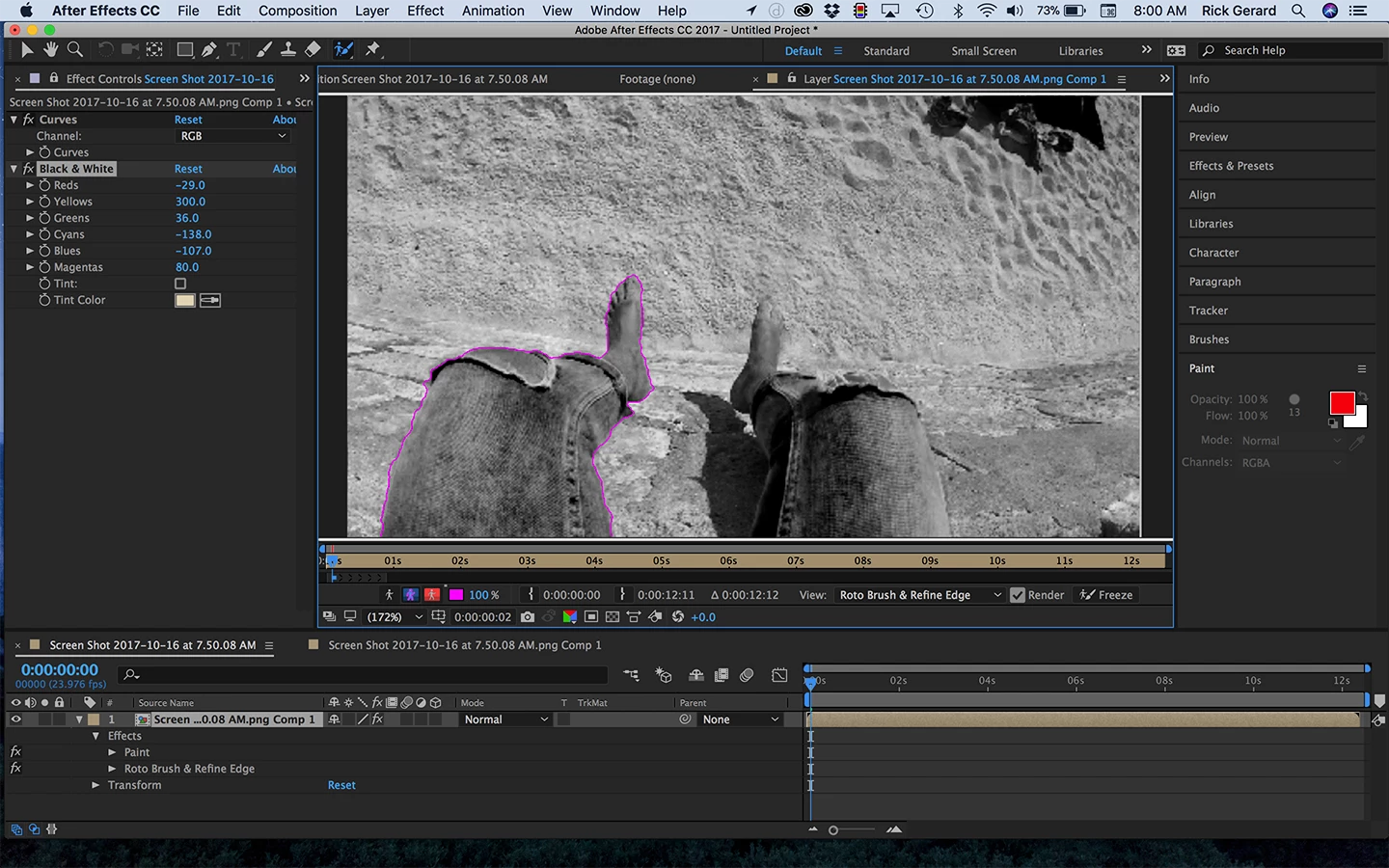
So I took a screenshot of your screenshot and as I suspected there are very few contrast and color differences in your footage for Rotobrush to work with. I didn't get the entire frame but when I tried to mask out the left leg there was so much of the image selected using the default Rotobrush settings that I could tell that Rotobrush would have a very hard time finding edges. The solution is to do some color correcting before you try and use Rotobrush. My first choice was to add Black and White and really jack the values around. It became much easier to cut out the left leg. When you have the roto completed, propagated and frozen, then you can turn off the color correction or just delete it. I hope this helps.

8 replies

Participant
August 9, 2025

Roto brush in editing time like this correctly working

 
2.09 MB of 4.56 MB
But render like this how to fix this
1.92 MB of 3.17 MB
Participant
April 3, 2025

I was messing with the frame rates and nothing was working, but, I realized when I tried to link AE comp to premiere that I sped up my 120fps clip, it didn't like that so when I slowed it back to 100% (regular speed) then the rotobrush worked again!

Participant
May 5, 2023

I have gone through every solution that has been provided, but yet my Rotobrush still wont work.

Participant
August 24, 2023

Same, i don't know what to do honestly.

Participant
February 28, 2022

Use AE 2020 or uper version.

Participant
May 20, 2022

Yeah, I ues AE 2020, But I have the same issue. And I can't solve my problem with the approaches above

Participant
November 22, 2022

Just a heads up to anyone who does a TIME STRETCH to their clip, AE will ask you to change the comp to the new frame rate. This however doesn't mean it rotobrush will now work. You must revert it back to original time (100 in time stretch settings). Do the rotobrushing and then auto trace....and finally you can times stretch.

A_Trozzo
Participant
August 6, 2021

Hey this just happened to me, same purple box around all of the footage in the layer edit panel. I also have footage with a limited amt of contrast, but I find that the RotoBrush (2.0) will still do a pretty good job of pulling something out of the footage, not simply producing a big purple square around the whole frame of the footage. 
I realized my footage and composition framerates were off. Footage was 23.976, comp was at 30. I got an error in the bottom of the layer edit panel that said as much. After changing the composition fps to 23.976 in composition settings,  I tried the RotoBrush again. The error went away, but still the full purple square. 
I deleted my footage from the timeline and re-imported it into the comp from the project panel with the matching fps (footage, 23.976 / Comp @ 23.976), and voila! The RotoBrush performed as expected. Now to adjust that contrast... 

Just my 2 cents!  

Participant
February 28, 2022

Use AE 2020 or uper version

Naya5EE3
Participant
January 30, 2021

It steel doesn't work for me:( 

I am trying to mask but only the outline goes purple and masked:/ 

PLEASE help me , I've been trying for days to fix it.

Participant
April 6, 2021

I'm having the same problem, but instead of the borders being purple I am not allowed to mask out anything. Please help.

Participant
May 17, 2024

same bro what do i do


Mylenium
Legend
October 16, 2017

Without knowing what your footage looks like, nobody can tell you much. Presumably the footage simply doesn't have enough contrast to allow the tool to detect any edges, but who's to say? You'd have to provide at least a screenshot.

Mylenium

Participant
October 16, 2017

Warren Heaton: I did as you say, but it still doesn't work.

Mylenium: Here is screeonshot. I tried on another video where I know edges are better, but it still didn't work. I tried some things, and I click on the icon I marked with red (set IN point...), and then this one frame where I click it, it choose what I want. But then another frame not anymore. I know this isn't right way to do it, but I guess it shows there are enough edges. So I really don't know what to do.

Mylenium
Legend
October 16, 2017

As a start, try working at 100% zoom and full resolution. This may merely be an issue with the effect operating on the reduced res.

Mylenium

Warren Heaton
Community Expert
Community Expert
October 16, 2017

The Roto Brush tool should work as expected.

Resetting your preferences is probably the quiickest way to restore the tool.

If on Mac, hold command option shift when you start AE.  If on Windows, hold control alt shift.  You should get a dialog box asking if you want to reset your preferences.  Choose Yes.