
lucask84628164
Participant
August 7, 2018
Answered

Roto Brush tool selects whole frame and skips frame

  • August 7, 2018
  • 3 replies
  • 5752 views

So Im trying to learn How to use the roto tool, if this is a obvious beginner misstand Then I am sorry But whats going on I am selecting the fore and background this goes fine but after around 1,5s of film suddenly the changes I make in adjusting the background/foreground only apply on the next frame. Is this normal behavior?

and the next thing which I think might be related is that when I use the tool on another layer but the same footage (duplicated) but at a later point in time  it selects the whole frame with no way to edit.
    This topic has been closed for replies.
    Correct answer Byron Cortez

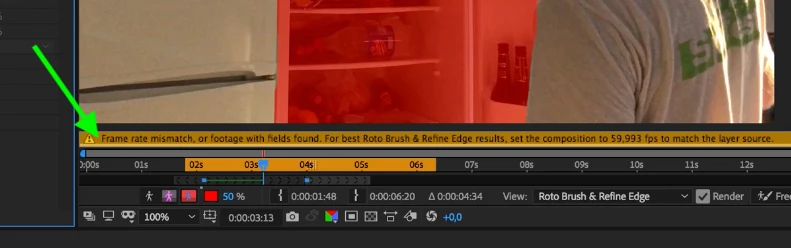
    How much is the framerate of your video? because I read that you have a problem of framerate incompatibility apparently between your video and the composition

    3 replies

    lucask84628164
    Participant
    August 8, 2018

    Yess thanks a lot! so my framerate for the comp was set at 59.992... I changed it to 59.993 and now it applies to the correct frame!

    Community Expert
    August 8, 2018

    Byron.
    Byron CortezCommunity ExpertCorrect answer
    Community Expert
    August 7, 2018

    How much is the framerate of your video? because I read that you have a problem of framerate incompatibility apparently between your video and the composition

    Byron.
    Community Expert
    August 7, 2018

    If you can record a video, upload it to YouTube and upload the link here, your message is half hard to understand. Maybe it's because I originally speak Spanish that I do not understand very well what exactly is happening with your Ae.

    Byron.
    lucask84628164
    Participant
    August 7, 2018

    Yeah sorry English is also not

    my first language I will try and be a bit more clear. So in my video I have selected what I want “hidden” or invisible by using the RotoBrush, now normally when you have this selection you can edit it so it fits better however after the first few seconds of footage this edit only will change the frame afterwards and not the current frame. I am

    making a video demonstrating this and will upload it soon

    edit:https://youtu.be/TnZYl8y5TqU