


- Home
- After Effects
- Discussions
- Re: Rotobrush 2.0 continues to slow down and hang ...
- Re: Rotobrush 2.0 continues to slow down and hang ...

Copy link to clipboard
Copied
Credit for the fix goes to: Jordan Clay
If you want to avoid reading all the posts, the answer is quite simple:
Simply install After Effects version 18.1 and your rotobrush will work fine as is did in the past.
The new updates after 18.1 are problematic and have bugs regarding rotobrush 2.0 and propagation.
BTW, the installation is super easy, just go to your Cloud and click the 3 little dots by After Effects.... then 'different versions' then install it. All your settings will be there pre installed, not worries.
Just ignore future updates and do not install any new AE updates until Adobe can fix the problem, which, after contacting the Adobe techs all I get is: "this is all news to us, surely the problem must be on your end" is the catch phrase they are using. Funny, 18.1 works perfectly, the only thing changed was the 'update.'
(rendering or propagating, not sure of the term) After rotobrushing the new mask, and seeing it in the timeline, and pressing Space Bar to see it in action.
After prior posting here, and not finding any answers to this problem with rotobrush 2.0 hanging,
I decided to contact Adobe and see what the masters say about this problem.
After trouble shooting, including removing preferences, and changing cuda to 'software only' the tech at Adobe was stumped.
Of course they were stumped, because it seems that I am the only one in the world with this problem. The tech had no prior experience nor info about this problem on file. I asked for a 2nd tech, and was refused.
All the hundreds of people with this problem have either fixed it themselves OR never reported it, as again, according to Adobe I seem to be the only with this problem.
Adobe's Solution:
"We will look into the matter and send you an email"
(taking a big breath here) aaaaaaaaaaaaHHHH
Followed by: ahahahahahahhahahahahhahah
Yeah right. That is how Adobe brushes off their customers when they can't fix a problem.
..the old "we'll send you an email." If I had a dollar for everytime I was told that, I'd be up a cool C note.
In the mean time, I'm paying $$$$ for this software that doesn't work.
The Rotobrush 2.0 is a crock. It's full of bugs and simple won't render a scene as complicated as a shelf with bottles in the background.
IF ANYBODY READING THIS CAN HELP, PLEASE STEP UP TO THE PLATE.
All I'm doing is RBing a simple face in front of a shelf full of bottles. The face moves and camera pans with him, not alot, but enough that it's too much to pen tool it, plus I've got 5 clips of this I have to fix. Yes, its a busy background, but then why does the brush rendering work for the first few seconds then get slower, and slower, to an eventual hang????
It should work, or not work at all, not this teasing madness.
My work around of doing a few seconds at a time is turning into a nightmare. I need this software to work.
Please somebody out there help me. Adobe CAN'T FIX THIS, MAYBE YOU CAN.
my system: 32GB, Ryzen 7, gtx1050ti solid state drives.
The roto2.0 does work with simple images and simple backgrounds, just not a shelf with bottles in the background.
Insane? Yes.
Is this image really too difficult for rotobrush?? PLEASE HELP!!! Thank you!!! Letty



 2 Correct answers


Rotobrush slows down because of the lack of system resources. If previous versions work better on your machine than the latest build it means that the system requirements have changed.
Without some massive color correction that image is going to be difficult for any automated masking tool to work with. Even with some serious color correction optimized for Rotobrush, these shots are going to require a lot of work and take a lot of time.
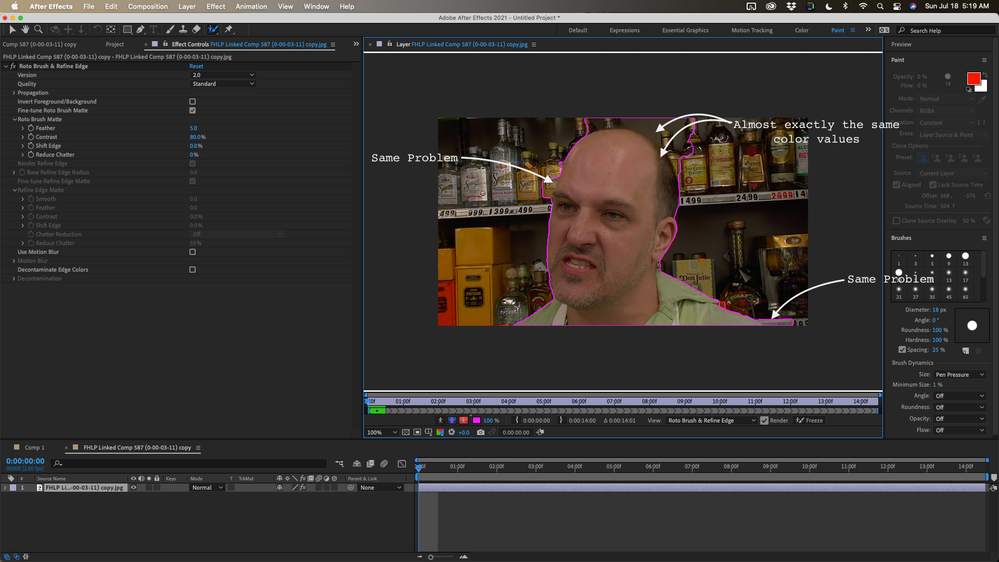
I would start by doing some tweaking on the colors to inc
...
There is nothing preventing you from splitting the layers and running Rotobrush on 2 or 3-second segments of your clip. When you have all the pieces frozen, pre-compose the group and use that pre-comp for a track matte for the original footage.
Any time I spend more than about four or five minutes on a Rotobrush layer I always pre-compose the layer after Rotobrush is frozen, go to the Composition/Prerender menu to render and replace the comp in AE with a MOVIE. The default settings for PreRe
... 25
Replies
25
25
Replies
25

Copy link to clipboard
Copied
UPDATE:
I tried again to render it out, and this time, instead of rendering, I clicked on Freeze to lock it in.
It propagated the same as a timeline render, it started off normal, then started getting slower and slower.....
then it got so slow, I thought it hanged again.... but I waited it out... it took 6 minutes per frame, and the last 7 frames took about 30 mins to freeze.
OK, so the issue is why?
After it was frozen, I was able to play it on the timeline no problems.
So what is causing the slow down? Is this a GPU issue? GTX1050ti has 4gb ram. Is it running out of ram ? Clips are 1080p.
I have the latest drivers and cuda drivers.
My brain can only take so much.
Thanks for your advice.
Letty
Copy link to clipboard
Copied
chirp.... chirp....
(sounds of crickets)

Copy link to clipboard
Copied
Is this issue still on going? It never had anything to do with resources unless you count AE not using them properly seen by a debug dump when the freeze happens. It's like it gets stuck in a compounding loop.
My system is a RTX Quadro 6000 on a i9 9900KS 5.1ghz using SSD mv2 drives on everything. When AE is stalling my resources never go above 12% then trickle down to 6% when its frozen after a few seconds. Going to 18.1 and that same project doesn't use anymore resources but finsihes immidiatly.
Other than that Thanks @Rick Gerard for spme of your other tips. helped out on a much more complex project but only on 18.1. Hopefully AE spends sopme time on this for tehir next release. haven't tried beta yet since rotoscoping is such a small portion of my work. but even then it's too much roto for me 🙂
Copy link to clipboard
Copied
Rotobrush slows down because of the lack of system resources. If previous versions work better on your machine than the latest build it means that the system requirements have changed.
Without some massive color correction that image is going to be difficult for any automated masking tool to work with. Even with some serious color correction optimized for Rotobrush, these shots are going to require a lot of work and take a lot of time.
I would start by doing some tweaking on the colors to increase the differences in the luminance levels. You are not trying to go for a pleasing color, you are trying to make the actor different than the background.
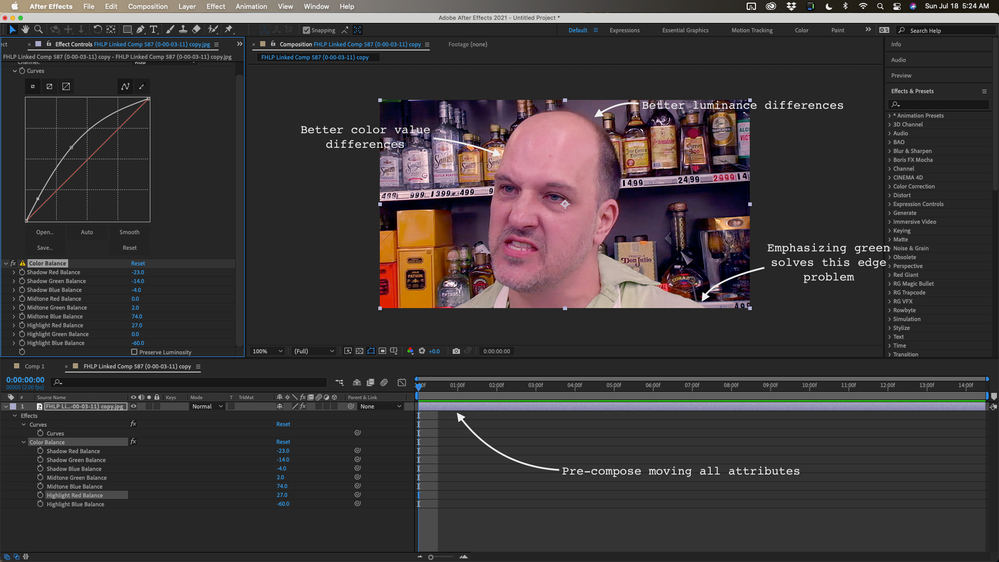
Then Pre-compose the layer and apply Rotobrush to the pre-comp. It took a couple of tries on the color correction but I finally got this result on this frame by using a total of 12 strokes. A shot that was better planned and better shot might have only taken 3 or 4.
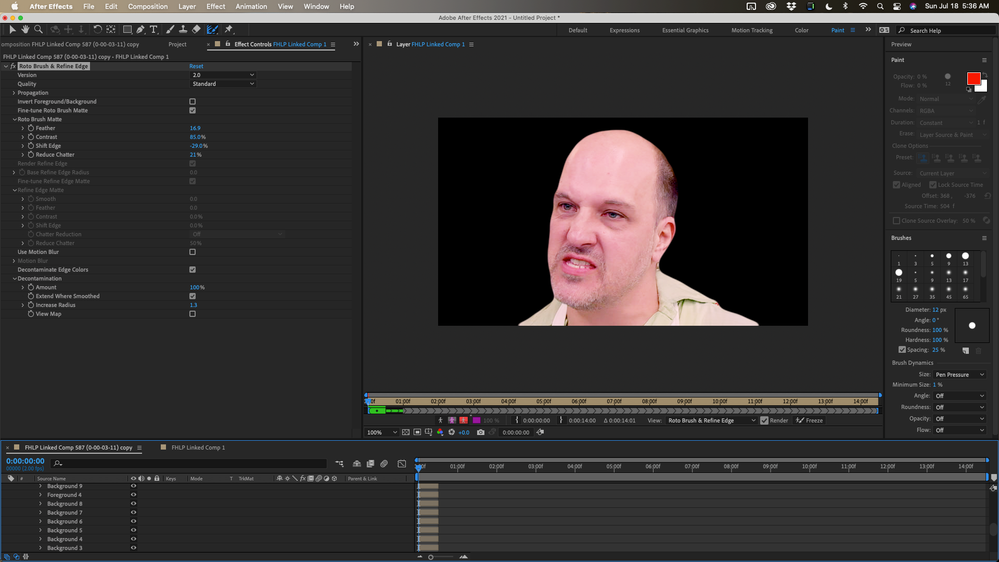
The last step is to use the pre-comp as an alpha track matte for the original footage and then do some serious color correction on the footage. The original footage is underexposed by about a little more than 2 stops. I got a fairly good result with your shot in about six minutes.

If the shot has a lot of movement and there is a fair amount of motion blur and is 8 seconds long I could see easily spending forty-five minutes to an hour on the shot. I could probably roto the shot by hand in about the same amount of time.
Copy link to clipboard
Copied
Thanks Rick! Always great info.
I was able tweak the color prior to the rotobrush and got a pretty good mask.
Problem remains of propagating the mask.
You mentioned 'Rotobrush slows down because of the lack of system resources. ' is there something I can do to fix this?
The propagation when I click space bar starts off great, then slower, then really slow, then 1 frame per 5 minutes at the end.
The clip is only about 8 seconds. The computer acts like it's running out of breath.
When I do the propagation, I checked my computer's Task Manager / Performance and the cpu and gpu were really low, nothing maxed out at all, nor near it. Just crawling along at very low levels.
I don't get why the propagation gets slower and slower to the point of hanging when my Performance is really low and not being used at all?
Do I really have to buy a new $1000000 gpu ? I'm using gtx1050ti.
Thanks again for your advice,
Letty
Copy link to clipboard
Copied
I just installed AE version 18.1 and the rotobrush works like a charm!!!!
So you are right about your statement:
Rotobrush slows down because of the lack of system resources. If previous versions work better on your machine than the latest build it means that the system requirements have changed.
In other post I did about this issue ther poster said to install 18.1 but I was hesitate because I like working in the latest version.
Anyways, I'm off the ledge again.
I guess I'm stuck in 18.1 forever.... you think a my problem was an old gpu?? gtx1050ti no longer works with the latest AE verion?
Thanks for your reply,
Letty
Copy link to clipboard
Copied
There is nothing preventing you from splitting the layers and running Rotobrush on 2 or 3-second segments of your clip. When you have all the pieces frozen, pre-compose the group and use that pre-comp for a track matte for the original footage.
Any time I spend more than about four or five minutes on a Rotobrush layer I always pre-compose the layer after Rotobrush is frozen, go to the Composition/Prerender menu to render and replace the comp in AE with a MOVIE. The default settings for PreRendder are lossless with alpha and import and replace as a post-render action.
I almost never use a rotobrush layer with the effect applied in my main composition. There is just too much chance for a render failure. Rotobrush also seriously bloats your AEP file size and can slow everything down. Rotobrush is a very good tool for creating a matte. Be safe. Render the matte and get rid of the Rotobrush when you are done with it.
This workflow goes back to the early days of rotoscoping. Once the roto was complete and working well and approved all professionals rendered the matte, even clear back to the days of doing it on film, and archived or just got rid of the original roto work.
Copy link to clipboard
Copied
You are so much more helpful than any of the Adobe online tech support people I've ever live chatted with.
Everytime I take a problem to Adobe, I have to jump thru "trial and error" hoops, and lots of meaningless guess work. I've wasted so much time there, I can only blame myself.
Thanks again for your solid avice and words of wisdom.
I'm using version AE 18.1 from now on, and can only hope the Adobe creators can fix the rotobrush bug in their latest updates. So far, the techs at adobe are giving me work arounds that don't work and a list of steps to do everytime I want to propagate a rotobrush'd mask (literally 6 steps before and after each render attempt, that didn't work) I have a feeling they are not interested in fixing the problem. Obviously, there is a problem because 18.1 works perfectly, while the latest update does not. (I still think it's on purpose, to get users to buy new gpu's as they phase out older ones, but we'll never know)
Thanks again,
Letty

Copy link to clipboard
Copied
Thank You!!! By reverting to 18.1 all of my Rotobrush woes have been fixed! I tried so many different solutions before finding this. You have literally saved my project! Not sure what the Adobe team changed from 18.1+ ,but whatever the issue is I hope they get it fixed in a future update. I have seen so many posts with people reporting the same issue. Until the bug is fixed I will be in 18.1!

Copy link to clipboard
Copied
Thanks!! The problem is not our machines, it is the update of the ae, I have a complex rotoscope of 15sg and in second 2, it got slow and slow until it did not advance, I almost cried. But looking for solutions I found it. Thanks and friends at Adobe, please be careful with these details.
I was working on version 18.4 and I changed to 18.1
cheers

Copy link to clipboard
Copied
This was definitely the key I want sure my new surface pro want working. I thought it was solid state memory I took to my desktop. Got v plenty of team still could only get like a second of frames did it 8 different times. I ended up going frame but frame to around the same point thanks for posting solution. Adobe would've had me ready to snap🥴

Copy link to clipboard
Copied
I've got the same problem with this new version of AE. Please update this Adobe!

Copy link to clipboard
Copied
I had this same issue today and found a different (but bizarre) work-around. It works for After Effects 18.4.1.
1. Uncheck the render checkbox. At this point the green information line disappears (the one that says "Roto Brush is propagating 1000 of 7000").
2. Move the timeline selector around (for example if it is a minute 2, move it to minute 1).
3. Press on the rotobrush tool.
Even though the render check box is unchecked, at this point you will see the green information line appear again and rotobrush will continue from where it left off. It will go fast at this point. Before I did this, I was processing around 1 frame every 90 seconds. I am now back to processing 1 frame every 4 or 5 seconds.
Copy link to clipboard
Copied


Copy link to clipboard
Copied
I'm having the same problem. It starts fine and then gradually the process gets slower and slower to a halt where the last 20 frames take 10-15 min per frame to process. I only have one scene to do a roto work so, it's really not worth for me to downgrade but, I just wanted you to know that you're not alone with this problem.
Copy link to clipboard
Copied
Downgrade. It's the only way. Back up your settings (1 minute) and simply downgrade to18.1 (another few minutes)
Whatcha gotta catch a bus? No time? Believe me, after you downgrade you will love A/E again. Adobe isn't going to fix it so you might as well get used to it, or buy a $ 10,000 gpu card, which is where they are trying to steer us to begin with. Ah the good old days when companies used to have 'regulation' but now it's the wild wild west and if they want us to buy $10,000 gpu cards that "work" better with the latest version of A/E, then you have 2 choices, stay at 18.1 or crack open your piggy bank and shell out $ 10,000 for the lastest Nvidea super duper gpu monster card.

Copy link to clipboard
Copied
It's definitely an issue with the new updates, as I have a beast of a computer and every since updating to the latest AE, rotobrushing has been extremely slow on propagating, sometimes not progressing at all.
Luckly, I came across your post and downgraded to 18.1 which works absolutely PERFECT.
I want to say that I experience the same issue when updating to the latest Premiere Pro, all of a sudden something as simple as colour-grading started to lag and I couldn't understand why... Then I downgraded to previous version of Premiere Pro and was able to colour correct in Real-Time once again.
Adobe we love you for all the amazing things you're doing, but sometimes you need to know when to admit a fault and works towards correction.

Copy link to clipboard
Copied
I'm pretty tired of Adobe at this point. Also experiencing this problem.
Systems specs are:
3080ti GPU
128GB of RAM
i9 9900 @ 3.6GHz
yet it still takes 10+ minutes to do a 2 second rotoscope for a 1080p 60fps clip. Unbelievable. Downgrading to 18.1 fixes the problem but it blows my mind that Adobe is blaming the clients for this problem when it is clearly their fault.
Copy link to clipboard
Copied
install 18.1 it will change your life!!!
Adobe and NVidia aren't gonna fix a thing, they want everybody to buy $$$$ new high end gpu's. But they left us common folks some scraps that still work, like v18.1

Copy link to clipboard
Copied
Has anyone tried the v22? If they fixed the problem or does this problem still continue?
Copy link to clipboard
Copied
Now why would they fix anything, gpu prices are skyrocketing and I think in a year or so, not even 18.1 will work. The squeeze is on.
Copy link to clipboard
Copied
Although there's no documentation/mention of it in the patch notes, it does appear that it has been fixed in v22.
However, take my words with a grain of salt, as my experience with v22 is rather limited.
Copy link to clipboard
Copied
Any word on version 22 ? Did they fix rotobrush?

Copy link to clipboard
Copied
I am using version 22 with all its updates, and the frequent freezing, even after uninstalling and reinstalling creative cloud, the problem of freezing is peersisting in AE version 22. That's what brought me here to look for a solution. I will be using AE 18 version and hope will fix my problem of using it. I am doing it on a MP4 file. RotoBrush-2 did not work on .jpeg images alone. So saw some YouTube videos where they have used MP4 to apply rotobrush-2 to it. If anybody knows why Rotobrush-2 does not work on a jpeg sequence, I will appreciate to hear that.
Thanks, to all in the comuunity.

-
- 1
- 2

Find more inspiration, events, and resources on the new Adobe Community
Explore Now
 AdChoices