louc81972341
Participating Frequently
November 26, 2016
Answered

Rotobrush Shortcuts?

  • November 26, 2016
  • 4 replies
  • 11900 views

Hello,

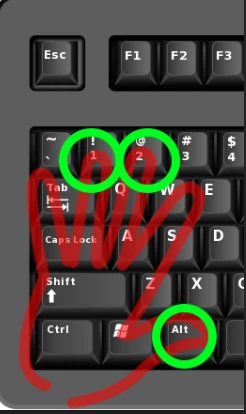
Just wondering if anyone knows a way to change the  default keyboard shortcut for removing unwanted areas. (red- circle ) Holding ALT when using the rotobrush?

It becomes very annoying when you have to advance frames using the PAGE UP and then having to go all the way over to the ALT to subtract an area.

Try doing that that for every other frame and you'll feel my pain.

The only shortcut I found to edit was just to open the rotobrush but not to change any brush controls.

Thanks in advance,

Lou

    This topic has been closed for replies.
    Correct answer Roei Tzoref

    WAIT! HOLD THE PRESS! I mean... I think I got it! .

    when you are on any of the paint tools, when you press 1 and 2 on the normal keyboard you can advance respectively backwards or forward one frame. this way you can very easily have access also to the Alt key. no need for page dn or up.

    What say you?

    **Credit for pointing out goes to the Meyers. I had to recall a few things about paint so was looking at their apprentice tutorials for it. After Effects Apprentice 13: Paint, Roto, and Puppet. BTW I do recommend anything from Chris and Trish Meyer and this course has also very useful information about Roto Brush workflow. guess I have missed the shortcut because I skipped the most of the paint chapter and they probably only gave this shortcut advice once in the paint section .

    this will speed up my workflow too so thanks for advocating for doing all with one hand. this doesn't mean you shouldn't work as efficient as possible and make as much strokes as you need to and nothing more.

    4 replies

    Participant
    August 28, 2024

    Hey

    Do you have any idea how can I access the delete section brush without alt key because my alt key stopped working

    I did change the shortcut of roto brush from alt +w to shift + w

    But I still can't figure out how to access the delete section brush 

    Roei Tzoref
    Roei TzorefCorrect answer
    Legend
    November 29, 2016

    WAIT! HOLD THE PRESS! I mean... I think I got it! .

    when you are on any of the paint tools, when you press 1 and 2 on the normal keyboard you can advance respectively backwards or forward one frame. this way you can very easily have access also to the Alt key. no need for page dn or up.

    What say you?

    **Credit for pointing out goes to the Meyers. I had to recall a few things about paint so was looking at their apprentice tutorials for it. After Effects Apprentice 13: Paint, Roto, and Puppet. BTW I do recommend anything from Chris and Trish Meyer and this course has also very useful information about Roto Brush workflow. guess I have missed the shortcut because I skipped the most of the paint chapter and they probably only gave this shortcut advice once in the paint section .

    this will speed up my workflow too so thanks for advocating for doing all with one hand. this doesn't mean you shouldn't work as efficient as possible and make as much strokes as you need to and nothing more.

    Roei Tzoref
    Legend
    November 26, 2016
    It becomes very annoying when you have to advance frames using the PAGE UP and then having to go all the way over to the ALT to subtract an area.

    how about going forward and backwards with the Ctrl/Cmd + right/left Arrows? I added you a key but you can do this in one hand (if they are big enough.. it is still a stretch) and M suggestion is a good one - you usually don't change every frame so make sure you read this through carefully and know how to save yourself time, effort and productivity with proper propagation before you correct your strokes: Roto Brush and Refine Matte in After Effects , After Effects Roto Brush, Refine Edge, and Refine Matte

    louc81972341
    Participating Frequently
    November 26, 2016

    Oh well, too bad.

    I will have to rethink my workflow if I choose the rotobrush for some mattes.

    Thanks guys,

    louc81972341
    Participating Frequently
    November 26, 2016

    In my situation, the background was similar to the subject yet different enough for rotobrush to hold onto.

    if you want, you can upload the footage via any legit cloud service and we can see what you're up against more clearly.

    Maybe I should add that into the suggestion box

    worth mentioning you can do it here: Feature Request/Bug Report Form


    Believe me, I would love to, however it's my client's footage and I can't post it without permission.

    Besides, I finished it last night.

    I had 15 seconds of  roto footage to do and I think it took me about 4 hours to complete. (2 hours to rotobrush & 2 hours of cleaning & fixing the edges.)

    I was posting to find better shortcut controls to make life move a little smoother.

    Mylenium
    Legend
    November 26, 2016

    No, not possible. This stuff is hard-coded. And not to put too fine a point to it: If you are painting on every frame, you are working against how the tool is actualyl meant to work and have a very inefficient workflow.

    Mylenium