jackr62853967
Participant
November 13, 2016
Question

Saving files AEP??

  • November 13, 2016
  • 1 reply
  • 1315 views

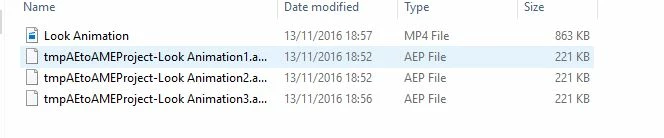
So first time using AE 2017. So far so good, but now when i go to save it they save as this AEP file type? Which i cannot re open in after effects?

This topic has been closed for replies.

1 reply

Roei Tzoref
Legend
November 13, 2016

Aep is an after effects project file extension. these look like temporary files that are saved in your AME folder once you encode in AME. these are only a reduced version of your rendered composition at the moment you sent it to AME. not you main full project file. these should open as well but look in your main directory (one hierarchy down), there you will find the AEP project that should open in After effects.

if you are experiencing anything different send more screenshots and don't crop anything

jackr62853967
Participant
November 13, 2016

It seems i have to now open up after effects then go file > open to open up an aep file to work on. Rather than just clicking on the file directly. Is this intended?

Roei Tzoref
Legend
November 13, 2016

you can open a file with these options:

1.Ctrl/Cmd+O will give you the open dialog box to your explorer and you can click on the file twice

2. clicking on the project file twice will launch Ae or load the project to Ae if it's already open

it looks like that you have a folder called "Look Animation" where you have your after effects project files. click on Look.aep or Look copy (cc 13).aep and it should open in Ae.