


Exit
  • Global community
    • Language:
      • Deutsch
      • English
      • Español
      • Français
      • Português
  • 日本語コミュニティ
  • 한국 커뮤니티
1

scattergraph animation

Community Beginner ,
Aug 06, 2023 Aug 06, 2023

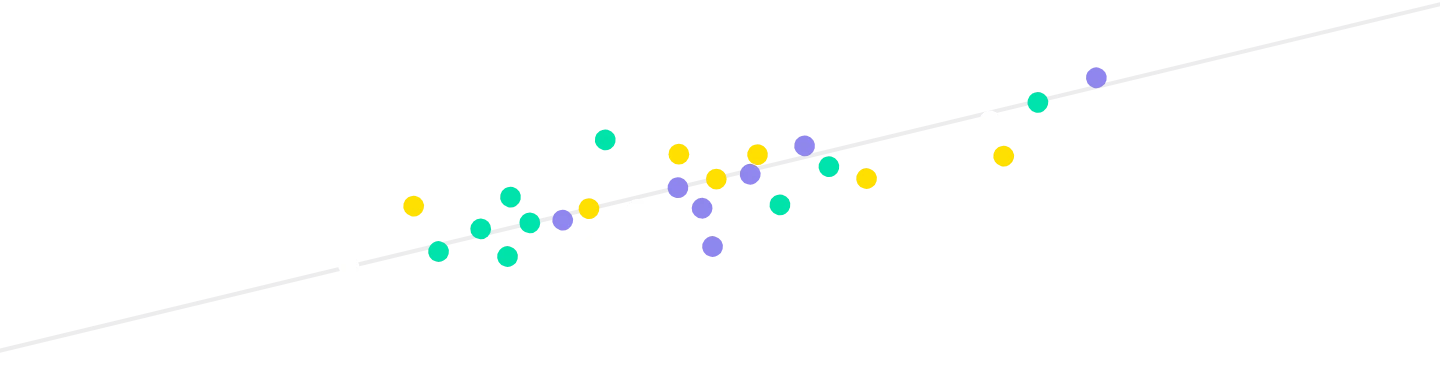
Hi, newbie here-trying to create a small animation for a website of a scattergraph-basically animating random dots to move towards an axis. should this be animated manually or is there a preset that could do this quickly? thanks for your help? (image attached)scattergraph.png
TOPICS
Error or problem , How to
444
Translate
Report
Community guidelines
Be kind and respectful, give credit to the original source of content, and search for duplicates before posting. Learn more
community guidelines
Community Expert ,
Aug 06, 2023 Aug 06, 2023

I would start with all the dots on the line, then work backward. It is much easier to get things to randomly move apart randomly than to put them together. When you have the line randomly coming apart, pre-compose and apply Time Remapping. 


One option would be to use Shatter. Another would be to use the index of the different dots as a random seed for a wiggle expression that increases over time. It all depends on the kind of action you want to achieve and when you want the dots to come together. 


If you can describe the kind of motion you want to achieve, we can give you some suggestions. This took about 2 minutes to create using Shatter.

RickGerard_1-1691329944106.gif


Translate
Report
Community guidelines
Be kind and respectful, give credit to the original source of content, and search for duplicates before posting. Learn more
community guidelines
Community Beginner ,
Aug 07, 2023 Aug 07, 2023

this looks great Rick, thanks for your help, the shatter effect example is close to what I would want, just want these to align on the x-axis-(like shown in this graphic)Untitled.png

Translate
Report
Community guidelines
Be kind and respectful, give credit to the original source of content, and search for duplicates before posting. Learn more
community guidelines
Community Expert ,
Aug 07, 2023 Aug 07, 2023

Just line up the original dots how you want them to end up. 

Translate
Report
Community guidelines
Be kind and respectful, give credit to the original source of content, and search for duplicates before posting. Learn more
community guidelines
Community Beginner ,
Aug 07, 2023 Aug 07, 2023

Thanks Rick, would i create the 'dots' in the shatter effect or apply the effect to dots i've previously created?

Translate
Report
Community guidelines
Be kind and respectful, give credit to the original source of content, and search for duplicates before posting. Learn more
community guidelines
Community Beginner ,
Aug 08, 2023 Aug 08, 2023

Hi Gerard, would you be able to screenshot the settings you used in the shatter effect example you gave please?

Translate
Report
Community guidelines
Be kind and respectful, give credit to the original source of content, and search for duplicates before posting. Learn more
community guidelines
Community Expert ,
Aug 08, 2023 Aug 08, 2023

How about a project file?

shatter example.gif


Translate
Report
Community guidelines
Be kind and respectful, give credit to the original source of content, and search for duplicates before posting. Learn more
community guidelines
Community Beginner ,
Aug 08, 2023 Aug 08, 2023
LATEST

Wow-thank you so much!

Translate
Report
Community guidelines
Be kind and respectful, give credit to the original source of content, and search for duplicates before posting. Learn more
community guidelines