
ScriptUI Panel is blank, but works with 'Run Script'
When using 'Run script file' the script works fine, but when I use it through scriptsui panel it appears blank
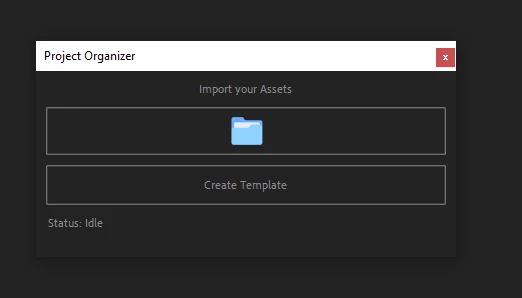
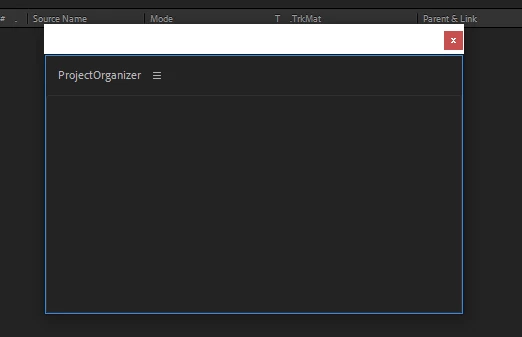
Here is the script:
(function combinedPanel(thisObj) {
// Build UI
function buildUI(thisObj) {
// Use dockable panel if available, otherwise floating window
var win = (thisObj instanceof Panel) ? thisObj : new Window("palette", "Project Organizer", undefined, { resizeable: true });
// === UI Layout ===
win.orientation = "column";
win.alignChildren = ["fill", "top"];
win.spacing = 10;
win.margins = 10;
// --- Title ---
var title = win.add("statictext", undefined, "Import your Assets");
title.alignment = "center";
title.graphics.font = ScriptUI.newFont("Segoe UI", "BOLD", 14);
// --- Import Assets Button (icon) ---
var iconPath = File($.fileName).path + "/asi_images/importIcon.png";
var importBtn = win.add("iconbutton", undefined, iconPath);
importBtn.helpTip = "Click to import your editing assets";
importBtn.preferredSize = [48, 48];
// --- Template Button ---
var templateBtn = win.add("button", undefined, "Create Template");
templateBtn.helpTip = "Generate project folders template";
templateBtn.alignment = ["fill", "top"];
templateBtn.preferredSize.height = 40;
// --- Status Text ---
var status = win.add("statictext", undefined, "Status: Idle", { multiline: true });
status.alignment = ["fill", "top"];
status.preferredSize.width = 400;
status.minimumSize.height = 30;
// ===== Functionality =====
// --- Import Assets ---
importBtn.onClick = function() {
var folderToImport = Folder.selectDialog("Select a folder to import");
if (!folderToImport) {
status.text = "Status: Cancelled.";
return;
}
if (!app.project) {
alert("Please open or create a project first.");
return;
}
app.beginUndoGroup("Import Folder with Subfolders");
status.text = "Status: Importing " + decodeURIComponent(folderToImport.name);
var ignoredFolders = [];
function importFolder(folder, parentAEFolder) {
var decodedFolderName = decodeURIComponent(folder.name);
var files = folder.getFiles();
// Skip folders with .aep files
for (var i = 0; i < files.length; i++) {
if (files[i] instanceof File && files[i].name.match(/\.aep$/i)) {
ignoredFolders.push(decodedFolderName);
return;
}
}
var aeFolder = app.project.items.addFolder(decodedFolderName);
if (parentAEFolder) aeFolder.parentFolder = parentAEFolder;
for (var i = 0; i < files.length; i++) {
var f = files[i];
if (f instanceof File) {
try {
var io = new ImportOptions(f);
if (io.canImportAs) {
var imported = app.project.importFile(io);
imported.parentFolder = aeFolder;
}
} catch (err) {
$.writeln("Skipped file: " + f.name + " (" + err.toString() + ")");
}
} else if (f instanceof Folder) {
importFolder(f, aeFolder);
}
}
status.text = "Status: Importing " + decodedFolderName;
}
try {
importFolder(folderToImport, null);
if (ignoredFolders.length > 0) {
alert(
"The following folders were ignored because they contain After Effects project files (.aep):\n" +
ignoredFolders.join(", ")
);
}
status.text = "Status: Done.";
} catch (e) {
status.text = "Status: Error.";
alert("Something went wrong: " + e.toString());
} finally {
app.endUndoGroup();
}
};
// --- Template Button ---
templateBtn.onClick = function() {
if (!app.project) {
alert("Please open or create a project first.");
return;
}
var folderNames = [
"01. Footage",
"02. Images",
"03. SFX",
"04. Overlays",
"05. Nasheed",
"06. Animations",
"07. Precomps"
];
app.beginUndoGroup("Create Project Folders");
function createFolderIfNotExist(name) {
for (var i = 1; i <= app.project.rootFolder.numItems; i++) {
var item = app.project.rootFolder.item(i);
if (item instanceof FolderItem && item.name === name) {
return item;
}
}
return app.project.items.addFolder(name);
}
for (var i = 0; i < folderNames.length; i++) {
createFolderIfNotExist(folderNames[i]);
}
app.endUndoGroup();
status.text = "Status: Template folders created.";
};
// --- Resize Handling ---
win.onResizing = win.onResize = function() { this.layout.resize(); };
return win;
}
// Build and show panel
var myPanel = buildUI(thisObj);
if (myPanel instanceof Window) myPanel.center(), myPanel.show();
})(this);


 AdChoices