
Participant
June 14, 2025
Answered

Scroll to Zoom not working in After Effects 25.3 on macOS

  • June 14, 2025
  • 12 replies
  • 7051 views

In After Effects 25.3 on macOS, using mouse scroll or Option + mouse scroll no longer zooms in the composition panel. Instead, it pans the view, regardless of modifier key. This function worked fine in version 25.2. Tested on multiple Macs with clean installs and no tablet drivers.
Please restore the ability to zoom with scroll in a future update.
Correct answer loyal_Whirlwind98A4

Thankfully, this solves the issue

12 replies

loyal_Whirlwind98A4Correct answer
Participant
June 17, 2025

Thankfully, this solves the issue

Participant
June 17, 2025

Thank you! I came back to AE after a few months and was freaking out why the scrolling was not working like how it was. Such an unneccessary change! 

Participant
June 26, 2025

I agree with you.

Community Manager
June 14, 2025

Alfredo,


This functionality has not been removed. If you're using a touch pad you can use two finger scroll to pan and pinch to zoom.


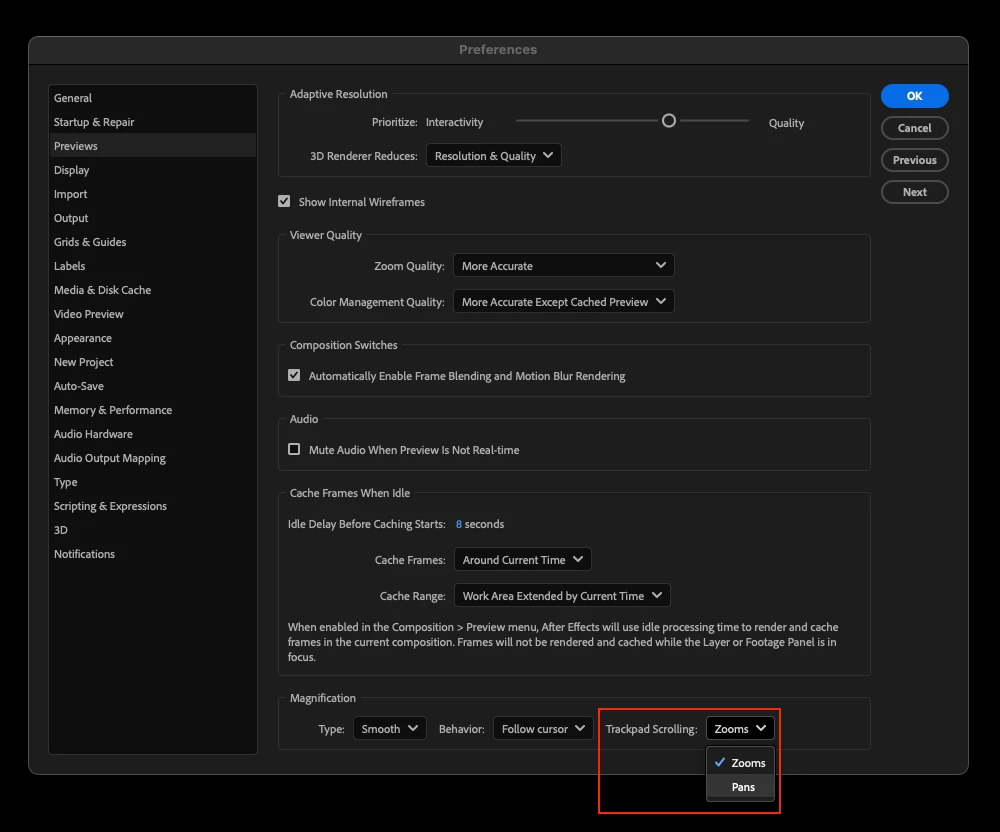
Additionally there is a new preference in Preview which allows you to go back to zooming when scrolling with a touchpad if you prefer that.


See more details here:

https://community.adobe.com/t5/after-effects-beta-discussions/new-in-beta-welcome-to-smooth-zoom-in-after-effects/td-p/15162700

Participant
June 30, 2025

This is not a functional solution. I use an Apple Magic Mouse that doesn't support pinch, meaning my entire workflow is broken because there is no longer a modifier key to swap between scroll and zoom. Please bring back the modifier key rather than expecting everyone to change their workflow on hardware that will not support it.

Participant
January 28, 2026

Same issue. If i change the preference to “zoom” instead of “pan”, then i simply cannot pan. In past i used to scroll with option button pressed in order to zoom in or zoom out.