
Participant
March 25, 2021
Answered

Seeking help with missing active camera options?

  • March 25, 2021
  • 5 replies
  • 18111 views

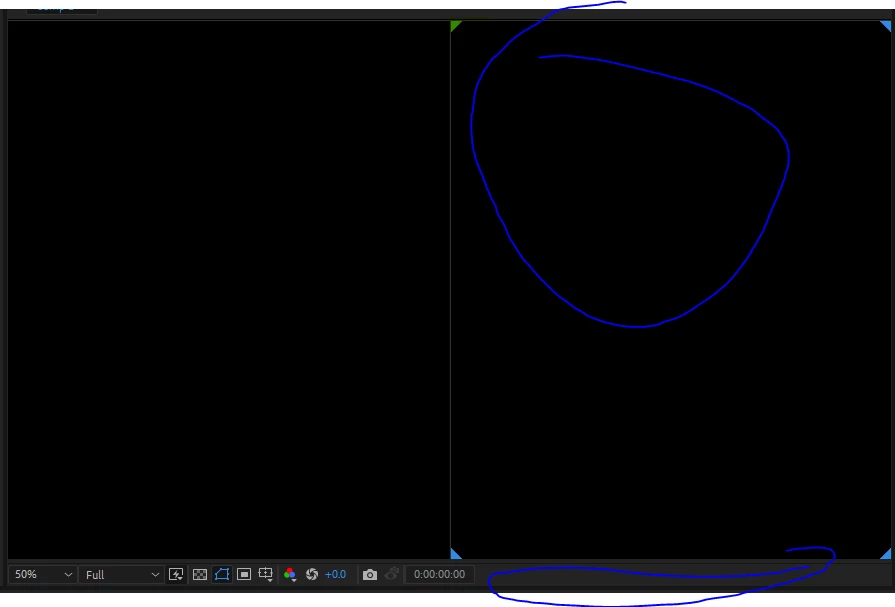
Hello everyone, can anyone offer suggestions on how to go back to a single camera view and show the active and camera options. I tried resetting my workspace to default, rebooting my system and AE and using the right click menu on set to active camera and one view up but nothing happens. Thoughts? 
Correct answer Jose Panadero

Adobe is aware of this issue and the solution right now is to create a 3D layer in your comp so the options for Active Camera are visible. We suppose that it will be fixed in a future update

5 replies

valentinb0
Participating Frequently
September 21, 2021

This is still not fixed, buttons simply disappeared. (09/2021)

Jose Panadero
Community Expert
Community Expert
September 21, 2021

It makes sense that the composition window doesn't show the 3D options if you are working on a 2D composition.  The options appear and dissapear as soon as you mark a layer as 3D or add a camera to your composition. Not sure that this is a bug but a new feature in latests versions. Are you working with the latest version?

valentinb0
Participating Frequently
September 21, 2021

Hi Jose, 

The simple fact, that I can't get rid of 2 views (taken over by other compositions) must be a bug. The select view button on the bottom right is simply missing. This is a composition with 2D layers only, and I can't get rid of the double view. 


Participant
May 8, 2021

Ughhhhh!!! Yes I'm having the same issue. I thought I was losing it. The amount of searching I just did only to find out its a bug that is waiting to be squashed. Hopefully, there's a fix soon.

Participant
August 12, 2021

I have a fix for that. I'm typing in August 2021 and Adobe hasn't still fixed that bug. But I found a way! Just create a new camera and option will be showed. After changing the view option you can delete the camera. But the view option again disappears. I'm afraid that you have to do the steps again. I hope Adobe will fix this.


Cheers!

Jose Panadero
Community Expert
Jose PanaderoCommunity ExpertCorrect answer
Community Expert
March 31, 2021

Adobe is aware of this issue and the solution right now is to create a 3D layer in your comp so the options for Active Camera are visible. We suppose that it will be fixed in a future update

Participant
October 30, 2022

Active Camera and View is not showing in composition panel after creating a 3D layer. So what will be the solution?  Please Guide me in this way......

valentinb0
Participating Frequently
October 31, 2022

Your panel is too small - simply drag it bigger. 


Participant
March 31, 2021

Hello,

I am having the exact same issue, the only difference is mine is stuck in 4-camera view. I am missing both the active camera view toggle, which is not that problematic .. as I can always press F12 to change to Active Camera .. but I am missing the standard, 2 way, 3 way, 4-way toggle .. and I am stuck in a 4-way display setting. 

This thread seems to be the only thing relatable for me ... not really sure how to fix it tho ..


Participant
March 31, 2021

Heya kretzc, I had to make sure at least 1 layer had 3d enabled, then they displayed again. 


Hope that helps

Participant
March 31, 2021

Weirdly enough, it does 🙂 thanks a lot, mate,

Cheers

Participant
March 25, 2021

Disregard, found a resolution. partially a corrupted file. 

P.M.B
Legend
March 25, 2021

Could you please explain what exactly is the corrupted file you found?  Because, according to Adobe this is a known bug that "slipped by" their devs and engineers and they are currently working hard to try and find the problem and fix it.  Have you solved the problem? 

~Gutterfish
Participant
March 31, 2021

Sorry P.M.B my looks like I had a few cards stacked against me, just had to reload my system.


I removed my preferences in the adobe folder and went back into have the system rebuild and they displayed, but... I think I made a newbie mistake to think that fixed it. Since my rebuild, it seems that I must of enabled 3d at some point on a layer and that is actually what made the view boxes dsiplay under the composition window. What I find weird is if you have a duel view up and uncheck the 3d later toggle the multi view options dissapear under the composition window, but the duel view stays enabled. And you need to go back to having a 3d layer to correct the layout. (I am assuming that is the bug you were refering to)


Sorry for the delayed response and lack of helpful info

Bobby