Participant
June 21, 2021
Answered

Separate Dimensions greyed out

  • June 21, 2021
  • 6 replies
  • 24190 views

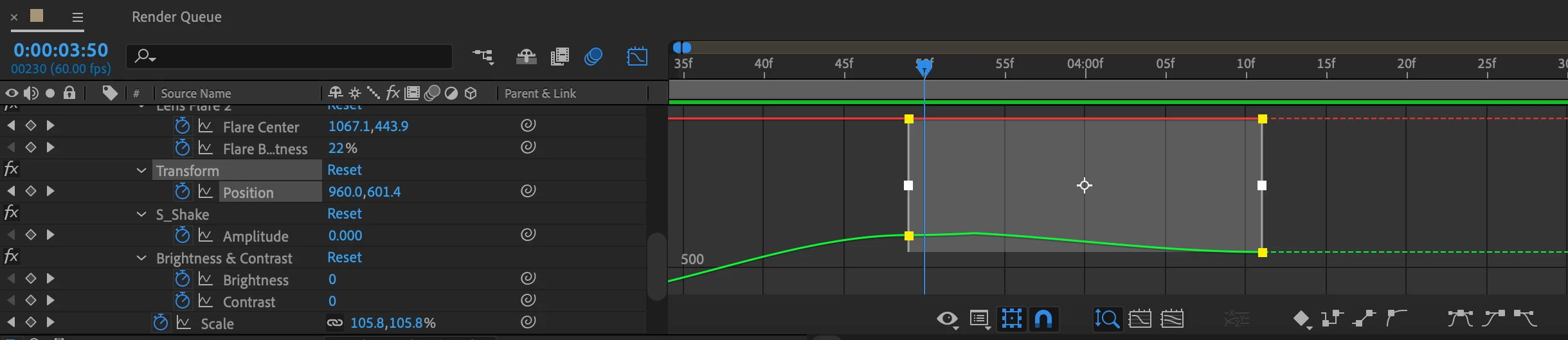
There is something wrong in this position graph but i can't enable Separate Dimensions to edit it. Whats going on? 
Correct answer mrwitte

On some stuff you simply can't Separate Dimensions and you're just out of luck. I'm currently experiencing that on the Position values of Contents on Shape Layers. I get around this by doing the following:

Set up two Slider effects on your layer, one called POS X and the other called POS Y

ALT+LeftClick on the Position value of the item you wish you could Separate Dimensions on, and enter the Expression below:

x = [pickwhip value to Slider POS X];

y = [pickwhip value to Slider POS Y];

[x,y]

Animate/keyframe the values of the two sliders instead of the Position value

6 replies

Participant
February 18, 2024

You have to right click on layer name and see if "3D layer" option is checked.
You can only see separate dimensions active if this option is checked.

mrwitte
mrwitteCorrect answer
Participating Frequently
September 10, 2023

On some stuff you simply can't Separate Dimensions and you're just out of luck. I'm currently experiencing that on the Position values of Contents on Shape Layers. I get around this by doing the following:

Set up two Slider effects on your layer, one called POS X and the other called POS Y

ALT+LeftClick on the Position value of the item you wish you could Separate Dimensions on, and enter the Expression below:

x = [pickwhip value to Slider POS X];

y = [pickwhip value to Slider POS Y];

[x,y]

Animate/keyframe the values of the two sliders instead of the Position value

Community Expert
October 23, 2023

Separating dimensions wipes out the ability to use the Composition panel to edit a motion path. The bezier handles disappear. Almost all motion arrays benefit from the ability to edit a motion path with the pen tools. In most cases, it is incredibly difficult to accurately control any path by animating separate dimensions. On the rare occasion that you need to separate dimensions to control the timing of specific paths at specific times, expressions can easily solve problems. I would be surprised if I have used Separate Dimensions more than twice in the last year. Those compositions would have been some kind of infographic involving attaching something to an animated graph.


CLWill
Inspiring
August 16, 2021

Another way to solve this is to create a null object, and tie the position property of the effect to the position of the null object (via pick whip). You can then animate the null, with separate dimensions, full bezier handles and all, and get the same impact.

Participant
November 16, 2021

how?

CLWill
Inspiring
November 29, 2021

I'm trying that, and I don't see how I can pick whip the "x" coordinate of my shape (not the layer - the shape witihin the layer) to an effect slider within a separate null object layer, and I'm having the same problem, which is that I can't separate out the "x" and "y" positions in order to pick whip each individual property to its own slider. If that were the case, I could just animate each without the need for the null object to begin with.


On the null object, select "separate dimensions" and there you go. 

Szalam
Community Expert
Community Expert
June 21, 2021

For the record, you can pretty easily get separated dimensions by applying three expression effects sliders to a layer and then tying the three position properties to those sliders.

Participant
November 16, 2021

That's nice. care to share more?


Shane5E25Author
Participant
June 21, 2021

Alright, i copied the keyframes from the Transform effect and moved it into the actual position keyframes of the clip. Fixed, Thank you!

Community Expert
June 21, 2021

AFAIK, you can only separate dimensions of the property "position" of the layer, you can't do that for the parameters of effects, even the "Position" parameter of the "Transform" effect

Participant
April 22, 2023

Why do we pay adobe 54.99 a month again?

Participant
October 23, 2023

Its becoming increasingly embarrassing that we pay what we pay.
