Participating Frequently
September 16, 2017
Question

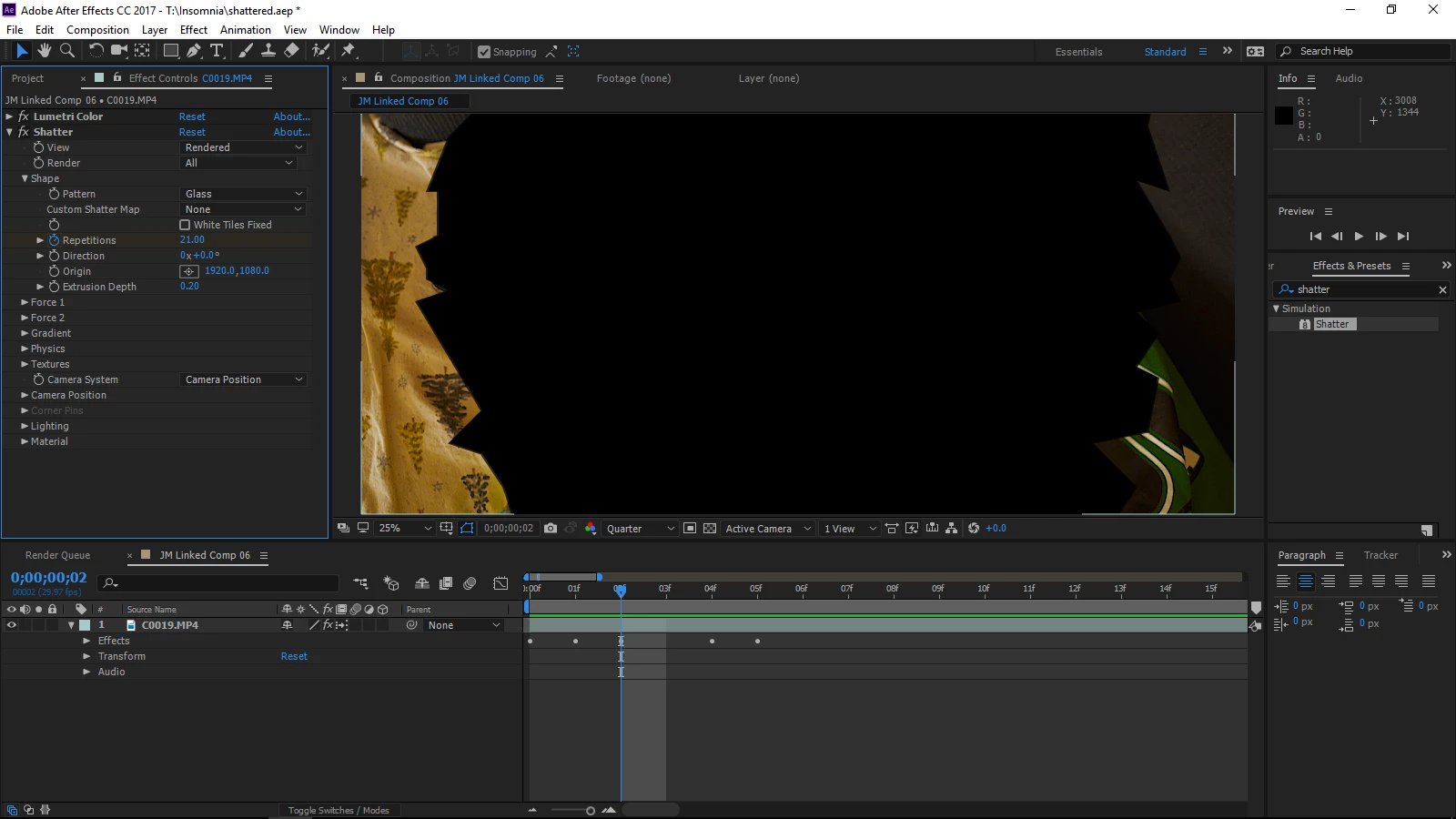
Shatter not showing footage.

  • September 16, 2017
  • 4 replies
  • 5950 views

Im trying to apply a shatter effect to a video. Its making the glass appear black. I followed a bunch of tutorials and nothing. My render is set to classic.

Help 😕😕
4 replies

Participating Frequently
October 11, 2017

Sorry for not responding, But I tried it now on a different project, precomposing first and its working .   Ill report back if I get anything different. Thanks again guys. Sorry for the late responses

angie_taylor
Legend
October 11, 2017

No problem, glad preconposing helped for you :-)

Kevin-Monahan
Community Manager
Community Manager
October 3, 2017

Hi DarkBlades,

Sorry for this issue. Did you ever find a solution? Please let us know if you have or if you still need help.

Thanks,

Kevin

Kevin Monahan - Sr. Community and Engagement Strategist – Adobe Pro Video and Audio
angie_taylor
Legend
September 16, 2017

Sorry, I had just woken up when I typed the original answer, you should select "Move All attributes to new Composition" when you Precompose. But you need to remove the Shatter effect before doing so. Then re-apply the Shatter effect to the precomposed comp that replaces the layer.

angie_taylor
Legend
September 16, 2017

As I said, the Shatter effect works from the original In point of the source layer. So if you have trimmed footage you need to Precompose it before applying shatter. That way the true in point will be at the beginning of the comp.

Community Expert
September 16, 2017

Shatter is a physical simulation that uses a force property to start the effect. By default the force is set to fill most of the screen and there are no keyframes. Look at the ECP (Effects Control Panel) and find Force 1. Change the radius to zero or move the force back out of the layer plane and no simulation of a shatter will happen.  Move the CTI (current time indicator) to the point in your animation where you want the shatter simulation to start and set a keyframe for force radius or position, then move down the timeline a few frames and set the force radius or position so you get the effect you want.

This is the most basic principal of all animated effects. It applies to all effects that have a value greater than zero on any of their controls. Think particle systems, warping effects, distortion effects. Most of them are show you a change in your layer default, if you want to make it happen later you have to change some settings and set some keyframes.

There are a million ways to animate shatter from using gradient maps to setting the force radius to something very small pasting the path of a shape layer to the position property of Force 1 (think Zorro). There is no need to Pre-compose or do any other work arounds, just animate the properties that make the effect work. I'm not sure why it's so hard for new users to figure out that they need to look for things to animate when they use Shatter.

About 1 minutes work using a shape layer for the source of the and the motion path for Force 1.

angie_taylor
Legend
September 16, 2017

Hi there,

Shatter works from the in point of a layer, because your footage layer has been trimmed at the beginning, the shatter will have taken place before the start of your comp.

To fix this the easiest thing to do is top recompose the C0019.mp4 clip before adding Shatter.

However, since you've already applied it simply select the layer and go to Layer > Precompose and then Choose the option to leave all attributes in the current comp. This should Precompose the footage but keep the effect in the current comp.

now that the layer's in point is at the start of the comp, the shatter effects should begin there. Please let me know if this works. :-)

Participating Frequently
September 16, 2017

theangietaylor

I understand what you are saying! Yes, Its being imported via premiere and the clip is a segment somewhere within the clip. So your saying the effect is somewhere else in the footage. NOT clip taken /made in premiere.

I precomposed prior to taking this screenshot or apply the shatter effect. Still not working.

Participating Frequently
September 16, 2017

So far I see one work around, which is exporting(rendering) that clip out of the project, and importing that clip into after effects, applying shatter, then reimport that comp into premiere. I know this will work, but I wish I can figure out shattering that section without going thru these extra steps.
