
Participant
June 13, 2018
Answered

Solid on 3D layer created from camera tracker is cut off

  • June 13, 2018
  • 1 reply
  • 1624 views

Hello all

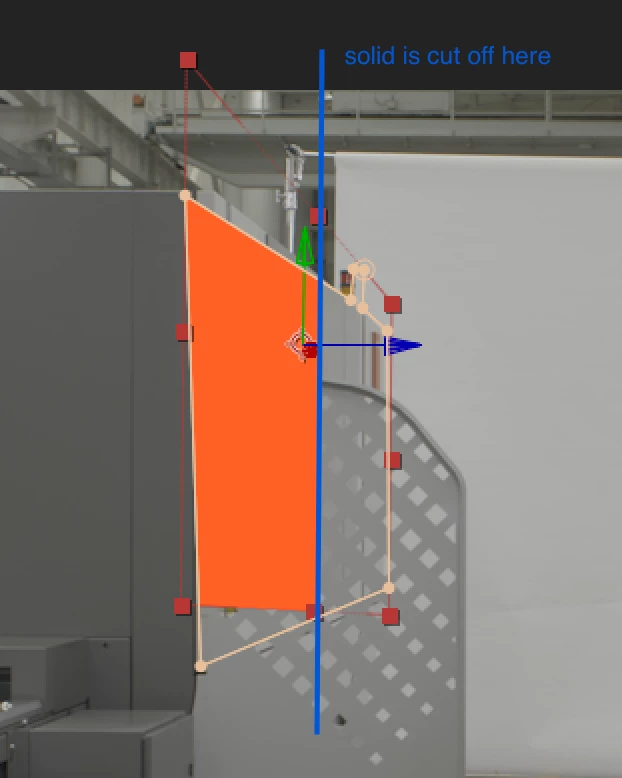
I created a solid from the 3D camera tracker with a target surface which points more or less away from the camera. About two thirds of the way away from the camera the solid is just cut off. The red crop markers show up and a mask that is drawn on the shape is also displayed correctly in the view port but the shape is cut off as if it were intersecting another (invisible) layer, but there is no other layer. When I rotate the layer so it is facing the camera  or if i move it closer to the camera the solid reappears.
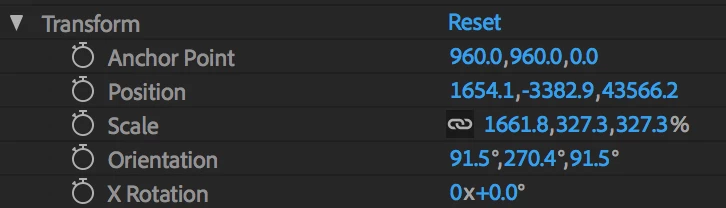
The coordinates of the solid that the camera tracker generates are quite large:
I've tried to parent the layer and camera to a 3D null and scale the scene down, because I thought I might have reached the "limit" (if that exists?) of AE's 3D space, but the problem persists.

In Cinema 4D I've managed to solve similar problems by scaling the scene. I can't find anything similar in AE, Is there an option to scale the environment or to make it larger?

Thanks for any help.

    This topic has been closed for replies.
    Correct answer Mylenium

    The 3D tracker is not globally scalable since it doesn't care for realworld units and calibration to begin with. The only way would be to parent everything to a Null, scale the Null and then unparent again. Other than that it seems to me you also misunderstand rendering order here and how masks operate inside the transformed layer, not globally in comp space, making the cutoff a normal thing because masks are processed before the 3D transform.

    Mylenium

    1 reply

    Mylenium
    MyleniumCorrect answer
    Legend
    June 13, 2018

    The 3D tracker is not globally scalable since it doesn't care for realworld units and calibration to begin with. The only way would be to parent everything to a Null, scale the Null and then unparent again. Other than that it seems to me you also misunderstand rendering order here and how masks operate inside the transformed layer, not globally in comp space, making the cutoff a normal thing because masks are processed before the 3D transform.

    Mylenium

    Participant
    June 13, 2018

    Thank you Mylenium
    The scaling with the null as parent doesn't resolve the clipping of the solid.

    By precomping the masked solid and using the alpha of the precomp for a track matte it seems to work though. It's taking the alphas of the masks regardless of the solid being not rendered entirely.

    Cheers

    Andy

    Community Expert
    June 13, 2018

    I think your footage layer is 3D. It should not be. The only reason that the created solid would be cut of is that there is another 3D layer in the scene,.You should also always set an origin and ground plane before you create a camera and a solid or text or null. That will get you somewhere close to the center of AE's 3D world.

    Cropped screenshots are useless for diagnosing problems. Select all layers giving you a problem, press the U key twice so we can see what you have done to the layers, then PrintScreen and paste to the forum.