
Inspiring
September 15, 2022
Answered

TEXT GLITCHING NEED FIX!!

  • September 15, 2022
  • 4 replies
  • 1113 views

I just want someone to explain to me what the hell is going on with my after effects?? 

The damn text is glitching all crazy, I can't work like this!!!

When adding symbols like "!@#$%^&*()_   they all appear at the end or wherever they want, as you can see in the video I also can't even select when I want to start typing.

What the hell is this crap?


This is my video example of what's going on:
https://streamable.com/7tq1a3


This topic has been closed for replies.
Correct answer JohnColombo17100380

Hi @angelica22537740wodu,

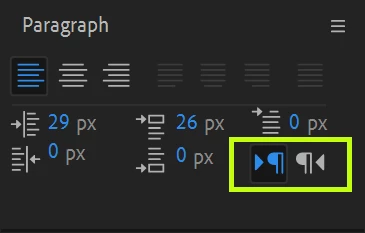
It looks like you may be working with a RTL ( right-to-left ) Text layer instead of LTR. Try selecting the Text layer, then open the Paragraph panel, then toggle the text direction controls ( highlighted by the green box below 😞


Please let us know if this works for you or if you continue to see the characters placed incorrectly when typing.


Cheers,

- John, After Effects Engineering Team

4 replies

JohnColombo17100380
Community Manager
JohnColombo17100380Community ManagerCorrect answer
Community Manager
September 18, 2022

Hi @angelica22537740wodu,

It looks like you may be working with a RTL ( right-to-left ) Text layer instead of LTR. Try selecting the Text layer, then open the Paragraph panel, then toggle the text direction controls ( highlighted by the green box below 😞


Please let us know if this works for you or if you continue to see the characters placed incorrectly when typing.


Cheers,

- John, After Effects Engineering Team

Inspiring
September 19, 2022

Thank you so much! I rarely move any settings on paragraph so I never thought to check if something moved on it's own!

Mylenium
Legend
September 16, 2022

It's probably simply a matter of inadequate hardware acceleration causing render delays, so check the relevant options in AE and update your system's graphics driver if necessary.


Mylenium

Jose Panadero
Community Expert
Community Expert
September 15, 2022

Can you upload a screen capture of your Character and Paragraph panels? I would also try to create a text without a paragraph box. Simply click over your composition with the Text Tool and type. If you get exactly the same behaviour tell us.

Community Expert
September 15, 2022

I'd close the app and then try resetting preferences.

Hold down Ctrl+Alt+Shift (Windows) or Command+Option+Shift (Mac OS) while the app is starting.