
Participant
April 19, 2021
Answered

Text wont add to MOGRT

  • April 19, 2021
  • 3 replies
  • 20875 views

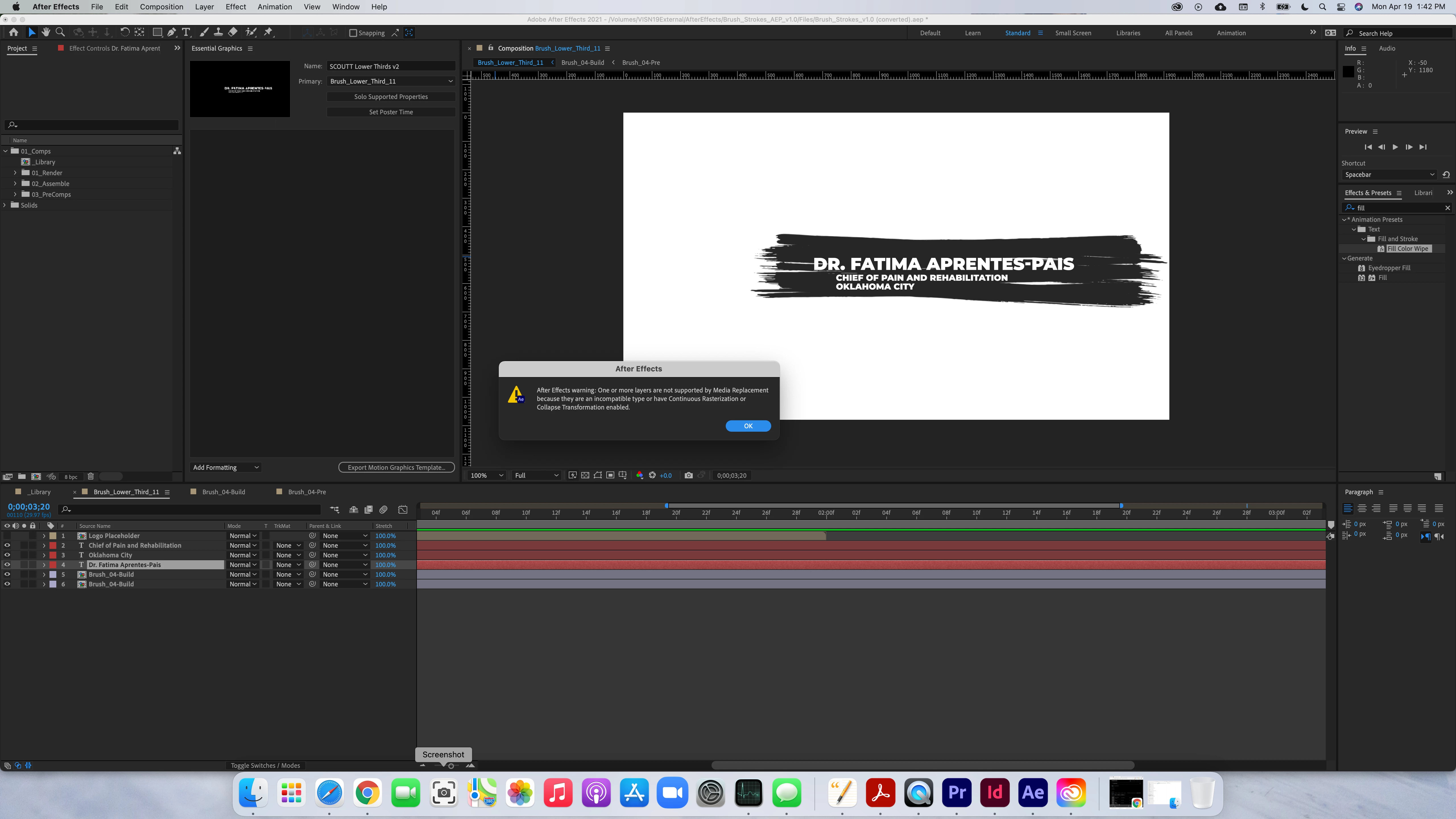
I receive this message when I try to place media replacement controls in the essential graphics window.  I am using a template that I purchased on Envato.  What am I doing wrong?


"After Effects warning:  One or more layers are not supported by Media Replacement because they are an incompatible type or have Continuous Rasterization or Collapse Transformation enabled."


I am trying to make the text editable in Premiere when i get it exported.


Correct answer Roland Kahlenberg

You Selected and then Dragged the Text Layer into the Essential Graphics Panel - you can't do this as the Text Layer contains multiple properties – the Essential Graphics Panel (EGP) only allows multiple properties to be simultaneously dragged into the its panel. However, all seelcted properties have to be supported. When you drag a Text Layer, you're placing ALL of its properties into the EGP. Unfortunately, not all of a Text Layer's properties are supported in the EGP.

So ... select individual properties – this is what most users do. In your case, you mentioned wanting to allow a PPro user to change the text in PPro. For this use-case, select and drag the Text Layer's SourceText property into the EGP. HTH

3 replies

Participant
September 5, 2024

Dont drag the entire text layer, click to the arrow to see the text properties then go to >Text - "Source text" and drag to the Essential Graphics panel.

Participant
December 6, 2024

Omg thank so much! This helped me a lot. God bless

Roland Kahlenberg
Roland KahlenbergCorrect answer
Legend
April 20, 2021

You Selected and then Dragged the Text Layer into the Essential Graphics Panel - you can't do this as the Text Layer contains multiple properties – the Essential Graphics Panel (EGP) only allows multiple properties to be simultaneously dragged into the its panel. However, all seelcted properties have to be supported. When you drag a Text Layer, you're placing ALL of its properties into the EGP. Unfortunately, not all of a Text Layer's properties are supported in the EGP.

So ... select individual properties – this is what most users do. In your case, you mentioned wanting to allow a PPro user to change the text in PPro. For this use-case, select and drag the Text Layer's SourceText property into the EGP. HTH

Very Advanced After Effects Training | Adaptive & Responsive Toolkits | Intelligent Design Assets (IDAs) | MoGraph Design System DEV
Mylenium
Legend
April 20, 2021

There is no acrtual media to replace. It's as simple as that. All your content that could be replaced is apparently packaged in pre-compositions. You would have to untangtle the template and add the actual source footage links to the MOGRT, not try to add the comps.


Mylenium