Osama Sa
Inspiring
June 30, 2016
Answered

The Position of The Top Left Corner of Any Shape Layer

  • June 30, 2016
  • 1 reply
  • 6202 views

Hi there guys,

So for the last couple of days I've been working on a script that would allow me to center X number of layers to middle of the containing comp, just like if the selected layers were just one layer. So my approach to achieve that is first to know the positions of each layer's four corners. My code so far is working perfectly with AVLayers and TextLayers, however it doesn't always work with ShapeLayers. Here is the formula I'm using to calculate the position of the top left corner of shape layers:

x = position - anchorPoint - (layerWidth / 2)

y = position - anchorPoint - (layerHeight / 2)

So the formula assumes the anchor point is on the middle of the shape layer if the anchor point is [0, 0], and that seems incorrect.
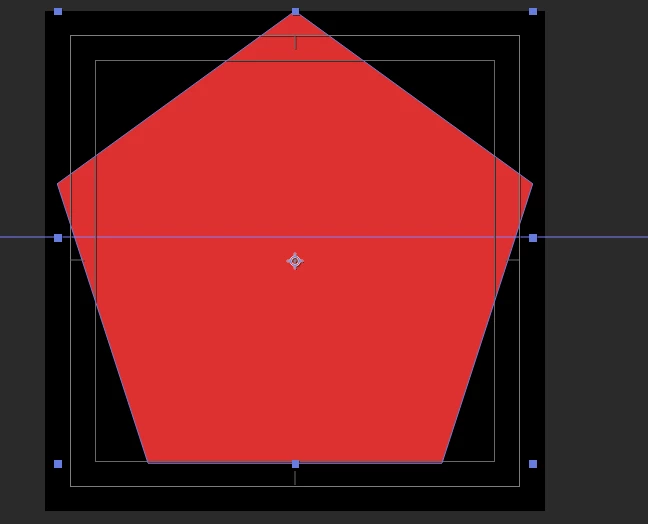
And this is the layer's properties.
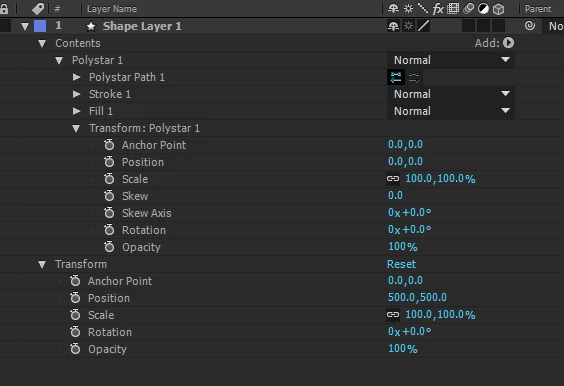
So the question is, what is the way to calculate the position of the top left corner of ANY shape layer?

Thank you so much!

This topic has been closed for replies.
Correct answer Dan Ebberts

This should work as long as the layer hasn't been rotated:

var C = app.project.activeItem;

var L = C.layer("Shape Layer 1");

var r = L.sourceRectAtTime(C.time,false);

var s = L.property("Scale").value;

var p = L.property("Position").value;

var a = L.property("Anchor Point").value;

var ul = [p[0] + (r.left - a[0])*s[0]/100, p[1] + (r.top - a[1])*s[1]/100];

Dan

1 reply

Dan Ebberts
Community Expert
Community Expert
July 1, 2016

Try this:

L = thisComp.layer("Shape Layer 1");

r = L.sourceRectAtTime(time,false);

L.toComp([r.left,r.top])

Dan

Osama Sa
Osama SaAuthor
Inspiring
July 1, 2016

Thank you Dan. This is an expression, and it's working perfectly, but I want to know the top left corner via scripting. If there is no way to get that info via scripting then I'll apply this expression to a layer via scripting and get the location. So again, is that possible?

Thank you

Dan Ebberts
Community Expert
Dan EbbertsCommunity ExpertCorrect answer
Community Expert
July 1, 2016

This should work as long as the layer hasn't been rotated:

var C = app.project.activeItem;

var L = C.layer("Shape Layer 1");

var r = L.sourceRectAtTime(C.time,false);

var s = L.property("Scale").value;

var p = L.property("Position").value;

var a = L.property("Anchor Point").value;

var ul = [p[0] + (r.left - a[0])*s[0]/100, p[1] + (r.top - a[1])*s[1]/100];

Dan