
Participant
December 23, 2016
Question

Timing with voice help please

  • December 23, 2016
  • 3 replies
  • 2159 views

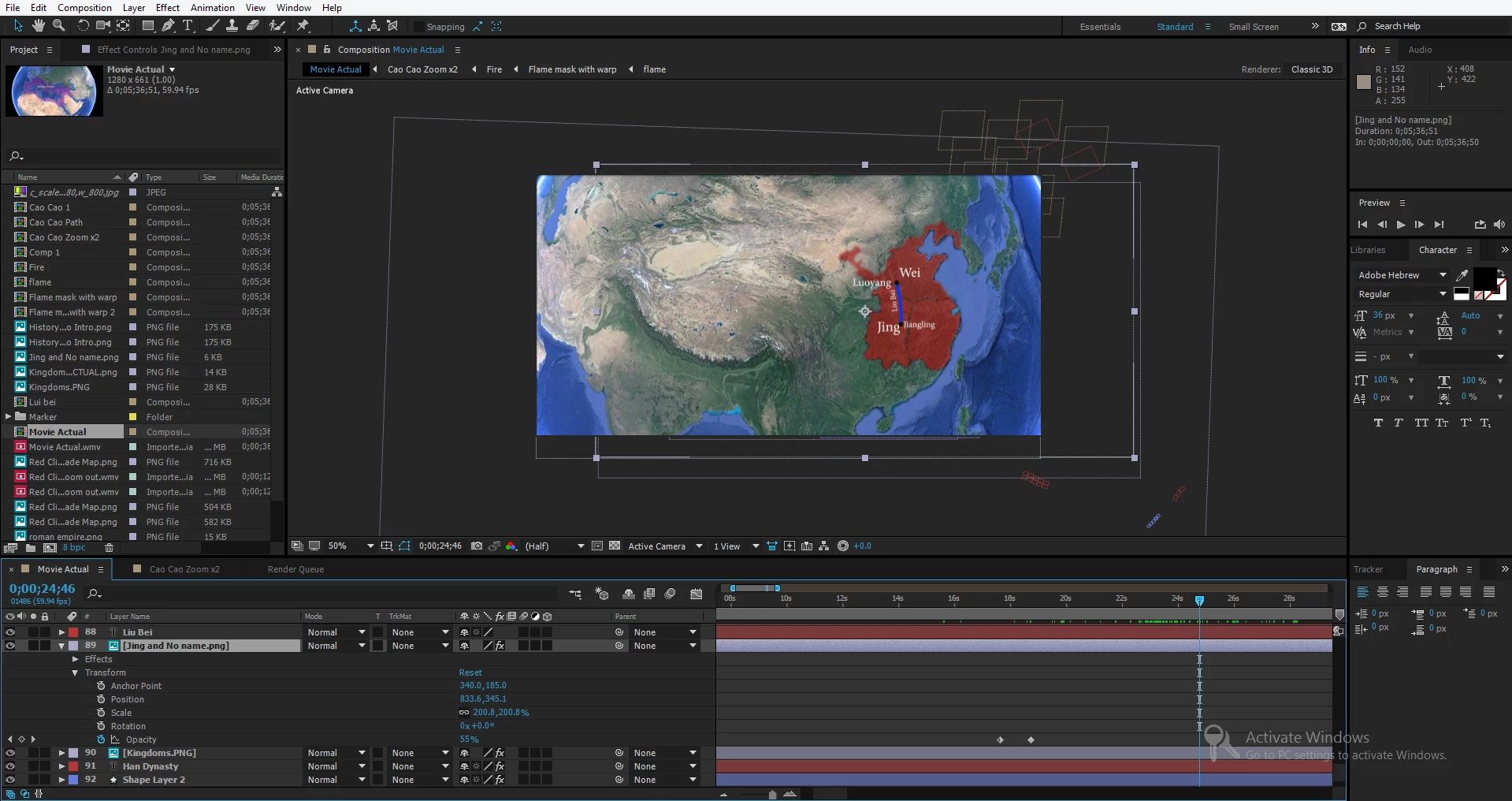
I just finished this history video and just finished recording the voice over. How to I make the video go along with the voice, for example I need some pictures to stay on screen longer or shorter depending on how long I talk. The main problem is that I have so many layers for this video, so it gets confusing, and if I extend one part then I have to push all the other layers after it further so they won't overlap, if that makes sense.

Here is a picture of what my project looks like.
This topic has been closed for replies.

3 replies

Kevin-Monahan
Community Manager
Community Manager
January 12, 2017

Hi JustinH,

Did you solve your issue with these responses from our experts here? Please let us know!

Thanks,

Kevin

Kevin Monahan - Sr. Community and Engagement Strategist – Adobe Pro Video and Audio
Roei Tzoref
Legend
December 23, 2016
I just finished this history video and just finished recording the voice over. How to I make the video go along with the voice. The main problem is that I have so many layers for this video, so it gets confusing, and if I extend one part then I have to push all the other layers after it further so they won't overlap, if that makes sense.

by looking at your screenshot and the way you describe your problem, I think this is more of workflow problem. specifically - project orientation and management problem. seems you are still getting to know your way around the software. editing and syncing your animation can be strange at first because in Ae because you can run out of timeline panel real estate fairly quickly and with that also lose orientation in your project. audio and video playback requires caching the frames most of the time so you have to be clever in the way you handle syncing to audio.

this is your timeline

this is mine

notice the differences?

here are a few tips I can give you right of the bat

  • trim your layers. if a layer has finished it's part in the animation of have not begun - Trim it
  • color label your layers to improve differentiation of different elements
  • remove unnecessary timeline columns: clear room in the timeline - you have the switches panel, the modes panel and parent. you don't need all of those together. if you don't use parent, remove it (you can always shift+f4 to bring it back), you can toggle between switches and modes (F4) so only leave one.
  • when you can, work in stairway editing - steps all the way up.
  • set your audio layer to be the first one and show it's waveform (LL). maybe you don't need markers.
  • don't waste time with previewing (Numpad 0) when you can preview just audio (Period key) or scrub while hold and drag your CTI and pressing Ctrl/Cmd
  • use shortcuts for revealing just the modified properties. you don't need to see all the properties of a layer if you don't plan to use them. press U to reveal all the modified properties.
  • use the transform shortcuts for each property (P,R,S,T)
  • learn to manage your compositions by using precomps when you can. for example the flags are precomps in my composition. anything that does not interact with my scene and serves as a self-contained scene is a candidate for pre-composing to save some real estate.
  • use shy layers to reduce clutter in the timeline of layers you don't need to have a visual cue of.

if this still does not solve your issue please be more specific as to the exact problem you are facing

Community Expert
December 24, 2016

Your first mistake was to put the entire voice over and all of the layers in a single comp. I've been doing this for a very long time and most of my comps are 7 seconds or less because After Effects is not an editing program, it is a compositing and motion graphics program designed specifically to do things to a shot or short sequence that you cannot do in a Non Linear Editor like Premiere Pro.

If I have dialogue to cover and with images or graphics (think dynamic text animation or as is sometimes called lyric video) and the project can't be done in Premiere Pro then the best thing to do is import your fairly polished audio track into AE and then cut it up into single sentences or phrases and put each of these sentences or phrases in a separate composition. Now you can go ahead and make the adjustments to that comp and get it to work fairly well. Your comp will usually be about 10 seconds long or less. When you're done, render all of the pieces and put them into Premiere Pro where you can easily and quickly add things like sound effects and music. You can also polish the transitions between thoughts and clean up the timing of the entire edit. If you really want control over the final project you load your PPro sequence into Adobe Audition and polish up your sound mix. When you're done you jump back to premiere for your final render.

I know that sounds like a lot of extra work but in reality you'll get more done in less time and the polish and final edit will be a bunch faster that you could ever do in After Effects alone.

Roei Tzoref
Legend
December 24, 2016

Your first mistake was to put the entire voice over and all of the layers in a single comp.

I am assuming you are responding to OP

(I know you sometime hit "reply" to one poster but actually referring to another). we actually don't know how long is Op's comp. he has many.

most of my comps are 7 seconds or less because After Effects is not an editing program, it is a compositing and motion graphics program designed specifically to do things to a shot or short sequence that you cannot do in a Non Linear Editor like Premiere Pro.

I agree. it is also true you should divide your work into manageable sections (I suggested Op should use precomps), but I can think of many cases where a timeline can be more than 7 seconds. your timeline is usually as long as your shot. sure in vfx a shot usually do not last more than a few seconds but in info/motion graphics this could very well be different. I see Op has a world map, and a shot of an animated world map when highlighting countries in accordance to a voice over that has to be synced to a certain audio and stay in the same shot only different animations overlap could easily be 30 seconds or maybe more.

I do transcripts and infographics and motion-graphics and animated maps for many years for news companies and documentaries. I sometime work alone and sometime in studios with other designers and I see how the work gets done professionally, mostly all in AE. for animated maps the average timeline is about 20 seconds maybe 30. transcripts could last a minute, sometimes even 2 minutes. some info/motion graphics could last a minute. sometime a minute of voice over has to be animated in certain fashion that requires all elements to stay in the comp. not "edited", but ANIMATED and syncing the animation the audio. many times you can't get around it because all the elements must be in the same composition, animated to the audio, one shot, no cuts, no way around it but work efficiently as possible in Ae. infographics templates are also a case where a main comp can last almost a minute (bars, graphs, pie's that have to be synced to a guide of 1 minute on average).

I know some studios and media companies don't even have an NLE for the motion designer. you work in Ae because it's pretty short sequences (30 seconds -> one minute) and that's what you got.

I am sure you got a very efficient way to work. I say this with great respect since your experience with this software and contribution to this community is unmatched, but 7 second comps in my opinion is not that common for many uses and many users (again we're not talking VFX) and I think making it as a general guideline, or calling making one timeline composition with a full voiceover a MISTAKE, could be misleading Op and other users reading this thread to think there is something wrong with their workflow if their comp is often longer than 7 seconds.

here's an example of an animated piece I did for a news story that has a voice over of 45 seconds. I do these quite often and they range from 20 sec to 1 minute. everything has to be assembled, composited and animated in the same scene and no way around it.

here is the video:

Sartan.mp4 - Google Drive

this is the timeline:

modified properties

manageable, pre-comped when possible of little scenes, color tagged, trimmed, named properly, efficient

to conclude if you don't mind: Op should divide his work into manageable sections and work as efficient as he can while in Ae through many tips and suggestions here and in other places online. if Op can take some of the work to an NLE then all the better but in my experience the problem more often than not (and could possibly be Op's problems) is to learn to work efficiently while in Ae.

Dave_LaRonde
Inspiring
December 23, 2016

I'd add the voiceover audio track to the comp, Then make markers on the audio layer with the asterisk key at the spots where things should happen.  It's lot easier to move things around that way.